• Directory
  • FAQ: about JURN
  • Group tests
  • Guide to academic search
  • JURN’s donationware
  • Links
  • openEco: titles indexed

News from JURN

~ search tool for open access content

News from JURN

Category Archives: JURN tips and tricks

How to remove fancy borders from pictures in a Microsoft Publisher file

05 Tuesday Jul 2016

Posted by futurilla in JURN tips and tricks

≈ Leave a comment

Problem: You’re sent a Microsoft Publisher .pub file, and need to extract the pictures, for re-use in another publication or academic paper. But the pictures all have Publisher’s fancy border effects applied to them. How to remove these border effects from the pictures in Microsoft Publisher 2013?

Barriers: You right-click on the pictures, but there’s no “Remove all effects” option. You look under Insert | “Borders and Accents”, but there’s no way there to “Remove all effects”. For some reason, perhaps because the file is from an older version of Publisher, the text cannot be copied, pictures cannot be moved or changed, and the file can’t even be re-saved. The file did not become read-only in the transfer. You remember that you probably need to activate the Pictures tab in MS Publisher 2013, which is normally hidden, and only shows up in certain activity states. But you can’t get to that Pictures tab. Nor can you save out a portable assets pack from the .pub file.

Solution 1: Download and install the free Libre Office suite, a fork of Open Office. The Draw module in this opens Microsoft Publisher files. Open the .pub in Libre Office, and extract the pictures. Didn’t work for me — Libre couldn’t even open the file.

Solution 2: Save a .pdf from the .pub. Then use Adobe Acrobat (the full version, not the free Reader) and its Tools sidebar option to ‘Save all images…’ from the .pdf. That’s the images on the pages, not images of the pages. This worked for me, for all but those images that had a sort of ‘ice crystals’ or ‘grunge-dotted’ border applied to them by Publisher.


Search in Facebook group posts

10 Tuesday May 2016

Posted by futurilla in JURN tips and tricks

≈ Leave a comment

A useful tip for those who moderate a Facebook group. Search of the group’s posts is case-sensitive. Searching for “acrylic” won’t find “Acrylic”, for instance.

Scoop.it’s new posting form breaks the service in Firefox – how to fix it

09 Wednesday Mar 2016

Posted by futurilla in JURN tips and tricks

≈ Leave a comment

The new update to the posting UI at Scoop.it has killed Scoop.it for me, in the Firefox Web browser. The new posting form just never loads in Firefox — and I have AdBlock and NoScript disabled at Scoop.it. The old Scoop.it browser bookmarklet has never worked for me in Firefox, so I can’t use that either.

In the Google Chrome browser, the Scoop.it post interface does appear, but the control graphics for it mysteriously fail to load, and there’s no snippet of text from the article being shown either…

nocontrols

Why do great Web services (Flickr, etc) feel compelled to ruin themselves by allowing idiot Web designers to mess around with what works and what people are familiar with, thus forcing many veteran users to look seriously at alternatives? If it isn’t broken, don’t fix it.

Anyway, here’s my functioning workaround for Firefox users who want to continue using Scoop.it:—

1. Install the AddThis addon in Firefox, and set it to use a right-click option (otherwise it will clutter the screen with its additional bookmarks bar, ugh…) and than also set AddThis to reference Scoop.it. You don’t have to give AddThis your log-on details at Scoop.it.

2. On right-clicking anywhere on a Web page you want to Scoop you can now select “Scoop.it”, thus…

scoop

3. This will take you to a Scoop.it posting page that actually works in Firefox, but is cramped inside a phone/tablet-sized box. So click the enlarge icon…

enlarge

4. A new window will then load, and the new Scoop.it posting interface will display fine in Firefox.

window

It does so with an URL of http://www.scoop.it/bookmarklet?childWindow=1 — thus proving that it wasn’t my Web browser’s addons or blockers that were preventing the posting form from loading in a standard Firefox page. Presumably the initial problem was down to the new posting UI’s interaction with other page elements.

Block the new animated .GIFs in Twitter

01 Tuesday Mar 2016

Posted by futurilla in JURN tips and tricks

≈ Leave a comment

There appears to be a new type of annoying animated .GIF on Twitter, a type which this morning somehow managing to get into my totally locked-down and text-only Twitter keyword-search stream.

Currently being used in the wild by Russian Kickstarter spammers and others…

unblockable

This type of animation was appearing in my search stream despite my having all animated .GIF loading turned off at the browser-root (via Firefox’s about:config control-panel). It seems to have multiple fall-backs, to things like .MP4 and HTML5 video and even static .JPG. Thankfully I have Flash uninstalled, so there’s no fallback to that. I guess that either the .MP4 or the HTML5 loading was bypassing the AdBlock methods I use to block all images posted to Twitter, and also my video-loading blockers.

It’s also armoured against selective page-element blockers, because it has multiple top-layers containing fiddly video controls and buttons. This means that (for Firefox users who use the add-ons AdBlock Plus + Element Hiding Helper for AdBlock Plus to block this sort of page-junk) it’s incredibly difficult to remove via the usual “Select an Element to Hide…” method.

Instead, I had success with right-clicking on the animation itself, selecting the AdBlock option there, then setting the following option as a global block with a * wildcard…

||twitter.com/i/videos/tweet/*

And once that was done, my stream was once again super-easy to quickly scan-by-eye for those few links to genuinely useful content…

better

DuckDuckGo offers CSEs, with multiple site search

14 Sunday Feb 2016

Posted by futurilla in JURN tips and tricks, Spotted in the news

≈ 1 Comment

DuckDuckGo Search Box now offers the ability to input and search multiple sites in a Custom Search Engine (CSE), something I don’t remember DuckDuckGo offering the last time I looked.

It’s certainly nice to have an alternative option when making a small CSE, and there are various reasons why one might prefer this to Google. DuckDuckGo is a non-tracking and privacy-centric search engine, and use doesn’t require a sign in to DuckDuckGo. DuckDuckGo is excellent on speed, relevancy ranking (especially with its image search) and on general navigational searches. So it may be a preferable choice for some, provided that it indexes all your CSE’s target URLs and doesn’t forcibly truncate (e.g. searching the full www.site.com/ when you only want to search www.site.com/academic-journals/

On the downside, the DuckDuckGo index doesn’t yet have the range and depth of Google Search, especially when it comes to small academic journals and sites of the sort in JURN. But it might be nice to test the coverage of a small DuckDuckGo CSE for a unified search across all the repositories at a university (the main theses repo, the eprints repo, various OJS installations, the law-school repos and journals, etc). Such an engine might conceivably have a deeper coverage of your repositories than Google, and it would only be a matter of thirty minutes to test such a notion.

One would then ideally plug the CSE search-box into the front page of each of those repositories — since I find that one of the problems with the increasing proliferation of repositories and OJS installations, at large universities, is that these are almost never interlinked or used for cross-promotion. One arrives at, say, the eprints server and is not even given a hint that the university also runs another half-dozen repositories and OJS installations.

A DuckDuckGo CSE search box can be embedded on your website via a normal HTML form, but the results are served by and at DuckDuckGo. However, DuckDuckGo has also kindly listed all their DuckDuckGo URL Parameters which can be embedded in the URL path and which one can use to change the CSE’s search results and appearance. These include the ability to turn off advertising.

Here’s a screenshot of my results from a German university which uses their CSE, showing how they’ve keyed the header colours to their own brand — although I do have a browser add-on that presents the search results in a desktop-friendly column layout and probably overrides their own colours on the search links…

unitu


Update:

Sadly there are significant drawbacks.

1) It truncates so can’t handle www.site.com/cgi/images/ only www.site.com

2) A test shows that it just doesn’t work at all with the Duck’s Image search feature.

3) Nor can you use it with even a single – modifier (e.g. Staffordshire -dog)


Update: appears to be dead. Just gives the message “Search too long” whatever you put into it.

Google Translate page embed

07 Monday Dec 2015

Posted by futurilla in JURN tips and tricks, JURN's Google watch

≈ Leave a comment

Google Translate option embedded on a front page, as a top menu-bar. Nice. First time I’ve seen this, and I visit a lot of Brazilian and Spanish front-pages…

trans

Seems to be done fairly simply, by adding…

script

… to the foot of the page’s HTML.

Some intitle: changes in JURN

04 Friday Dec 2015

Posted by futurilla in JURN tips and tricks, JURN's Google watch

≈ Leave a comment

JURN search results seem to have changed a bit recently. Specifically, those that are obtained with the popular intitle: search modifier. It seems Google is now running intitle: against the actual document title, rather than against the text that forms the hyperlink.

For instance, search via JURN for…

intitle:turtles Hawaii “longline fishing” bycatch

… and some of the ’10 blue links’ titles returned will lack the word ‘turtles’ in them. I don’t remember that happening before. Did Google break? It seems not — loading up such links shows that the fulltext does indeed have ‘turtles’ in the article title (the title that heads the actual document).

This means that users of JURN should not overlook intitle: results links that seem to lack their desired keyword or phase.

My guess is that Google Search’s document title identification and extraction is improving, behind the scenes. But that the results server is told not to waste good computational time, and so is free not to plug each and every article title into the results links. Maybe the Googleplex figures that anyone smart enough to use intitle: will pretty soon figure out that all the search results need to be considered when using intitle:, whether or not the desired intitle: keyword appears in a blue link or not.

I also noticed that Google may even be truncating the oh-so-hip preambles that are common on academic article titles in the arts and humanities. For instance, the results link that in 2009 appeared in JURN worded as…

   “Home on the Range: Space, Nation, and Mobility in John Ford’s The …”

… now appears in JURN simply as…

   “Space, Nation, and Mobility in John Ford’s The Searchers”

I haven’t tested this very extensively, but if I’m correct it may be more evidence of Google getting better at article title identification and manipulation, and/or at weighing a long article title against the article’s abstract. Something like…

   SPLIT document title on “:”
   MATCH both sides of “:” against the article abstract
   IF the words that occur before a “:” DO NOT MATCH words in the abstract
   THEN truncate the document title before “:”

The snippet below a JURN results link is also starting to be a citation of sorts, in certain circumstances…

seachers2015

Author surname in capitals, even. Very nice, even if it is taken from the document’s own formatting rather than from some new gee-whizz improvement in Google. Journal editors, and those slapping generic cover pages on repository PDFs, might do well to check out that particular PDF article’s front page and seek to duplicate its simplicity. Since it obviously plays so well with Google.

Use MS Excel 2007 to split a long column / list into smaller chunks

24 Tuesday Nov 2015

Posted by futurilla in JURN tips and tricks

≈ Leave a comment

How to use MS Excel 2007 to split a long column or list into smaller chunks, for later batch processing:

Real world scenarios: You have a simple but huge list that you want to parcel/email out in equal portions to various project participants. Or you are working with an old form-based system that can only process X amount of items at a time.

1. Get the excellent free ASAP Utilities plugin, install it in Excel. Note that you may need to enable it before its tab will appear (Top-left orb | Excel Options | Add-ins | Disabled Applications | ASAP + Go | Enable ASAP | OK)

2. Open a new sheet and paste your long list down into a single column.

3. In your new ASAP Utilities tab, click the Select button.

4. ASAP’s Columns and Rows | Select gives you a list of choices before it runs. Choose option 2 (“Conditional Row and Column Select…”) and then use the dialog box that appears. Here I’ve opted to have ASAP tell Excel to select every 25th cell…

25

No ‘Select’ button? Go: Options | Find and Run a Utility | Type ‘Select’ | Scroll down to “Conditional Row and Column Select…”.

5. Run Select, then exit the dialog box. The cells won’t immediately look like they’ve been selected. But if you Ctrl + C to copy them, then the familiar “marching ants” will reassuringly appear around the selected cells.

6. Now right-click your mouse anywhere inside your new group of selected of cells, and choose ASAP Utilities | option 18 “Insert before and/or after each cell in your selection…” In this new dialog choose “Insert after” and type {lf} to add a new blank line inside each of your selected cells.

7. Run the Insert process. It may take a minute to run, on a long list. Each selected cell will be given a double height by adding a line-break, thus…

paddedcell

If you just need to print out an Excel spreadsheet with each list-chunk separated by a space, perhaps so that your manager can easily read through the list in printed form, then you can leave the process there.

8. Some may now want to go further. When the whole column is selected and copied out to Notepad, you will see that the 25th, 50th, 75th etc cell will appear in quote marks “”, thus…

item 24
“item 25”
item 26

That’s kind of useful, but not really — since the primitive Notepad can’t handle multi-line search/replace.

However, simply paste the same list into the free open-source Notepad++ and the list copies as…

item 24
“item 25
”
item 26

9. That’s perfect. So now we just use Notepad++ to search all the “ occurrences and replace them with blanks. Then we have our list in chunks of 25 — each nicely separated by a blank line.

10. The neatly chunked list can now be pasted back into Excel, adding real blank cells between each chunked section. You might then add a comma to each blank cell, thus giving a basic comma-delimited .csv file for use with automated mailing-list software and similar.

Or the list can simply be saved out of Notepad++ as a plain .txt list, to work with manually — in clearly defined batches of 25 at a time.

facebookGroupArchive

16 Monday Nov 2015

Posted by futurilla in JURN tips and tricks

≈ Leave a comment

facebookGroupArchive…

A [2015] tool to allow someone to archive a Facebook group and then provide a searchable API for the archive.”

Note that Facebook’s own option of: Settings | “Download a copy of your Facebook data” doesn’t include an archive of Groups you admin/moderate.

DuckDuckGo testing #2

24 Thursday Sep 2015

Posted by futurilla in JURN tips and tricks

≈ Leave a comment

I did a quick experiment in making a Custom Search Engine via DuckDuckGo‘s link-chaining feature. In this experiment I enable a search across a small group of reputable crowdfunding services, via this search in DuckDuckGo. The search format is…

"open access" site:patreon.com,gofundme.com,peerbackers.com,mysherpas.com,wedidthis.org.uk,crowdcube.com,cofundos.org,indiegogo.com,rockethub.com,kickstarter.com

Works fine. WordPress.com refuses to embed an active link that contains “a phrase” (it’s the inverted commas, presumably), but this test link should work.

Unfortunately chaining a list of URLs appears to turn off DuckDuckGo’s intitle: search modifier, at least when searching for a phrase. But intitle: does work when using a single keyword, in a search such as…

intitle:journal "open access" site:patreon.com,gofundme.com,peerbackers.com,mysherpas.com,wedidthis.org.uk,crowdcube.com,cofundos.org,indiegogo.com,rockethub.com,kickstarter.com

A keyword / phrase that veers more into popular culture (such as Lovecraft) seems to cause Kickstarter results to swamp the search results.

I also noted that the search results from the above example fail to distinguish between “open access” and “open-access”. Adding +, as in +”open access”, fails to force a verbatim search. There is obviously some slight wiggle-room in DuckDuckGo’s claim that they don’t try to second-guess your search terms. Google has the same problem with a verbatim that is-not-really-verbatim.

There’s no sort-by-date filter on the search results, and adding the search modifier sort:date to the search causes a chained-URLs search to totally fail.

Sadly a list of chained URLs just doesn’t work with DuckDuckGo’s Image Search. For instance, a searcher can’t constrain Image Search thus…

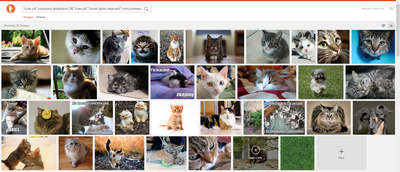
"cute cat" site:flickr.com,deviantart.com,commons.wikimedia.org

When looking for Creative Commons images using DuckDuckGo Image Search a better strategy is probably simply to dispense with the URL chain and use this…

"cute cat" "some rights reserved" OR "cute cat" commons attribution -noncommercial

This will still pick up “noncommercial” CC pictures on Flickr (since Flickr obfuscates the picture’s license behind a “some rights reserved” generality), but at least you’d be headed in the right direction. Note that it seems that DuckDuckGo only lets you use a single minus sign to knock out one keyword from the search, and it has to be at the end of the search to work.

A “Region” filter doesn’t appear to work on Image Search. You can’t just see the “cute cats” of Japan, for instance.

cats

← Older posts
Newer posts →
RSS Feed: Subscribe


Please become my patron at www.patreon.com/davehaden to help JURN survive and thrive.

JURN

  • JURN : directory of ejournals
  • JURN : main search-engine
  • JURN : openEco directory
  • JURN : repository search
  • Categories

    • Academic search
    • Ecology additions
    • Economics of Open Access
    • How to improve academic search
    • JURN blogged
    • JURN metrics
    • JURN tips and tricks
    • JURN's Google watch
    • My general observations
    • New media journal articles
    • New titles added to JURN
    • Official and think-tank reports
    • Ooops!
    • Open Access publishing
    • Spotted in the news
    • Uncategorized

    Archives

    • February 2026
    • January 2026
    • October 2025
    • May 2025
    • April 2025
    • September 2024
    • June 2024
    • May 2024
    • April 2024
    • March 2024
    • February 2024
    • January 2024
    • December 2023
    • November 2023
    • October 2023
    • September 2023
    • June 2023
    • May 2023
    • January 2023
    • December 2022
    • November 2022
    • October 2021
    • September 2021
    • August 2021
    • July 2021
    • June 2021
    • May 2021
    • April 2021
    • March 2021
    • February 2021
    • January 2021
    • December 2020
    • November 2020
    • October 2020
    • September 2020
    • August 2020
    • July 2020
    • June 2020
    • May 2020
    • April 2020
    • March 2020
    • February 2020
    • January 2020
    • December 2019
    • November 2019
    • October 2019
    • September 2019
    • August 2019
    • July 2019
    • June 2019
    • May 2019
    • April 2019
    • March 2019
    • February 2019
    • January 2019
    • December 2018
    • November 2018
    • October 2018
    • September 2018
    • August 2018
    • July 2018
    • June 2018
    • May 2018
    • April 2018
    • March 2018
    • February 2018
    • January 2018
    • December 2017
    • November 2017
    • October 2017
    • September 2017
    • August 2017
    • July 2017
    • June 2017
    • May 2017
    • April 2017
    • March 2017
    • February 2017
    • January 2017
    • December 2016
    • November 2016
    • October 2016
    • September 2016
    • August 2016
    • July 2016
    • June 2016
    • May 2016
    • April 2016
    • March 2016
    • February 2016
    • January 2016
    • December 2015
    • November 2015
    • October 2015
    • September 2015
    • August 2015
    • July 2015
    • June 2015
    • May 2015
    • April 2015
    • March 2015
    • February 2015
    • January 2015
    • December 2014
    • November 2014
    • October 2014
    • September 2014
    • August 2014
    • July 2014
    • June 2014
    • May 2014
    • April 2014
    • March 2014
    • February 2014
    • January 2014
    • December 2013
    • November 2013
    • October 2013
    • September 2013
    • August 2013
    • July 2013
    • June 2013
    • May 2013
    • April 2013
    • March 2013
    • February 2013
    • January 2013
    • December 2012
    • November 2012
    • October 2012
    • September 2012
    • August 2012
    • June 2012
    • May 2012
    • April 2012
    • March 2012
    • February 2012
    • January 2012
    • December 2011
    • November 2011
    • October 2011
    • September 2011
    • August 2011
    • July 2011
    • June 2011
    • May 2011
    • April 2011
    • March 2011
    • February 2011
    • January 2011
    • December 2010
    • November 2010
    • October 2010
    • September 2010
    • August 2010
    • July 2010
    • June 2010
    • May 2010
    • April 2010
    • March 2010
    • February 2010
    • January 2010
    • December 2009
    • November 2009
    • October 2009
    • September 2009
    • August 2009
    • July 2009
    • June 2009
    • May 2009
    • April 2009
    • March 2009
    • February 2009

    Proudly powered by WordPress Theme: Chateau by Ignacio Ricci.