• Directory
  • FAQ: about JURN
  • Group tests
  • Guide to academic search
  • JURN’s donationware
  • Links
  • openEco: titles indexed

News from JURN

~ search tool for open access content

News from JURN

Category Archives: JURN tips and tricks

SMS to VoiceMail on a home phone

27 Friday Jan 2023

Posted by futurilla in JURN tips and tricks

≈ Leave a comment

Another handy tip for wrangling with online life.

Situation: An online service requires verification of your new phone number. It’s a home phone, not a mobile, but they still send you an SMS message. This is delivered, great. But… your phone service has turned it into a spoken voicemail. The user only hears the vital verification number being read aloud thus…

Two hundred and ninety-five thousand two-hundred and forty-two

Problem: This is puzzling to many users, especially older people. Even if they can write it all down in time, what are they meant to input into the confirmation-box on the website? 20095000242? 295000242? 295,000,242?

Solution: None of the above. What the above read-aloud number actually translates to, in numbers is this…

295242

So write it down ‘as spoken’ first, then translate it back to (most likely) a six-digit number.

The above should also work if the same method is used by your service for ongoing two-factor verification. That’s if the same phone is also used for two-factor.

Block the mouseover pop-ups on individual Archive.org search results

17 Tuesday Jan 2023

Posted by futurilla in JURN tips and tricks

≈ 1 Comment

How to block the mouseover pop-ups on individual Archive.org search results, in the annoying new flickering / flashing search interface…

1. Go to the top bar of your Web browser | click on the uBlock Origin extension icon | Click on its cogwheel icon.

2. In the uBlock Origin Dashboard | go to “My Filters”.

3. In the My Filters list, add the new line…

archive.org##tile-hover-pane

… and save. Reload the results page. The item ‘preview’ popup panels will have all been blocked. You can still right-click on any result tile, and launch a new tab showing the main page for that result.

The above is for a user who uses the Grid view.

The above fix at least removes one of the main annoyances of the regressive new UI.

Delete small pure silences in an audio recording

07 Saturday Jan 2023

Posted by futurilla in JURN tips and tricks

≈ 1 Comment

How to find and delete small pure silences in an audio recording?

These silences are known in the audio recording trade as “dropouts” or “RF hits”, commonly caused by tiny failures in radio microphone transmissions. But they can also be caused by having to record on a desktop PC from a huge video that’s streaming down to someone with a relatively poor Internet connection. The video playback stutters and stalls a bit. Each stall results in a perfectly silent pause in the recording.

So let’s assume you’ve either captured a field audio recording using a flaky RF mic, or have captured the audio going through your desktop sound card by using something like Total Recorder. Either way you find there are silent skips, and now you need to delete these tiny bits of silence. All 250 of them. Automatically.

The powerful audio repair suite iZotope RX 7 should help here, and do this for you in a few clicks. But rather surprisingly it doesn’t have such a thing. You instead have to have a PhD in using its complex ‘Ambience Match’ and ‘Spectral Repair’ modules. There must be an easier way for non-professionals.

There is. The quick, easy, automatic and free solution is actually (you guessed it) good old Windows desktop freeware. Here’s the workflow…

1. In this case the freeware really is a dinosaur, or rather the Wavosaur. Download and run. Admire the groovy retro 1995-style icon with the dinosaur face. Actually it’s not that old, and the Wavosaur’s current version is July 2020.

2. Load your .WAV file into the mighty mammal-munching maws of the Wavosaur. Then go: Tools | Silence Remove | Custom. It’s that simple.

3. “-90” = find real pure silence, not just lecture room ‘ambience’. “0.25” = the silence is only to be deleted if longer than 0.25 seconds. Run “OK”.

4. Wavosaur will stomp through the .WAV and find and delete silence, also close up the resulting gaps. There is no notification this has been done, but it has. When you go to see if it worked, you won’t be able to find all those former “flat bits” in the audio signal. Though the “ambient room noise” heard in the speaker’s pauses should still be there in the waveform.

That’s because they had a tiny bit of noise in them, lifting them above the -90db threshold needed for deletion.

5. Now you can save and then load the cleaned .WAV into Ocenaudio (also freeware, and a great replacement for Audacity) and from there quickly save out to an .MP3 file.

If you’re going to do this a lot, note that Wavosaur can do MP3 export, but it first needs lame_enc.dll installed correctly.

How to remove an erroneously added Excel hyprlink

11 Sunday Dec 2022

Posted by futurilla in JURN tips and tricks

≈ Leave a comment

How to remove an erroneously added hyperlink, from just one cell in Excel 2007. Problem: Sometimes you paste and there’s a hyperlink formed, sometimes not. It seems a bit arbitrary, regardless of what you have set in your Autoformat settings. Once a live hyperink appears in a cell, there is no right-click | “Remove Hyperlink” in Excel 2007. Only the ability to add a hyperlink. No “remove hyperlink” on right-click.

Solution in Excel 2007:

1. Select just the hyperlinked cell.

2. Top bar | Home | go along to the far end of the bar, where the “Sort and Find” is. Next to this is “Clear” and there you select “Clear Formats”. That should do it. You now have plain text in your cell, and it’s no longer a live hyperlink. Later versions of MS Office Excel also added a “Clear Hyperlinks” option here, at the foot of the “Clear” selection options. But here we’re assuming you’re stuck with good olde 2007.

3. Save.

How to archive a recalcitrant forum

11 Sunday Dec 2022

Posted by futurilla in JURN tips and tricks

≈ Leave a comment

Task: To download and safely archive a useful but very recalcitrant user-forum, one that may be at risk of going offline.

Roadblocks:

1) The forum archives can only be accessed by drop-downs that require you to input precise from-to dates (see above). Harvesters / bots cannot get past such barriers, and cannot reach the forum’s ‘deep history’ of per-post threads.

2) Even if you had the individual URL of each and every forum thread, only a proper Web browser can get and archive each forum thread URL. Automated harvesters / bots / capture utilities are quickly blocked by the forum’s server.

3) AutoIT or the newer AutoHotKey might be a solution on Windows, by calling Internet Explorer to load the URLs and then save each as a file. But my intensive searches find only arcane code fragments, and one code function. Nothing complete or even part-way complete.

The following solution thus requires a bit of manual work, though not too much. It is for a relatively small forum or sub-forum, of technical coding advice (in this case Python for 3D software) without a great weight of images being posted. In this case there are 16 master pages of links to some 500 actual forum posts, and each post has user replies appended. Each post displays as a single scrolling page and is not paginated.

Solution:

1. Find the earliest forum thread date, then manually go through and create a per-year page that show the links to the forum threads. Save it, and also any continuation pages there may be for that year. Work through the years and, on a long-standing forum or sub-forum, you may perhaps end up with some 15-20 saved HTML pages. It should not take more than a few minutes.

2. Extract a big list of all the links in these locally saved HTML pages. I used Sobolsoft’s ‘Extract Links from Multiple HTML Pages’ Windows utility to do this, but there are other bulk link extractors.

3. Save the extracted one-per-line links list to a .TXT file, copy-paste that list to Excel and sort the list A-Z. From this sorted list you extract just the links that point to the forum threads. They should have a uniform path and pattern, allowing them to be easily identified and extracted. Save the new list to a further .TXT file.

4. Use the free Chrome-based Web browser extension DownThemAll! to load the new list .TXT (Web browser | start DownThemAll! | right-click anywhere | ‘Import from file’). You may also want to set DownThemAll! to only download one forum thread at a time (Web browser | start DownThemAll! | Cog icon in DownThemAll!’s lower right | Network | Concurrent downloads: 1).

Have DownThemAll! do the downloads. Very regrettably there is no way to have DownThemAll! save the pages from the browser to .MHT (.MHTML) or .PDF files. Just the same format as the target URLs point to.

5. Because you’re using your normal Web browser and only downloading one page/post at a time, use of DownThemAll! should not trigger any traffic blocking from the targeted forum.

Great, so you have the forum threads downloaded as .HTML files. Of course, there’s a problem. The .HTML pages being saved locally are not also saving the images. When you load one of these HTML forum pages locally, the Web browser is still loading the post’s images from the online forum server. That’s good, but we need a more permanent local file being saved.

6. The only solution I found for the next bit is the Pale Moon browser (very worthy, based on Firefox) and its free MozArchiver add-on. This add-on appears to be unique, in terms of being happy to save all open tabs (rather than just one). It saves each open tab as a portable .MHT file with embedded images. You will have to be brave though, and load 50-80 tabs at a time by drag-dropping the .html files onto Pale Moon. With my RAM and workstation, I find Pale Moon has no problem with 80 at a time. After drag-drop, pause to let the tabs all load. Then “save all tabs” to .MHTML files, which is quickly done.

It’s thus relatively easy to use this method to work through 500 or so locally-saved forums post-pages, provided they were not too image-heavy.

Then when done with each batch in Pale Moon, right-click on the left-most tab and “close all tabs to the right”. Repeat until finished.

That’s it. A slightly tedious workflow, but your recalcitrant and harvester-phobic user forum is now safely archived as portable .MHT files, one per forum thread. Good local indexing/search software (DocFetcher, DTSearch etc) should have no problem indexing local .MHT files, ready for you to do keyword searches across the local archive.

If you ever need to convert the .MHT (.MHTML) files back, the Windows freeware MHTML Converter 1.1 will do that and has batch processing.

URLlister

22 Tuesday Nov 2022

Posted by futurilla in JURN tips and tricks, Spotted in the news

≈ Leave a comment

URLlister 0.4.0 (March 2021) is Windows freeware. Manually click through a long list of URLs, as if with a TV remote-control. Each new click passes the next URL on the list into your Web browser, and loads it in a new tab. No more manual copy-paste needed, for slow and careful ‘eyeball’ manual checking of a list of URLs. More details on GitHub.

It may not be ideal to have lots of tabs opening and accumulating over time, and you may prefer not to have to manually close them. In which case the Tab Wrangler extension for Chrome-based Web browsers can handle that. It “automatically closes idle tabs after a designated time”.

See also the Chrome browser extension Load URLs At Interval, which moves through the URL list at a set timed interval. The URLs are loaded into the same tab, rather than a new tab opening for each.

Word macro to increment the numbers in a back-of-the-book index

12 Saturday Nov 2022

Posted by futurilla in JURN tips and tricks

≈ Leave a comment

Situation: You have a completed back-of-the-book index for a book, perhaps created with PDF Index Generator. You are then required to add a further page to the book, that you thought was finished. Such a change will ‘throw off’ most of the numbers in the index, but not all of them. Only the page-numbers after the point where the new page was added. Do you need to remake the index again? No.

Solution: You use the following Microsoft Word macro to do the required ‘intelligent corrections’ of the changed numbers in the Index.

Use: Copy-paste the kaput Index to a new Word document of the same page size, with retained formatting. Edit the macro’s three variable numbers for your needs and load it. Run it. Copy back the results to the book. Check the new index aligns with the book.

Change the numbers indicated. The first number is the increment, and the other is the page number above which incrementing is done.

' WORD MACRO - Increment the numbers in the back-of-a-book index by x, only if above a certain number.
Sub Demo()
Application.ScreenUpdating = False
' Change the following number 1 to the increment you need. Number of pages added = the number you need.
Const i As Long = 1
With ActiveDocument.Range
With .Find
.ClearFormatting
.Text = "<[0-9]{2,3}>"
.Replacement.Text = ""
.Forward = True
.Wrap = wdFindStop
.MatchWildcards = True
.Execute
End With
Do While .Find.Found
' Change the next number to the page-number below which all must stay the same.
If CLng(.Text) > 77 Then
' Page number 2000 is the ending backstop number - change this only if you have a monster book.
If CLng(.Text) < 2000 Then .Text = CLng(.Text) + i End If .Collapse wdCollapseEnd .Find.Execute Loop End With Application.ScreenUpdating = True End Sub Change the numbers to suit your situation.

Here the above macro is set to increment by 1, any page-number it finds in the index. But only if it has a value between 77 and 2000. You are assumed to have added one new page at page 76. Any indexed page number for page 77 must therefore now become 78, and so on. Numbers are recognised individually, even if in the hyphenated form, e.g.: 99-100 or similar.

Your index is assumed to have no dates or street numbers used as index terms, e.g. “1066 A.D., Battle of Hastings, p. 356”, or “221B Baker Street, p. 73”.

The newly added page(s) will of course need to have their new entries indexed, if not simply illustrations, and manually added to the revised index.

So far as I can tell, there’s no way to do this with a regex.

Browser problem fixed: it was LetsEncrypt’s expired root SSL certificates

03 Sunday Oct 2021

Posted by futurilla in JURN tips and tricks, Spotted in the news

≈ 2 Comments

The browser problem I described yesterday is fixed.

As a test sample, consistently utterly un-reachable sites in Opera were…

www.majorgeeks.com
www.etools.ch/
www.davidrevoy.com/blog

All loaded perfectly fine and instantly in the Pale Moon Firefox-based browser.

One clear possible cause I found was LetsEncrypt changing its root site certificates, which are used by way too many (20%?) of the world’s smaller website servers…

DST Root CA X3 will expire on September 30, 2021. That means those older devices that don’t trust ISRG Root X1 will start getting certificate warnings when visiting sites that use Let’s Encrypt certificates.

The timing was right. The systems affected were right. The reason for the Chrome vs. Firefox strangeness was right…

Browsers (Chrome, Safari, Edge, Opera) generally trust the same root certificates as the operating system they are running on. Firefox is the exception: it has its own root store.

Thanks to ‘GGG’, who got it right. He had exactly the same problem as me, Chrome (Brave) not working, Firefox working fine. He traced the broken sites to their use of LetsEncrypt root SSL certificates. This led me to the server techie Gunter Born in Germany warning of the same problems a little in advance and describing them in detail. Apparently the certificates are free and thus are widely used by smaller sites. It’s the world’s largest certificate authority. Seriously. The world’s largest certificate authority suddenly revokes its 300-million+ key server certificates and effectively breaks 20% of the Web and… the media don’t tell anyone in advance? So far as I can see only a few gadget sites and some Indian sites gave a few hours warning.

Anyway, assuming rogue SSL certificates rather than iffy DNS servers was the actual problem, as now seemed very likely… how to fix it?

The solution: You need to manually add fresher certificates. Do as the Tech Journal explains in the new page for the DST Root CA X3 Certificate Expiration Problems and Fix. There Stephen Wagner has kindly dug up the links to the new fresh certificates.

The guy who saved the world.

You will need a Firefox or Pale Moon browser to get them, as LetsEncrypt’s problem is blocking LetsEncrypt from itself (durh…). Some Windows users will need to choose the .DER rather than the .PEM version of the certificates. Best to get them all and see which version your Windows recognises and adds an icon to.

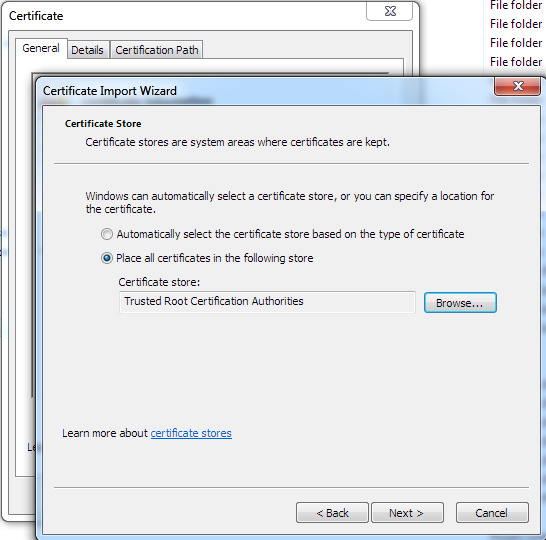
Once downloaded you need to double-click them and for each one a Windows Certificate import Wizard will launch. Install it to the correct folder….

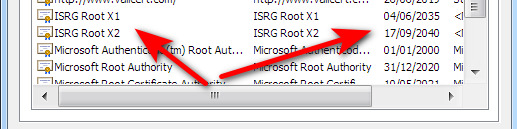
Don’t just accept the Windows defaults (could install anywhere…), but guide each certificate to its correct folder. isrgrootx1.der and isrg-root-x2.der go in the “Trusted Root…” and lets-encrypt-r3.der goes in the “Intermediate…”. Intermediate seems just as important as the others, so don’t skip it. There appears to be no need to delete the old defunct certificates, although browser access seemed to speed up a bit when I hard-deleted the Sept 2021 certs from “Trusted Root…” and “Intermediate…”.

Now when you close and re-launch your Chrome-based browser, and after a pause of perhaps 12-20 seconds for each previously blocked site, the problem should be fixed. It was for me. I assume the one-time pause is for the browser to re-cache the page.

I did not need to re-boot Windows for this fix to ‘take’. The Windows-savvy will be able to type MMC at the Windows Start menu and then load a Snap-in to see new certificates and their dates…

This is also the way you delete the old ones, which cannot be done via Settings | Security | Proxy in Chrome/Opera…


Update: According the Linux Addicts the problem briefly took out Amazon Web Services, Shopify and The Guardian. The Daily Swig adds Google Cloud, Microsoft Azure, and many others.

Chrome-based browsers – “This site can’t be reached”

02 Saturday Oct 2021

Posted by futurilla in JURN tips and tricks, Spotted in the news

≈ 1 Comment

A curious problem has developed persistently in recent days, for users of Chrome and Edge browser… but not for Firefox / Pale Moon. Evidently the problem is now shared by others as well as myself.

While browsing a site/page fails to respond to the Chrome browser, but springs instantly into action for Firefox or Pale Moon (based on Firefox). In the Chrome-based Opera you get…

This site can’t be reached. [URL] took too long to respond.

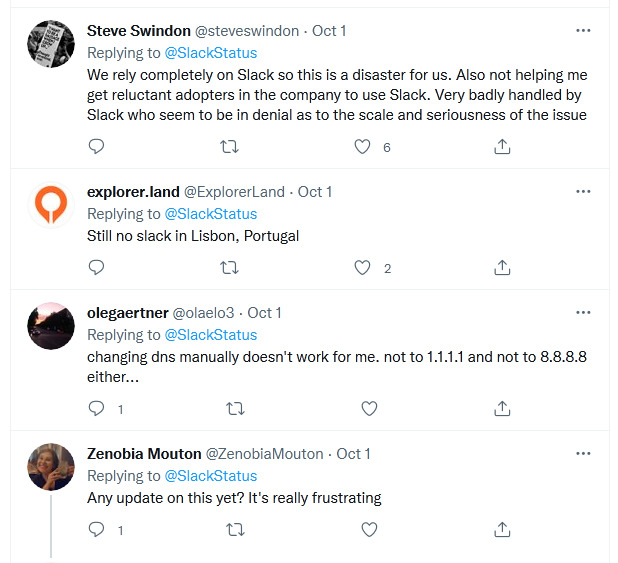
Doesn’t appear to affect the mega-sites like YouTube or WordPress. Sometimes there is a 20-30 second delay in reaching a mid-ranking site, and often nothing at all from smaller sites or certain known recalcitrant mid-ranking sites (e.g. Stack Overflow, GreasyFork). Slack also seems to be badly affected, though that doesn’t affect me…
The problem appears to be cross OS, as I’m on Windows and this other guy (linked above) is on Linux. I have the same symptoms as he has: Chrome often gives this error while Pale Moon (Firefox) is totally fine. The problem occurs even if you are using a DNS server other than that of your ISP. For instance in Opera, it’s possible to select from a number of DNS servers. They all exhibit the same problem. Other fixes tried include:

* Changing the Windows IVP4 DNS to another (9.9.9.9, 8.8.8.8, 1.1.1.1) makes no difference either.

* Running with all browser extensions and scripts off also makes no difference.

* Visiting the page in ‘Incognito mode’ makes no difference.

* Modem reset makes no difference.

* PC reboot makes no difference.

* I don’t have proxies configured.

My first guess was some iffy under-the-hood Chrome update, perhaps some new and imperfect query being made to the some local and rather sluggish and partial DNS cache. Linux-guy’s claimed solution thinks along these lines and he suggests flushing your local DNS, which on Windows is:

1. Start menu.
2. Run.
3. Run dialog box, type…
4. ipconfig /flushdns
5. Confirm. A DOS-box window should flash up for a microsecond, the DNS cache is flushed, and the Run box exits.

Works as described above, but this didn’t cure the problem for me.

Nor did clearing the internal Chrome DNS cache (who knew?) and restarting the browser…

chrome://net-internals/#dns

Then I downgraded the Opera browser, back to Opera 78.0.4093.147 (mid August 2021) with the help of the full offline installer. Still the same problem, and thus it can’t be due to some recently-updated Chrome component.

So… if its not in Windows and not in Chrome, and not due to extensions or other obvious problems… what on earth could it be? It must be some kind of interaction between any DNS server and a Chrome-based browser, even a slightly older one. A problem which Pale Moon/Firefox is not affected by, and which has only recently started in the last few days. It can vary between DNS servers, some loading one page and not the other and visa versa.

One odd thing is that if you click hard and long and quick enough to load such a jammed page, like 50 times, it will often eventually load. This is repeatable. It’s like there’s a ‘black hole’ somewhere along the route, for smaller and mid-ranking sites that need DNS lookup, and eventually the system will ‘get the message’ and use an alternative route. I wonder in DNS servers have been ‘split’ in three and now have different sub-databases for top, middle and lower-ranking sites? And that the low-ranking databases sometimes power down their disks when not being called? That might explain it. The disks could need time to power up. But surely they would be modern always-on SSD’s and not old mechanical hard-drives?

Why Firefox / Pale Moon is unaffected I have no idea. But it is. I’ve been unable to discover if it uses any special DNS routing. Only that Pale Moon has no support for ‘DNS over HTTPS’.

So the temporary solution is then:

1. Open the Pale Moon browser, which has no such problems, and keep it open.
2. Install Andy Portmen’s “Open in Pale Moon” extension in Opera or Chrome.
3. Pin “Open in Pale Moon” button to your bookmarks bar.
4. Launch any recalcitrant page in Pale Moon (Firefox). This browser is already open so it will load instantly, and the supposedly ‘un-findable’ page will also load instantly.

Sadly the above only works once Opera has actually received the “This site can’t be reached. [URL] took too long to respond.” message. If you pass the URL over to Pale Moon while the browser is still waiting (and waiting and waiting…) for a DNS server, you get nothing in Pale Moon. You can however go back and right-click on the original hyperlink and “Open in Pale Moon” that way.

You can also switch your RSS reader to open pages externally in Pale Moon / Firefox.


Update: This, at first glance, seems to explain the difference between the browsers…

1. “Chrome uses DNS prefetching to speed up website lookups”

2. DNS pre-fetch is off by default in Pale Moon… “DNS prefetching disabled by default to prevent router hangups”.

Checking the value on about:config / network.dns.disablePrefetch assures that it is indeed off in Pale Moon.

In Chrome/Opera this is now called “Preload pages for faster browsing and searching”, and again it is turned off for Opera. The uBlock Origin addon forces it off.

So, despite sounding plausible, the above can’t be the explanation for the problem.


Update: Browser problem fixed: it was LetsEncrypt’s expired root SSL certificates. Install the new ones. Firefox / Pale Moon uses its own SSL certificate store, which was why it was unaffected.

In the tab lab…

27 Monday Sep 2021

Posted by futurilla in JURN tips and tricks

≈ Leave a comment

Power-bloggers may be used to making a folder of Web browser bookmarks containing 30 or 40 on-topic sites or forums that have no RSS. Right-click on this folder, “Open All” and they all spring open in new tabs. Then you quickly flick through and close each tab, if there is nothing new to see. Only takes a few minutes. Also useful for keeping an eye out for rare used books, vintage gear, 70% sales and the like.

But it can be annoying to rapidly click through these tabs only to find that… some tabs have not loaded or only partially loaded. Not because you don’t have the bandwidth or the PC RAM, but because the site has some kind of “visitor not present, is probably a bot or a scraper” thing going on. No visitor on a current tab = no main content block loading.

In which case the following UserScripts may be of interest…

* Block Visibility Detections.

* PreventPageVisibility.

* And if those don’t work, Idle Detection Bypasser… “gives a fake active response” when the Web browser is queried by the site for tab focus/activity.

← Older posts
Newer posts →
RSS Feed: Subscribe


Please become my patron at www.patreon.com/davehaden to help JURN survive and thrive.

JURN

  • JURN : directory of ejournals
  • JURN : main search-engine
  • JURN : openEco directory
  • JURN : repository search
  • Categories

    • Academic search
    • Ecology additions
    • Economics of Open Access
    • How to improve academic search
    • JURN blogged
    • JURN metrics
    • JURN tips and tricks
    • JURN's Google watch
    • My general observations
    • New media journal articles
    • New titles added to JURN
    • Official and think-tank reports
    • Ooops!
    • Open Access publishing
    • Spotted in the news
    • Uncategorized

    Archives

    • February 2026
    • January 2026
    • October 2025
    • May 2025
    • April 2025
    • September 2024
    • June 2024
    • May 2024
    • April 2024
    • March 2024
    • February 2024
    • January 2024
    • December 2023
    • November 2023
    • October 2023
    • September 2023
    • June 2023
    • May 2023
    • January 2023
    • December 2022
    • November 2022
    • October 2021
    • September 2021
    • August 2021
    • July 2021
    • June 2021
    • May 2021
    • April 2021
    • March 2021
    • February 2021
    • January 2021
    • December 2020
    • November 2020
    • October 2020
    • September 2020
    • August 2020
    • July 2020
    • June 2020
    • May 2020
    • April 2020
    • March 2020
    • February 2020
    • January 2020
    • December 2019
    • November 2019
    • October 2019
    • September 2019
    • August 2019
    • July 2019
    • June 2019
    • May 2019
    • April 2019
    • March 2019
    • February 2019
    • January 2019
    • December 2018
    • November 2018
    • October 2018
    • September 2018
    • August 2018
    • July 2018
    • June 2018
    • May 2018
    • April 2018
    • March 2018
    • February 2018
    • January 2018
    • December 2017
    • November 2017
    • October 2017
    • September 2017
    • August 2017
    • July 2017
    • June 2017
    • May 2017
    • April 2017
    • March 2017
    • February 2017
    • January 2017
    • December 2016
    • November 2016
    • October 2016
    • September 2016
    • August 2016
    • July 2016
    • June 2016
    • May 2016
    • April 2016
    • March 2016
    • February 2016
    • January 2016
    • December 2015
    • November 2015
    • October 2015
    • September 2015
    • August 2015
    • July 2015
    • June 2015
    • May 2015
    • April 2015
    • March 2015
    • February 2015
    • January 2015
    • December 2014
    • November 2014
    • October 2014
    • September 2014
    • August 2014
    • July 2014
    • June 2014
    • May 2014
    • April 2014
    • March 2014
    • February 2014
    • January 2014
    • December 2013
    • November 2013
    • October 2013
    • September 2013
    • August 2013
    • July 2013
    • June 2013
    • May 2013
    • April 2013
    • March 2013
    • February 2013
    • January 2013
    • December 2012
    • November 2012
    • October 2012
    • September 2012
    • August 2012
    • June 2012
    • May 2012
    • April 2012
    • March 2012
    • February 2012
    • January 2012
    • December 2011
    • November 2011
    • October 2011
    • September 2011
    • August 2011
    • July 2011
    • June 2011
    • May 2011
    • April 2011
    • March 2011
    • February 2011
    • January 2011
    • December 2010
    • November 2010
    • October 2010
    • September 2010
    • August 2010
    • July 2010
    • June 2010
    • May 2010
    • April 2010
    • March 2010
    • February 2010
    • January 2010
    • December 2009
    • November 2009
    • October 2009
    • September 2009
    • August 2009
    • July 2009
    • June 2009
    • May 2009
    • April 2009
    • March 2009
    • February 2009

    Proudly powered by WordPress Theme: Chateau by Ignacio Ricci.