Search Console – Submit URL to Google. Handy to bookmark if you find or own a site that is missing from Google, and where there’s no ../robots.txt on the URL to block the indexing bots.


11 Tuesday Apr 2017
Posted in JURN tips and tricks, JURN's Google watch
Search Console – Submit URL to Google. Handy to bookmark if you find or own a site that is missing from Google, and where there’s no ../robots.txt on the URL to block the indexing bots.
07 Friday Apr 2017
Posted in JURN tips and tricks, Spotted in the news
DuckDuckGo‘s Image Search has had another expansion. It was already rather good, and now it’s even better.
Finding Extra Large: Extra Large has been added as a filter. This is the main improvement, though in practice it appears this means 1024px or higher. Whereas for a magazine I’d call Extra Large 2048px or higher and even then it would be too small for a double-page spread. Still, the new filter is much better than the fairly useless old ‘Large’ option, which was as high as the Duck used to be able to fly.

Finding Clipart: ‘Types’ includes ‘Animated’, for all your dancing hamster needs. Perhaps that was there before, but I don’t remember it. Definitely new is ‘Transparent’, allowing searches only for isolated items on a transparent background. Sadly you can’t combine ‘Transparent’ + ‘Photograph’ together, so a simple search tends to be awash with very naff clipart when you add “creative commons attribution” and combine it with ‘Extra Large’. Also ‘Transparent’ often appears to give false positives. Still, it’s nice to see it being tried by a major search engine.
Black and White: You can also search by one of many colours or just black-and-white (greyscale). You can usefully chain ‘Black-and-White’ for a search for large Creative Commons pictures. Though this will tend to pick up blogs where the text is CC but the pictures discussed are not (or are doubtful, perhaps being from that one idiot on Flickr who’s put tens of thousands of superb vintage pictures under CC when they’re not).

There’s also ‘Proportion’ (square, tall, wide).
Possibly the ‘Regions’ filter has also had a makeover, but I never use it so I’m not sure. However I certainly don’t remember it had mini-flags before, or so many nations.
03 Monday Apr 2017
Posted in JURN tips and tricks
Getty Open Content in the Getty Art Collection. Google Search results for site:www.getty.edu/art/collection/ “without charge” suggests there are currently around 1,700 such images in the Getty Open Content public domain programme. Sharp 20mb+ hi-res versions are available, though a simple anonymous form on which the user tells Getty the intended use.

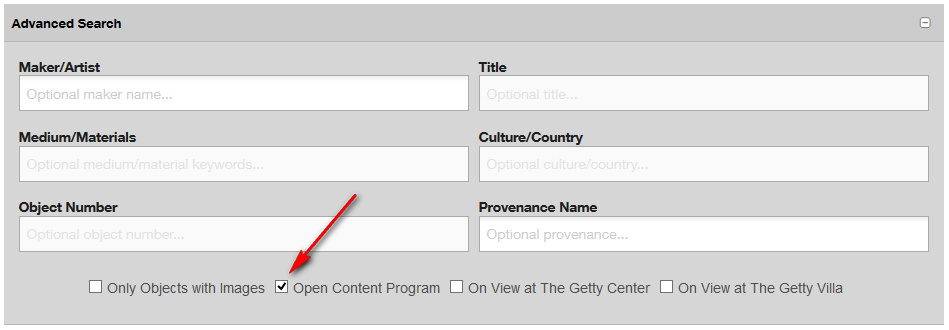
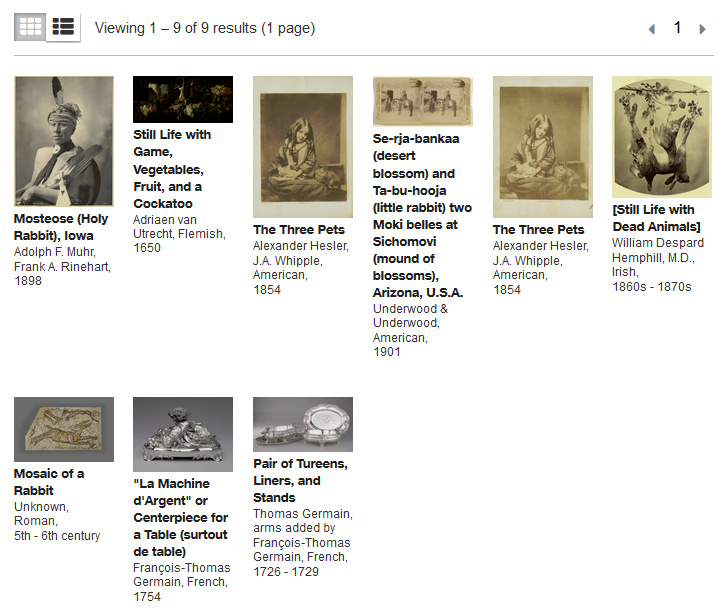
The Getty has an Advanced Search panel which can limit the search results to Getty Open Content. A test for “rabbit” unearthed nine items, but failed to unearth a delightful rabbit in a 13th century illuminated manuscript.
The manuscript rabbit was however found via a straightforward keyword search in DuckDuckGo’s Image Search…
site:www.getty.edu/art/collection “without charge” rabbit

However I should note that DuckDuckGo Image Search also failed to find the other nine “rabbit” results.
Further perusal of the 17Mb source picture for the single-rabbit image found by DuckDuckGo, revealed there were actually two such rabbits on the manuscript page…

Thus a combination of a Getty Advanced Search and DuckDuckGo Image Search seems useful for public domain picture researchers.
23 Thursday Mar 2017
Posted in JURN tips and tricks
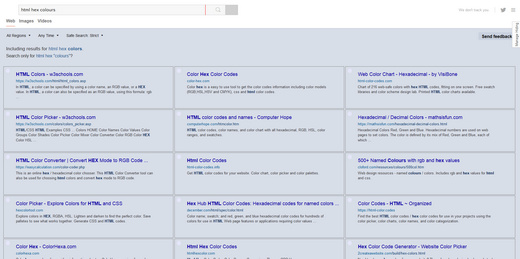
The old DuckDuckGo MultiColumns v.5 script no longer works with the Duck’s search results page. Upgrading to DuckDuckGo – Multi-Columns v.7 fixes the problem.
1. You first need to remove the 0.5 script, which is found under: Tools | Addons | User Scripts.
2. Install version 0.7. This will show up is a new place, under: Tools | Addons | UserStyles.
3. The script’s garish results numbering will default to ‘visible’, but it’s easy to fix this. Click on Edit to edit the script. Change both results numbering colour codes to the same neutral colour hex code…
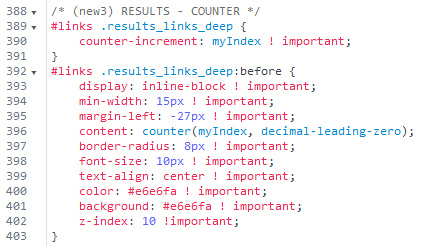
The result of this change is that the distracting red/gold flash of the results numbering becomes a simple light blue-grey dot, which gently aids the eye in passing across the results but which doesn’t distract…
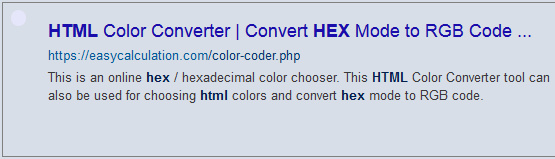
4. To also change the garish tomato + violet colours of the domain + link URL in each result, to the more restful blues shown above, fix the colour hexes in the script here…
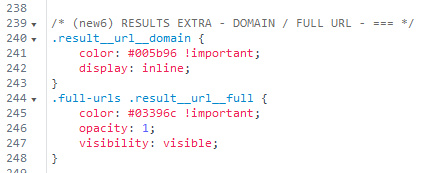
For a traditional green look, try a colour combination like #089000 and #479458
5. To fix the colour of the highlighted word(s) in the results snippet, fix the colour here. I’ve set it to a dark blue that’s not quite black…
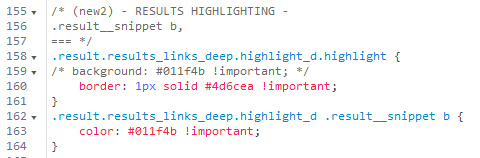
Then press Save to save the changed script.
Then, to prevent such changes being overwritten, turn off automatic updates for the script.
That’s it. Enjoy multicolumn desktop-friendly searching in DuckDuckGo…
16 Thursday Mar 2017
Posted in JURN tips and tricks, JURN's Google watch
It appears that Google’s recent Google Feed API depreciation has finally stopped the very useful RSS Search Engine from working.
“With the Feed API, you can [could] download any public Atom, RSS, or Media RSS feed using only JavaScript”
But I’m very pleased to see that the search engine DuckDuckGo now offers Bing-like feed:keyword searches and seems to do so rather well. Unlike Bing, DuckDuckGo even offers a “Past Week” option on such searches. Though it’s not so useful. Because the results are “we crawled this in the last week, but it hasn’t updated since 2012”, rather than “wow, the feed updated with juicy new content in the last week”.
Searches are however aware of the feed’s content as well as the simple fact that is a feed. Since feed posts are dated, this means that you can approximate a ‘recent’ search with:
feed:keyword March 2017
feed:deadline conference history university March 2017
Very useful for those who need to find timely new content, drawn only from sources highly likely to be dedicated to pumping out such content. Although on a simple search you will still get tangled in feeds that don’t restrict themselves to ‘last 20 posts’, and instead pour in years and years of posts. Using an additional -2016 seems to knock out such over-long feeds, at the cost of omitting some feeds that may be useful. feed: also accepts a ‘nuke-from-orbit’ command such as -2010~2016.
You can also do feed:“keyword” to prevent annoying word-juggling (e.g. search for stoke, see results for stock) or to add phrases.
Firefox browser users may not get the feeds to display prettily as a browser page, when you start clicking on the search results from such a DuckDuckGo search. This may have been because you reset your Firefox RSS preview (‘Live Bookmark’) functionality some time in the past. This may have been done because it’s apparently been somewhat insecure to preview RSS feeds inside Firefox until a security fix in version 51, the current version being 52. So security-minded users may have passed RSS feed subscription handling straight to a dedicated desktop reader, such as the excellent free FeedDemon. To undo such a change go: Tools | Options | Applications | Web Feed | and switch back to ‘Preview in Firefox’.
You’ll then get an in-browser page-like preview of the RSS feed, whatever format it comes in (it appears Firefox can tell an .xml feed from an “.xml document”). The Firefox preview page will still offer you an option to send the feed to your main feed reader.
05 Sunday Mar 2017
Posted in JURN tips and tricks
Fed up with all the “Educational” quacking on the DuckDuckGo home-page? You can turn it off via the DuckDuckGo settings…

01 Wednesday Mar 2017
Posted in JURN tips and tricks
One of the annoying things that searchers often encounter is a site-blocking overlay, blocking the site just seconds after it loads. Overlays are not just annoying, but are also publicity killers. No experienced Facebook curator, regular blogger and only a few journalists will link to a site that’s not going to give readers the content they were told to expect, as well as annoying the heck out of them within two seconds of arrival. It would be a betrayal of carefully-built trust to send one’s readers to such a broken website.
So all attempts at overlay blockers are welcome, and I was pleased to see the new Behind The Overlay Revival. It’s a forked revival of an older abandoned add-on for the Firefox Web browser. It allows a uniform one-click closure of site-blocking overlays. The only drawback with Behind The Overlay Revival is that it plonks a HUGE icon on your browser task-bar, and will remove something else on the page when you click the button without an overlay present. Without any easy way to Undo. For those reasons I un-installed, but it’s about the only option available and may be what you need.
The equivalent for users of the Chrome browser is the much more polished Poper Blocker. Works as a right-click context menu + select. Option to always remove the overlay on that site. Blacklist option, even.
The other way of doing it in Firefox is via the AdBlock Plus + “Select An Element To Hide” (get that option via the Element Hiding Helper for Adblock Plus). But that requires that the users manually block each and every element of the overlay, which can take a laborious minute or so since there can be as many as a dozen elements. But these days I’m increasingly just going back to the search results and clicking BLOCK, and never again seeing that site in search results.
See also CSS and desist, for methods of getting to content even on sites with vile blockers such as unherd.com.
04 Saturday Feb 2017
Posted in JURN tips and tricks
A quick round-up of some helping hands for a better Facebook experience:
* the vital Facebook Purity plugin has just gone to version 18, restoring blocking of “Sponsored” ad posts in timelines.
* a new Greasemonkey script, Facebook Demetricator tweaks all the fairly pointless “View 33 comments”, “Posted 25 minutes ago” micro-messages and suchlike. Instead you just see a much more relaxed format such as “View comments”, “Posted recently” etc.
* new to me, Unseen for Facebook. Prevents your Web browser from pinging a “Seen” message to Facebook, when you open a message sent via a chat box. Possibly especially useful if your employer starts to use Facebook messaging for business purposes, when you only use Facebook for personal matters.
30 Monday Jan 2017
Posted in JURN tips and tricks
There’s new behaviour from Google Custom Search, of relevance to Google CSE curators. In the dashboard, one can no longer edit a URL in place (for instance, make a simple updating of a URL from http:// to https:// ) and then save it to update it in the index. Doing this deletes the URL from the index without any warning. If you didn’t keep a backup copy of that URL pattern, you’ve lost it.
The behaviour is so remarkable and abrupt that I think perhaps it’s a temporary glitch. But for now, a wary CSE curator needs to:
1) open the indexed URL in the CSE then copy / paste it to Notepad
2) manually delete it from the URL base
3) make the corrections to the URL in Notepad
4) then paste the URL back into the CSE index, as if it were a fresh URL.
Backing up one’s CSE index (aka ‘annotations’) as .xml is probably also advisable, if glitches are indeed getting into the system.
27 Tuesday Dec 2016
Posted in JURN tips and tricks
Here’s a working Microsoft Excel 2007 .xlsx file (11kb) that has a simple formula to split a word list according to the case of each word’s starting letter. For instance, you have a list that runs…
Frodo
Merry
Pippin
riders
Gandalf
Sam
ponies
Strider
mushrooms
You want to remove all the words that do not start with a capital letter, since they are not likely to be personal names or place-names or species etc. Excel can’t do this ‘out of the box’, at least not with the various Sort buttons available in Excel 2007. Nor can plugins like ASAP Utilities. This spreadsheet results in a list with the all-lowercase words pushed down to the bottom of the sorted list, thus…
Frodo
Merry
Pippin
Gandalf
Sam
Strider
ponies
riders
mushrooms
It won’t work properly if you also have words in your list with a capital letter after the first letter, such as “naZgul”. Those words will be flagged as if they start with a capital letter. Numbers, on the other hand, are fine.
