• Directory
  • FAQ: about JURN
  • Group tests
  • Guide to academic search
  • JURN’s donationware
  • Links
  • openEco: titles indexed

News from JURN

~ search tool for open access content

News from JURN

Category Archives: JURN tips and tricks

DuckDuckGo multi-columns is broken

16 Thursday Nov 2017

Posted by futurilla in JURN tips and tricks

≈ Leave a comment

A change at the DuckDuckGo search engine has broken multi-column add-on support. Possibly this is to accommodate the new engine in Firefox 57, but that’s just my guess.

Anyway, it’s broken and this is true of both DuckDuckGo – Multi-Columns v.9 | Userstyles.org and its fork DuckDuckGo – Multi-Columns Custom – FreeStyler.WS, therefore the fault must lie with a change in the code at the DuckDuckGo results page. Both Firefox and Pale Moon show the same behaviour.

Turning on autoscroll in DuckDuckGo’s internal settings doesn’t seem to fix it. Presumably the script will be fixed in the next week or so.


Update: DuckDuckGo Multi-columns is now fixed: DuckDuckGo – Multi-Columns v.10 at Userstyles.org.

If you need to tweak the colours, either backup your existing tweaked script before updating and then port back snippets of code, or use my colour-tweaking guide to the code.

Note that, to access script editing, you no longer go to User Scripts, but rather to: the Firefox Extensions panel at Tools / Addons | Stylish | Click on the Stylish “Options” button | DuckDuckGo – Multi-Columns v.10 | Edit | Save.

Firefox 57 to Pale Moon

16 Thursday Nov 2017

Posted by futurilla in JURN tips and tricks, Spotted in the news

≈ Leave a comment

Did the dreaded Firefox 57 automatic update put the kibosh on all your vital browser add-ons? If you’re not ready to make the switch to the unfamiliar UI of Opera as your main browser, or the interesting new Brave, then the Pale Moon browser is now perhaps the best option. Based on Firefox but…

Unlike Firefox, Pale Moon will continue to offer full support for XUL and XPCOM binary-component extensions and there is no plan to discard the current extension system in lieu of Chrome-like alternatives (WebExtensions).

gHacks: How to move Firefox legacy extensions to another browser.

And while you’re at it beware of updating to the latest AdBlockPlus 3.0, if you also use the vital Element Hiding Helper.

FiveFilters RSS – new paid booster feature

06 Monday Nov 2017

Posted by futurilla in JURN tips and tricks

≈ Leave a comment

The wonderful FiveFilters RSS extractor has added a new feature. Their free service extracts RSS feeds of headlines and article links, from those annoying news sites that can’t or won’t offer RSS. You can now PayPal FiveFilters a modest £9 now £42(!) (UK) a year, and get a paste-in key-code that bumps any FiveFilters RSS feed from five to ten “most recently posted” items.

One way to fix your broken Google News RSS feeds, at November 2017

04 Saturday Nov 2017

Posted by futurilla in JURN tips and tricks, JURN's Google watch

≈ Leave a comment

The new RSS change at Google News makes their existing keyword-based RSS feeds defunct. It affects the RSS feeds that collect all Google News items with a headline/snippet containing the words ‘bunny’ + ‘fluffy’, for instance. I don’t know if the generic catch-all ‘Science’, ‘Health’ etc RSS feeds are affected, as I don’t use those.

Those keyword-based feeds will now need to be changed. Changed slowly and manually and individually by slogging down the list in one’s RSS feedreader. It’s a big task to do, for some, and journalists and editors and bloggers will have hundreds (if not thousands) of these feeds set up.

So far as I can see there’s no way to export the OPML from one’s desktop RSS feedreader and then simply do a global search-replace of the Google News URL paths in Notepad++, then bring the OPML back in. The URLs are too complex and varied in their structures to allow that.


One way of tackling the change is as follows:

Aim: Open our list of feeds in Excel and extract only the Google News ones, thus making it relatively easy for a worker to run through them all and discover the new ones.
Software required: the free Notepad++ and MS Office Excel with Sobolsoft’s Excel Remove Text addin.

1. Export your OPML master file from your RSS feedreader / newsreader.

2. Right-click on this and open the OPML in Notepad++. Search/replace "/> with "/>; and then manually go through and add a ; to the end of the remaining few lines which now lack them.

3. Search/replace all , (i.e.: all the commas) and change these to &&&&.

4. Save a backup of the changed OPML, then save another copy from Notepad++ — this time as “feeds.csv” which makes it a comma-separated Excel file. “But there are no commas left” you cry. That doesn’t matter, as Excel will treat the ; instances as if they were commas. And it won’t be terminally confused by commas sitting within the URLs, as we just changed them all to &&&&.

5. You can now load feeds.csv in MS Office’s Excel spreadsheet package. If you successfully put a ; at the end of each line of the OPML, Excel will happily load the file and it will display correctly, meaning in a similar way to the clear structured view you saw in Notepad++.

6. You’re now able to extract all the lines containing the phrase “Google News” and then do the same for “news.google”. There are a number of complex ways to do this, involving fiendish formulas, but a very easy way is with Sobolsoft’s Excel Remove Text, Spaces & Characters From Cells add-in. This gives Excel a number of very useful functions, including “Clear all cells not containing X”. Select all lines. Then clear everything not containing Google News. You can then ‘sort A-Z’, to get a neat list of all your defunct Google News feeds, one per line.

7. Select all lines with content in them. Then use the same add-in to “Remove all text before…” xmlUrl=" (which is the query command in the URL). Then “Remove all text after…” &output=

You can continue doing this sort of search/replace, and thus end up with a fairly clean set of the keywords and phrases and knockout -keywords which you were using for each Google News URL. For instance, you can search/replace %22 with ” to get recognisable search phrases again, inside the URL.

If you have hundreds or thousands of these, they can now be passed to a gig worker at Fivver.com etc, tasked with working down your nicely cleaned one-per-line list to discover the new working RSS URLs from Google News. While they’re at it, you may as well pay them to discover the Bing News equivalents.

You may also want them to use a VPN in order to also snag the Google News USA equivalent URLs, if you’re in the UK etc. Although it appears possible that simply changing the end of the new URLs from ?hl=en-GB&gl=GB&ned=uk to ?hl=en&gl=US&ned=us does the trick and gets the USA version. Google News USA obviously has better coverage, and is perhaps updated more quickly. For instance, a UK-centric search for: newcastle-under-lyme -police in Google News UK has no search results. The same from the USA site has one valid result in a local freesheet two hours ago. Such timeliness may matter for journalists with deadlines to meet.

8. You don’t then need to create a new OPML without any Google News URLs, and try to import it back to your newsreader etc. That’s a hassle and the OPML will probably break. So it’s easier to just let the defunct Google News URLs sit there and do nothing, since they’re not doing any harm. Some newsreader software may eventually flag them as defunct, and may even offer the ability to mass-delete your defunct feeds after 1st December 2017. Apparently that’s the date Google has set for the current feeds to die altogether.

9. Once your Fiverr gig worker etc comes back with the new URLs, either add in your new working Google News URLs by hand, or (if you have lots of them set up) have your Fivver gig worker format them up as a valid OPML file for bulk import to your newsreader. That’s very simple to do, once you have a newly-working Google News sample line to show them, although I think there are website converters that will turn a one-per-line RSS URL list into a valid OPML with ease.

That’s the most efficient way I can think of for handling the changeover.

How to fix Firefox, when viewing about:addons totally freezes the browser

01 Wednesday Nov 2017

Posted by futurilla in JURN tips and tricks

≈ Leave a comment

A seemingly common Firefox problem:

1. You want to check your list of Extensions (i.e: your browser’s installed add-ons). To do this you go to: top menu | Tools | Add-ons | about:addons
2. The top “Get Add-ons tab” of about:addons is active, and it wants to load. But can’t.
3. The “Loading…” button appears in the middle of this “Get Add-ons” page, but never completes “Loading…”. Firefox totally freezes.
4. You have to Alt+Ctrl+Del to force Firefox to close down.

This appears to be a local Internet service provider problem, because turning on a VPN (in the USA, in my case) before going to the “Get Add-ons” tab solves the problem. The page loads as it should.

I assume the problem arises because the ISP’s local cache of the relevant addons page hangs, and Firefox is unable to fallback gracefully from that failure.

One solution:

1. Load Firefox.
2. Turn on your VPN.
3. The about:addons / “Get Add-ons” tab should now load properly.
4. Switch down to the next tab, “Extensions”. (Which is what you wanted to view in the first place).
5. Turn off VPN and close the about:addons page. Close and restart Firefox.
6. Firefox should remember the last tab it was on for about:addons, this now being the “Extensions” tab. This tab, being seemingly local to your PC, should have no problem loading.

The “Get Add-ons” service being (temporarily) useless, you should instead use the Add-ons for Firefox Web page to find and install new add-ons.

Fireflop

02 Monday Oct 2017

Posted by futurilla in JURN tips and tricks

≈ Leave a comment

If you’re also cursing Firefox 56’s total system hangs, and want to downgrade to the previous version of the Web browser: Firefox 55.0.3 Win64 En-GB. Yes, I tried the suggested remedies. Renaming the files places.sqlite and cert8.db to *.old and then letting Firefox replace them with fresh ones on restart. Didn’t work. I’m now very seriously looking at switching to Opera, rather than having to go to Firefox 57 and be a guinea-pig for experimental code and suffer the looming “won’t run legacy add-ons” problem. Nearly all my Addons currently sport the yellow “Legacy” banner.

On the Grid

21 Thursday Sep 2017

Posted by futurilla in JURN tips and tricks

≈ Leave a comment

National Grid Reference Redirect is a simple free service that takes your UK Ordnance Survey Grid Reference map location number, and then whisks you to the equivalent string of geo-coordinates on the large public mapping services such as Google Maps. Sadly it doesn’t yet work with the excellent OS-based footpathmaps.com or the historic maps.nls.uk.

Usage: make sure you use the six-number format, e.g. SJ882359. If you have a more precise eight number OS Grid Reference — such as SJ882?359? — then you’ll need to lop off the last ‘?’ number in each block of four, and then cross-reference with the same spot in the OS-based footpathmaps.com and maps.nls.uk to work out the precise spot.

We could really use a Web browser plugin that streamlines all this, and intelligently discriminates between six and eight OS digit map references. Or the big mapping services could just start being able to handle OS map references.

On the slide – how to block Google’s “More Info” slide-out panel

21 Thursday Sep 2017

Posted by futurilla in JURN tips and tricks

≈ Leave a comment

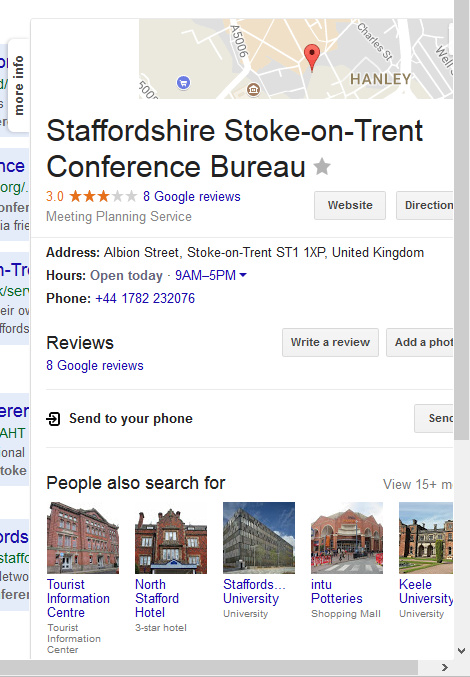
Are you regularly annoyed by Google Search’s spammy slide-in panel labelled “More Info”? It’s also known as the “Local Info” or “Info Panel” among marketeers.

I have no use for it whatsoever, and it’s just another whizzy and distinctly spammy distraction from proper search. It tends to appear when doing local searches, but I’m almost never searching for an eatery / hotel / venue ‘to book’. Instead I’m looking for pages that give long-range advance details about forthcoming events, such as conferences, events which are set to happen locally over the coming months or even into next year. So I can feed them through into special-interest local Facebook groups. In which case Google’s panel becomes yet another annoying example of dumb auto-suggest getting it wrong.

How to block it? In AdBlock Plus, with the Element Hiding Helper installed, this slide-in panel can be blocked for Google Search UK with…

 google.co.uk###rhs.slideout

Presumably

 google.com###rhs.slideout

… etc, would also work.

Sumatra PDF – launch in magazine mode with no gutters

02 Saturday Sep 2017

Posted by futurilla in JURN tips and tricks, My general observations

≈ 1 Comment

I’ve waved goodbye to the Foxit Reader software on Windows. Foxit had added one to many nags, extra bits of unwanted ‘extra’ software such as its Connected module, and generally felt like it was headed toward more and more bloat. Then there was the recent security glitch which still isn’t patched.

I’m now using the freeware Sumatra PDF instead, with its Book view (Cover page + Facing pages) for magazines and books. This view mode is found under Settings | View | Book View. Super-quick launch and very smooth page-turn.

You can set Sumatra PDF to always launch in Book mode by editing the Advanced settings list. Find:

DefaultDisplayMode = automatic

and change this to…

DefaultDisplayMode = book view

The other initial drawback appears to be a slight sliver of gutter between double-page spreads, which spoils magazine spreads in art / architecture / fashion etc magazines. This can also be fixed in the Advanced settings. Find:

PageSpacing = 4 4

and change this to…

PageSpacing = 0 0

It also has an ugly icon for PDF documents, in a garish yellow. To change this on Windows 8.1.x use the freeware FileTypesMan. Scroll to the .pdf setting, and double-click it. From there you can assign a new icon for PDFs.

How to reclaim downloaded pictures that should be public-domain

14 Monday Aug 2017

Posted by futurilla in JURN tips and tricks

≈ Leave a comment

How to reclaim downloaded pictures that should be public-domain:

1. Remove watermark logos. InPaint ($s). Has a cheesy home-page, but it’s been tested and works really very well, even on fairly faint logos. Use the magic wand, in combination with the tolerance slider, to select the letters or symbols you want to remove. Can save your letter-picks as a repeatable mask, but that mask can only be applied on a repeat picture of the same size. (Also available as a separate InPaintBatch version for batch processing, of things like time-stamped video frames).

2. Remove hidden watermarks and embedded metadata. Batch Purifier ($s). Tested, works fine, quick and easy to operate.

3. Up-res your pictures. Perfect Resize (now known as On1 Resize, $s). Exactly twice the size should work well. There are presets for portrait, landscape, low-res JPG etc. May also help to remove steganographic watermarks.

4. Clean-up. Photoshop ($s) or your favourite paint software. Crop edges; remove any crude colour-cast (often added on old photos); lift overly-dark shadows with Photoshop’s Shadows/Highlights tool; do some quick spot-repair on damage and mould spots.

5. Colourise (optional). Akvis Coloriage. Tested, but expensive and not great. Rather garish results, though if you spend a day learning it and experimenting you may do better. Probably works best with quite simple crisp portraits. For old postcards, someone with an artistic touch may have quicker and more artistic results by using a new Photoshop layer. Set the layer to Colour blend mode at 80%, then manually paint areas in with a soft brush.

Fully automated recolouring — guided by only a half-dozen colour-dabs — is coming in a few years, but at 2017 is still at the ‘SIGGRAPH demo’ stage, rather than the ‘retail Photoshop plugin’ stage. Nor is there yet a way to segment a picture into smooth-edged secure zones and thus provide what comic book makers call ‘colour flats’ and 3D people call a ‘clown pass’, which would enable quick colouring with the Photoshop paintbucket.

You can also hire a coloriser for a mere $5 on Fivver, of course, but you probably want to make sure they’re doing it by hand. Here’s one that does the work by hand, for a nice price.

You may also have the problem of banded colour moire on scans, which can be very tricky to fix (and which is wholly different than .JPG compression banding)…

There are various Photoshop descreen plugins, such as Sattva Descreen, but note that these are designed to work with big 600dpi ‘hot from the scanner’ scans rather than smaller Web copies. Sometimes on Archive.org or Hathi scans much moire can be removed in Photoshop via: Copy | Auto Contrast | Auto Colour | Desaturate | Paste copy as Layer (in Colour layer blending mode) | Soft erase the worst moire, which will be on pale patches such as roads and skies. Repaint the resulting missing colour using a colour blending brush.

Also, you want to remember that if your original find has been colorised already, from an obviously b&w source, then it’s no longer public domain but a new work. In which case you might want to note the title or geographic location of the work and try to find where their original came from, as it might be in b&w somewhere deep in Archive.org, Hathi, or similar archival websites. If an eBay scan of an old postcard, another vendor may have a better and larger scan. The free Irfanview + a plugin will let you view Archive.org’s highest-res .JP2 scans as Windows thumbnails.

← Older posts
Newer posts →
RSS Feed: Subscribe


Please become my patron at www.patreon.com/davehaden to help JURN survive and thrive.

JURN

  • JURN : directory of ejournals
  • JURN : main search-engine
  • JURN : openEco directory
  • JURN : repository search
  • Categories

    • Academic search
    • Ecology additions
    • Economics of Open Access
    • How to improve academic search
    • JURN blogged
    • JURN metrics
    • JURN tips and tricks
    • JURN's Google watch
    • My general observations
    • New media journal articles
    • New titles added to JURN
    • Official and think-tank reports
    • Ooops!
    • Open Access publishing
    • Spotted in the news
    • Uncategorized

    Archives

    • February 2026
    • January 2026
    • October 2025
    • May 2025
    • April 2025
    • September 2024
    • June 2024
    • May 2024
    • April 2024
    • March 2024
    • February 2024
    • January 2024
    • December 2023
    • November 2023
    • October 2023
    • September 2023
    • June 2023
    • May 2023
    • January 2023
    • December 2022
    • November 2022
    • October 2021
    • September 2021
    • August 2021
    • July 2021
    • June 2021
    • May 2021
    • April 2021
    • March 2021
    • February 2021
    • January 2021
    • December 2020
    • November 2020
    • October 2020
    • September 2020
    • August 2020
    • July 2020
    • June 2020
    • May 2020
    • April 2020
    • March 2020
    • February 2020
    • January 2020
    • December 2019
    • November 2019
    • October 2019
    • September 2019
    • August 2019
    • July 2019
    • June 2019
    • May 2019
    • April 2019
    • March 2019
    • February 2019
    • January 2019
    • December 2018
    • November 2018
    • October 2018
    • September 2018
    • August 2018
    • July 2018
    • June 2018
    • May 2018
    • April 2018
    • March 2018
    • February 2018
    • January 2018
    • December 2017
    • November 2017
    • October 2017
    • September 2017
    • August 2017
    • July 2017
    • June 2017
    • May 2017
    • April 2017
    • March 2017
    • February 2017
    • January 2017
    • December 2016
    • November 2016
    • October 2016
    • September 2016
    • August 2016
    • July 2016
    • June 2016
    • May 2016
    • April 2016
    • March 2016
    • February 2016
    • January 2016
    • December 2015
    • November 2015
    • October 2015
    • September 2015
    • August 2015
    • July 2015
    • June 2015
    • May 2015
    • April 2015
    • March 2015
    • February 2015
    • January 2015
    • December 2014
    • November 2014
    • October 2014
    • September 2014
    • August 2014
    • July 2014
    • June 2014
    • May 2014
    • April 2014
    • March 2014
    • February 2014
    • January 2014
    • December 2013
    • November 2013
    • October 2013
    • September 2013
    • August 2013
    • July 2013
    • June 2013
    • May 2013
    • April 2013
    • March 2013
    • February 2013
    • January 2013
    • December 2012
    • November 2012
    • October 2012
    • September 2012
    • August 2012
    • June 2012
    • May 2012
    • April 2012
    • March 2012
    • February 2012
    • January 2012
    • December 2011
    • November 2011
    • October 2011
    • September 2011
    • August 2011
    • July 2011
    • June 2011
    • May 2011
    • April 2011
    • March 2011
    • February 2011
    • January 2011
    • December 2010
    • November 2010
    • October 2010
    • September 2010
    • August 2010
    • July 2010
    • June 2010
    • May 2010
    • April 2010
    • March 2010
    • February 2010
    • January 2010
    • December 2009
    • November 2009
    • October 2009
    • September 2009
    • August 2009
    • July 2009
    • June 2009
    • May 2009
    • April 2009
    • March 2009
    • February 2009

    Proudly powered by WordPress Theme: Chateau by Ignacio Ricci.