Inside Higher Ed has a useful summary of new large-scale research on “How Readers Discover Content in Scholarly Journals”.
How researchers discover scholarly content
08 Saturday Dec 2012

08 Saturday Dec 2012
Inside Higher Ed has a useful summary of new large-scale research on “How Readers Discover Content in Scholarly Journals”.
17 Sunday Jun 2012
Posted in Academic search, JURN's Google watch
“Google Scholar: The Good, The Bad and The Ugly“, a short free Powerpoint from the University of Leeds in the UK. It’s a useful up-to-date summary, but I’d worry about the document’s opening claim that Google Scholar has… “Almost 100% coverage of journals from partner databases and publicly available TOCs”. A casual glance at this statement may mislead people into assuming that Google Scholar has complete coverage. It doesn’t. As I’ve said before, it is rather poor at including the contents of large numbers of open access arts and humanities ejournals.
13 Wednesday Jun 2012
Posted in Academic search
I hear that Questia is to… “relaunch this summer with an all-new updated look and feel”. Questia is a low-cost commercial buffet-style online research library, aimed at students. It claims to be… “the world’s largest online collection of books and journal articles in the humanities and social sciences”.
Incidentally, I also note that Open J-Gate hasn’t come back online after five months away — it went offline in February 2012 and is now just a holding page. Does anyone know if it’s likely to be coming back?
15 Tuesday May 2012
Posted in Academic search, Spotted in the news
The Getty Research Institute has announced the Getty Research Portal…
“a free online search gateway that aggregates descriptive metadata of digitized art history texts, with links to fully digitized copies that are free to download.”
Launch date is the 31st of May 2012.
25 Sunday Mar 2012
A new paper, “A study of the information search behaviour of the millennial generation” [those born between 1982 and 2000]. The paper found; erratic information search processes; only limited attempts to evaluate the quality / timeliness / validity of information found.
29 Wednesday Feb 2012
Posted in Academic search, Spotted in the news
How Consumers Discover Books Online, a Feb 2012 presentation at O’Reilly TOC 2012, by the CEO of GoodReads…
“Otis Chandler, CEO of Goodreads, would like to provide an in-depth quantitative and qualitative analysis of consumer behavior in discovering books online. Who is searching for books online? What are their personas? How are they discovering books? How many are they discovering, and how many do they go on to read? Are there strong influencers? What factors can help a book get discovered online? How is the picture different for books in the head vs the long tail?”
13 Monday Feb 2012
The Google Desktop Search software became officially defunct toward the end of 2011. But one can still download the last 5.9.1 version if you look hard enough for it, and it happily installs and indexes and searches the full-text of your content. For instance, a folder full of Gbs of PDF encyclopaedias and journal articles, ebooks, etc, presenting results in a familiar Google Search interface. Note the indexing has to be manually started by you, and this is done by right-clicking the taskbar icon and selecting “reindex”…

But if you need a personal desktop search product that’s being supported and developed, perhaps due to the need to index a new file-format such as .ePUB, then the alternatives are…
* New addition, January 2019: Paperwork, free open-source software to help a scholar get to grips with their PDF pile, without hooking into some online service ‐ it OCR’s all your PDFs and other documents and then searches across them quickly. Could be used as a OCR tool for other desktop search tools such as dtSearch.
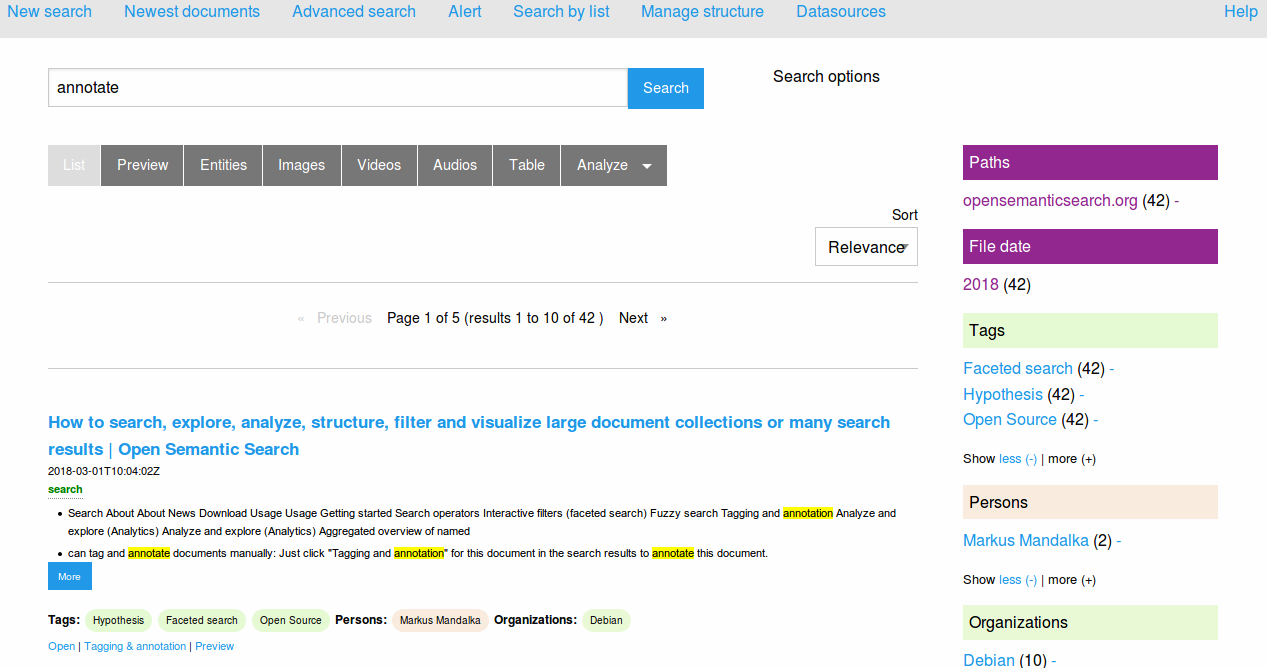
* New addition, July 2018: Open Semantic Desktop Search. Free, open source, and with a Google-like interface. Supports .PDF and .ePUB and many other file formats.
* dtSearch Desktop (PC World review from 2011). A very mature and powerful software, although the price of $199 will likely make it unappealing to personal users. The powerful interface will make it unappealing to small business users and it needs to be used with an OCR product such as the free Paperwork, but it should not be overlooked as “too old”. It’s still very powerful and fast, just bloody difficult to control — even getting it to search for an “exact phrase” and then running it so that it only finds the “exact phrase” can be a bit of a nightmare. It constantly wants to find “something phrase” as well, and I’ve tried and tried and I just can’t find how to turn off that behaviour.
* the free ad-supported Copernic Desktop Search. Well-reviewed and mature software. Can be a bit aggressive in its initial indexing, but then it works quickly and intuitively. There is also a Copernic Desktop Search Professional Edition. The best everyday replacement for Google Desktop Search. Warning, July 2018: the latest free version (7.1) no longer supports .PDF files and has a 10,000 file limit! Do not allow an older version to update itself!
* the new X1 Desktop Search. The X1 website’s main landing page seems to be positioning the X1 range for the corporate market.
* DocFetcher 1.1 is a Java-based desktop search software, that’s open source and free. It’s been around since 2009, but doesn’t seem to have any genuine reviews (that I could find). Note that installing Java on a Windows desktop is a security risk. But it does supports indexing of Open Office file types, and has the very significant advantage of easily “finding the exact phrase” in a Google-like manner without complex switch-setting. (Update: broken by the July 2020 Java update, and when it’s fixed in 2021 it will be $50 and no longer freeware).
* the free built-in Windows 7 and 8 search. Although now tamed, and no longer the fearsome disk-grinding Windows Vista incarnation, in my view turning on Windows Search still makes a desktop PC too slow. Especially if you run a PC stuffed to the top with legacy files and emails.
* Also worth a look are SearchMyFiles (freeware) and Effective File Search (freeware).
10 Friday Feb 2012
Posted in Academic search, Spotted in the news
Ellen Collins and Michael Jubb. “How do Researchers in the Humanities Use Information Resources?“, Liber Quarterly, Volume 21 (2012), No.2.
26 Thursday Jan 2012
Posted in Academic search, Spotted in the news
The Public Domain Review has a new online leaflet, A Guide to Finding Interesting Public Domain Works Online.
26 Thursday Jan 2012
Posted in Academic search
The Web’s biggest pirate galleon has just announced a new search category: “Physibles”, a fancy name for digital 3D objects…
“Data objects that are able (and feasible) to become physical. We believe that things like three dimensional printers, scanners and such are just the first step. We believe that in the nearby future you will print your spare sparts for your vehicles. You will download your sneakers within 20 years.”
Google 3D Warehouse has of course being quietly doing something very similar for some years now. All their models are free (inc. commercial use) too, but legit. They even give you awesome software, Google SketchUp, for free to manipulate and alter the objects.