The All-Sky Survey is extracting observation pictures from old astronomy journals and newsletters, and adding them into existing systems to make them discoverable in an easy manner.


28 Tuesday Mar 2017
Posted in Spotted in the news
The All-Sky Survey is extracting observation pictures from old astronomy journals and newsletters, and adding them into existing systems to make them discoverable in an easy manner.
25 Saturday Mar 2017
Posted in Ecology additions, New titles added to JURN
Journal of Astronomy in Culture
REED Online (indexing the per-county ‘performance traditions’ papers only)
Mediterranean Archaeology and Archaeometry (now restored to JURN’s search results)
West Midland Bird Club Annual Reports (UK Midlands, 1934-2013)
24 Friday Mar 2017
Posted in New titles added to JURN
Aegean Studies and associated book reviews.
Newsletter on Aegean Prehistory (2009-2015, one year paywall) (Not, it seems, to be confused with Aegean Prehistoric News 2011-2013 from the same organisation — since the latter has its own page.)
Bulletins des Seances / Mededelingen der Zittingen and Memoirs (Royal Academy for Overseas Sciences, Belgium)
24 Friday Mar 2017
Posted in Spotted in the news
Chronos is a new Gates Foundation website, offering a closed list of open access journals to publish in…
“Gates-funded researchers and Gates employees will use this service [to] search for journals offering open access options”
It’s non-public, and is presumably in the form of a whitelist. It’ll be interesting to see if the list becomes public at some point.
24 Friday Mar 2017
Posted in Spotted in the news
Predatory journals recruit fake editor, a new sting published by Nature. The sample in the study was a…
“pseudo-randomly select [of] 120 English-language journals that matched Szust’s expertise from each list. [JCR, DOAJ, and Beall’s List]”
The fake editor’s profile seems somewhat skewed toward the result the researchers may have been hoping for, having purported expertise in…
“the theory of science and sport, cognitive sciences and methodological bases of social sciences”.
It doesn’t seem that the proportion of the psuedo-random pick from each list was weighted, to account for the relative numbers of journals on each list which matched the editor’s profile. But since it’s been published by Nature, one has to assume that maybe the methodology was sound. The results are about what one might expect…
“40 predatory [Beall’s List] and 8 DOAJ journals appointed her as an editor … Of the 8 DOAJ journals that accepted Szust as editor, 6 remain on the directory as of March 2017.”
I note that, though perhaps it’s a co-incidence, the DOAJ has just thrown out a great many Bentham journal titles from their directory, citing ‘Suspected editorial misconduct by publisher’.

I should probably note here that Bentham has never been directly indexed in JURN, and that JURN doesn’t actively seek to directly index social studies or psychology or general education studies journals. Although some university titles in those areas will be incidentally included via general direct indexing of multi-journal OJS installations and repositories at universities. Such titles will also be included via JURN picking up article records from the DOAJ, Paperity, J-Stage and similar trusted aggregators.
23 Thursday Mar 2017
Posted in New titles added to JURN
Restored to JURN search results: the PDFs at Numdam, the French digital mathematics journal library. The site’s curators had changed the URL path for the article PDFs. PDFs are also now being indexed at both their servers.
23 Thursday Mar 2017
Posted in JURN tips and tricks
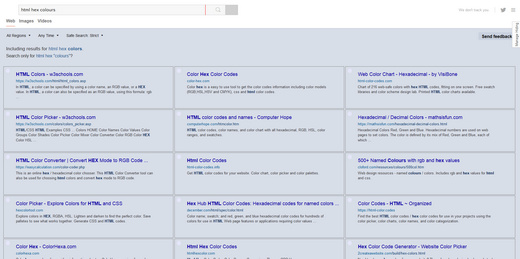
The old DuckDuckGo MultiColumns v.5 script no longer works with the Duck’s search results page. Upgrading to DuckDuckGo – Multi-Columns v.7 fixes the problem.
1. You first need to remove the 0.5 script, which is found under: Tools | Addons | User Scripts.
2. Install version 0.7. This will show up is a new place, under: Tools | Addons | UserStyles.
3. The script’s garish results numbering will default to ‘visible’, but it’s easy to fix this. Click on Edit to edit the script. Change both results numbering colour codes to the same neutral colour hex code…
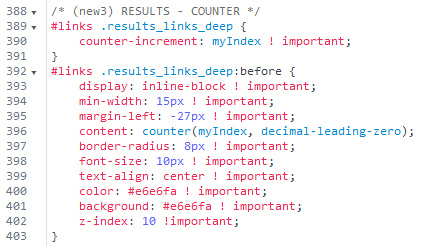
The result of this change is that the distracting red/gold flash of the results numbering becomes a simple light blue-grey dot, which gently aids the eye in passing across the results but which doesn’t distract…
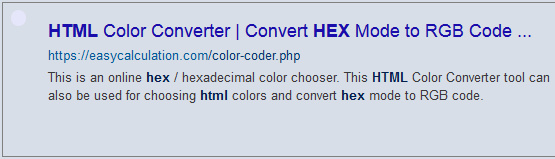
4. To also change the garish tomato + violet colours of the domain + link URL in each result, to the more restful blues shown above, fix the colour hexes in the script here…
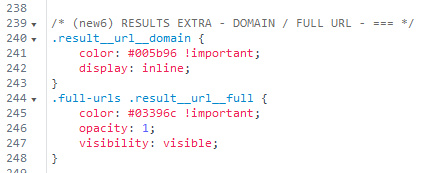
For a traditional green look, try a colour combination like #089000 and #479458
5. To fix the colour of the highlighted word(s) in the results snippet, fix the colour here. I’ve set it to a dark blue that’s not quite black…
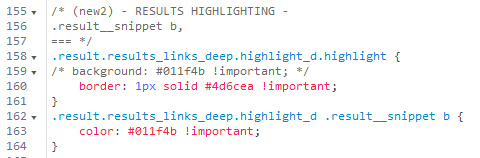
Then press Save to save the changed script.
Then, to prevent such changes being overwritten, turn off automatic updates for the script.
That’s it. Enjoy multicolumn desktop-friendly searching in DuckDuckGo…
19 Sunday Mar 2017
Posted in Spotted in the news
Excellent, there’s going to be a dedicated public catalogue for Open Access Classics Serials, building on the outstanding work done by AWOL. Although its planners note that…
“A certain amount of iteration and even manual curation of data is likely to be necessary.”
Indeed. A vision of ‘herding cats into a library, and then asking them to sit in neat rows’ springs instantly to mind. If it were me, I’d consider skipping past the years of fiddling with trying to make/align/cajole automated inputs which are ‘library science friendly’ from over 1,500 journals — and instead go straight to the crowd and their keyboards. Via outreach to Fiverr-like $5 gig-workers, especially to needy scholars in places like Bangladesh1 and Africa, to do the few months of manual keyboard bashing required to make such a catalogue totally comprehensive.
What would the cost of that be? Well, at $10 per manual input of data/links on 50 articles, adding AWOL’s 50,000 articles into an OJS setup… that’s a piffling $10,000 and would have a usefully-searchable catalogue done in a few months. I’m assuming an OJS installation can scale to provide a unified mirror for the TOCs/abstracts/metadata of 1,500+ journals, but perhaps Persee’s WooCommerce template system might scale better (as well as being much more elegant to look at). Then perhaps add another $5,000 for volleys of curator-directed $10 gigs to ’round up the strays’, and to get second-opinion proofreading and error-correction.
Of course, AWOL’s posts sometime list volumes alone rather than volumes + articles, so there would be a certain amount of additional build-out and extra cost beyond the initial scooping of AWOL into catalogue form. But that might not cost a great deal extra on top of the initial $15k. Even with management and web-hosting costs the v1.0 version of the catalogue could probably all be done very comprehensively for less than $30,000. A small Foundation, a Kickstarter, or even a private consortium of 60 classics professors (x $500 each) should be able to easily raise that.
1. A skilled Bangladeshi purchasing and inventory clerk, a job which seems an apt comparison for data entry, currently earns an average of around $250 U.S. per month. A Bangladeshi teacher earns about $180 per month. Assuming a carefully-done entry of data and links on 50 articles (paying $10) per day, over 28 days such work would pay a needy scholar a good local monthly wage of $280.
17 Friday Mar 2017
Posted in Spotted in the news
20,000 Worldclass University Lectures Made Illegal, So We Irrevocably Mirrored Them…
We copied all 20,000 and are making them permanently available for free via LBRY. The vast majority of the lectures are licensed under a Creative Commons license that allows attributed, non-commercial redistribution. The price for this content has been set to free …
16 Thursday Mar 2017
Posted in JURN tips and tricks, JURN's Google watch
It appears that Google’s recent Google Feed API depreciation has finally stopped the very useful RSS Search Engine from working.
“With the Feed API, you can [could] download any public Atom, RSS, or Media RSS feed using only JavaScript”
But I’m very pleased to see that the search engine DuckDuckGo now offers Bing-like feed:keyword searches and seems to do so rather well. Unlike Bing, DuckDuckGo even offers a “Past Week” option on such searches. Though it’s not so useful. Because the results are “we crawled this in the last week, but it hasn’t updated since 2012”, rather than “wow, the feed updated with juicy new content in the last week”.
Searches are however aware of the feed’s content as well as the simple fact that is a feed. Since feed posts are dated, this means that you can approximate a ‘recent’ search with:
feed:keyword March 2017
feed:deadline conference history university March 2017
Very useful for those who need to find timely new content, drawn only from sources highly likely to be dedicated to pumping out such content. Although on a simple search you will still get tangled in feeds that don’t restrict themselves to ‘last 20 posts’, and instead pour in years and years of posts. Using an additional -2016 seems to knock out such over-long feeds, at the cost of omitting some feeds that may be useful. feed: also accepts a ‘nuke-from-orbit’ command such as -2010~2016.
You can also do feed:“keyword” to prevent annoying word-juggling (e.g. search for stoke, see results for stock) or to add phrases.
Firefox browser users may not get the feeds to display prettily as a browser page, when you start clicking on the search results from such a DuckDuckGo search. This may have been because you reset your Firefox RSS preview (‘Live Bookmark’) functionality some time in the past. This may have been done because it’s apparently been somewhat insecure to preview RSS feeds inside Firefox until a security fix in version 51, the current version being 52. So security-minded users may have passed RSS feed subscription handling straight to a dedicated desktop reader, such as the excellent free FeedDemon. To undo such a change go: Tools | Options | Applications | Web Feed | and switch back to ‘Preview in Firefox’.
You’ll then get an in-browser page-like preview of the RSS feed, whatever format it comes in (it appears Firefox can tell an .xml feed from an “.xml document”). The Firefox preview page will still offer you an option to send the feed to your main feed reader.