• Directory
  • FAQ: about JURN
  • Group tests
  • Guide to academic search
  • JURN’s donationware
  • Links
  • openEco: titles indexed

News from JURN

~ search tool for open access content

News from JURN

Author Archives: futurilla

How to get an old Quicktime QTVR onto Facebook 360

07 Sunday Apr 2019

Posted by futurilla in JURN tips and tricks

≈ 1 Comment

Curators and archivists may sometimes come across the once-popular Quicktime format known as QTVR. Possibly as abandonware, or under a permissive licence, or freely released by the maker. The format offered a 360-degree picture in an immersive viewer and Web plugin. The equivalent experience today is ‘Google StreetView’ or ‘Facebook 360 pictures’, but with a genuine 360-degree view, able to look right up into the sky and right down at the ground under your virtual feet.

The defunct QuickTime is no longer a viable install due to major security risks. Yet it was once widely used. Not only for point-and-click CD-ROM games (Myst etc) and as output from 3D landscape software such as MojoWorld, but also for virtual tours of heritage sites. Some historians of the digital may thus have archives of this type of image that they now wish to convert to display as a 360 VR ‘bubble picture’ on Facebook / WordPress, or in HTML5. Videogame environments can also be captured and ported this way, enabling a better understand of an old videogame environment than is possible by simple screenshots. In the image(s) above you see a Half-life 2 videogame level.

I’m always keen to find ways to keep old media alive, especially if it has a permissive licence such as Creative Commons, and so this post is a quickstart on the practicalities of conversion.

QTVR is likely to be encountered in one of two formats. The six 90° × 90° still source images that form the sides of the viewing cube, or these same images compiled into a single .MOV Quicktime movie for display in the Quicktime Player.

.MOV format:

The $32 conversion utility Bixorama can import and convert the .MOV file, and output to a universal HTML5 viewer or other panorama formats.

6 x cube images:

My first thought was simple freeware utilities, but there don’t seem to be any that have a Windows GUI.

Next I thought to use my install of the panorama-assembler PTGui ($115). But I found my trusty and venerable old version of PTGui was a little too venerable, and thus could not handle a set of QTVR tiles. I then learned that PTGui only added support for QTVR tile import from version 8.2. But it was not until the recent 11.0 version that this workflow became easy and streamlined, and only in 11.2 (June 2018) that a major bug with this same workflow was fixed. Thus, if you don’t need the nice authoring tools of Pano2VR (see below), then using the latest PTGui 11.2 might save you $50.

However, today the easiest and slickest tool I found that could easily stitch the six cube images was the $170 Pano2VR 6.0. This is a full-fledged ‘virtual tour maker’ aimed at institutions, tourism businesses and real-estate, and as such it’s quite friendly and easy-to-use despite its obvious power. It can add clickable hot-spots and basically seems to be able to do what the old QuickTime Pro authoring tool could do.

Load the six image tiles via Pano2VR’s ‘Input’ button | ‘Cube Faces’ panel. You just link up each of the six cube tiles until a seamless 360 VR bubble panorama is created over in Pano2VR’s real-time previewer.

Then you export to either: i) the Pano2VR HTML5 viewer (requires a secure server to host); or ii) use the ‘QuickShare’ button (top right of the user interface) to get a Facebook 360-friendly image for upload. That remaps the assembled cube to a standard panorama projection and pops out a single .JPG image.

To Facebook 360: You then simply upload this .JPG to Facebook like any other picture. Facebook will recognise that the image is a panorama and needs to be shown inside a 360 VR bubble, without any need for special metadata. Note that Facebook tends to desaturate colour in pictures by about 10%, so you may want to boost the saturation before you upload.

To WordPress.com: WordPress.com free blogs now support embedding 360° VR pictures via a simple shortcode and a rather clunky viewer. But note you must host the image externally, and it can’t be called from the Media Library of the blog. WordPress.com’s Media Library often has difficulties with huge image uploads, and so presumably WordPress prefers not to encourage people to wrestle with uploading huge 30Mb panoramas. I’m uncertain if moving from free to paid would unlock this shortcode to support images in your Media Library.

To a WordPress based self-hosted blog, on your own webspace: Such blogs seem to have the above-mentioned shortcode functionality disabled. Apparently a security fix for WordPress knocked out a lot of shortcodes, a while back. Instead I chose to install the free plugin DImage 360. This is not over-complicated, yet does have the very nice feature of allowing visitors to ‘zoom-in’ as well as ‘pan around’ your panorama. Its embed code is as a simple as the official WordPress shortcode, and the source image can be hosted in your blog’s Media Library.


Ok, I hope that’s helpful, in terms of saving time for those tasked with converting old QTVR to a format we can view today.
Mamont

06 Saturday Apr 2019

Posted by futurilla in Academic search, Spotted in the news

≈ Leave a comment

I’m pleased to find another good FTP search engine for filename searches, Mamont. The best of the bunch on Biskbard’s survey.

Caught in the Web

31 Sunday Mar 2019

Posted by futurilla in Academic search, Spotted in the news

≈ Leave a comment

“Building a mission critical research ecosystem for Russia” (Feb 2019). The glossy report appears to be at attempt to sell Web of Science to Russia, and states…

The Web of Science platform is the first and only comprehensive, publisher-neutral discovery resource for trusted, peer-reviewed Open Access content.

Added to JURN

30 Saturday Mar 2019

Posted by futurilla in New titles added to JURN

≈ Leave a comment

Open Screens (TV and film studies)

TheoLogica : An International Journal for Philosophy of Religion and Philosophical Theology

Prague Papers on the History of International Relations (via CEJSH)

A Public Record at Risk

29 Friday Mar 2019

Posted by futurilla in Official and think-tank reports, Spotted in the news

≈ Leave a comment

A new report, “A Public Record at Risk: The Dire State of News Archiving in the Digital Age”.

Added to JURN

28 Thursday Mar 2019

Posted by futurilla in New titles added to JURN

≈ 3 Comments

ACM Interactions (human-computer interaction and interaction design)

Working Paper Series “Communicative Figurations” (how changes in media communication might be changing culture and society)

ACTA (Mediterranean archaeology and art history)

Added to JURN

23 Saturday Mar 2019

Posted by futurilla in New titles added to JURN

≈ Leave a comment

Cinema : Journal of Philosophy and the Moving Image.

LLIDS : Language, Literature, and Interdisciplinary Studies.

NGSBA Archaeology Journal and Excavation Preliminary Reports.

Added to JURN

18 Monday Mar 2019

Posted by futurilla in Ecology additions, New titles added to JURN

≈ Leave a comment

JMASM : Journal of Modern Applied Statistical Methods

Elephant : The Publication of the Elephant Interest Group (1977-2000)

Arctic and Antarctic Research (journal of AARI, Russia’s main polar research and monitoring body)

A footnotes-insert system for free WordPress.com blogs

18 Monday Mar 2019

Posted by futurilla in JURN tips and tricks

≈ Leave a comment

How to rig a simple footnotes-insert system for your free WordPress.com blog

Situation: A free WordPress.com blog does not provide the tools to footnote your blog posts. There appears to be no Web browser add-on or UserScript dedicated to this task.

Solution: This can be partly solved with two free add-on assistants for your Web browser, and some simple HTML page code.

This solution assumes you are writing your blog posts with HTML code visible and editable. It has not been tested with other types of blog editing. For free WordPress blogs this means using the unofficial Redirect to Classic Editor script. For self-hosted WordPress blogs on purchased webspace this means using the official Classic Editor plugin (but if you’re on a self-hosted blog then you already have a wealth of footnote plugins you can use).

All this is only a temporary lash-up for free users, and hopefully in future either i) the free blogs at WordPress.com will implement footnotes on the post editor, or ii) someone will code a nifty injecting UserScript that makes footnoting a seamless feature of the editor on free WordPress.com blogs.


1. Install Rich Copy URL or similar, to easily copy to the clipboard the current Web URL with title, inside a formatted HTML link.

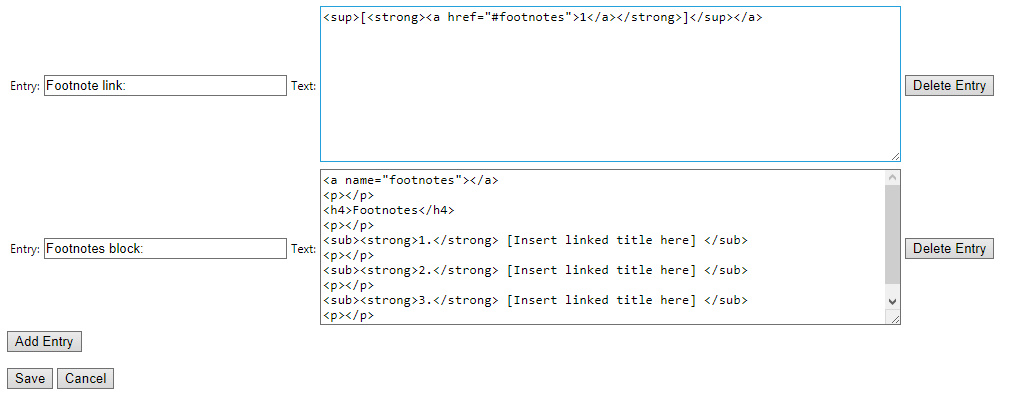
2. Install Paste Email. This adds user defined snippets of text to your right-mouse click, when the user is typing into any form on a Web page. These text snippets don’t have to be just an email address, and the add-on can also cope with multi-line formatting.

Then, in the Paste Email addon settings, you set up the following HTML snippets…

For a short blog post with three or four simple footnotes, these two snippets can be easily invoked with a right-click and placed in the post, enabling you to quickly set up the post for footnoting with only very minimal editing of code (you change three numbers, basically).

When your reader clicks on any numbered footnote link, all such body links will jump the reader down to the top of the footnotes block. As this is only a blog post and there are only a few footnotes, this saves the writer time — we don’t need to fiddle with code that sends each footnote link precisely to its footnote number. We also expect the reader to reflexively know how to go “Back” to the point in the text from which they just departed, without needing a HTML-coded “Back” link placed at the top of the footnotes block.

Thus all that the writer needs to adjust in a post is: i) the sequential number on the footnote link placed into the body text; and ii) each link and title needs to be inserted into the footnote block (and the Rich Copy URL addon helps enormously with that, meaning that no manual coding of the the link needs to be done). The writer can of course hard link words in the text as normal.

You may need to tweak the Web URL link title, as many Web page titles add extraneous items to the title. For instance, this blog post form has a captured title of “Edit Post ‹ News from JURN — WordPress” and you might want to make it more understandable to the reader by changing it to “Edit Post form at ‘News from JURN'”.

Of course, you can also tweak the formatting of the above HTML snippets. For instance by making footnote numbers stand out more by forcing a red colour rather than bold styling. If you object to my old-school HTML code then it’s easily tweaked into some shiny modern format. I welcome any necessary cross-browser corrections in the comments on this post. I’d also welcome knowing how to form a plain HTML-coded ‘Back’ link that takes one to the last-clicked anchor within the page (rather than to the last page in the browser history, or to a specific named anchor).

The lines are not really needed with WordPress but they make the code more compatible with the free blogs at Blogger.


Demo insert:

… this text is footnoted [1]


Footnotes

1. [Insert linked title here]

2. [Insert linked title here]

3. [Insert linked title here]

4. [Insert linked title here]

YouTube’s ‘Sort by date’ filter seems to be kaput

17 Sunday Mar 2019

Posted by futurilla in Spotted in the news

≈ Leave a comment

YouTube’s ‘Sort by date’ filter for keyword search appears to have stopped working. Multiple different Web browsers, with or totally without addons, all show the same thing. Search seems to be stuck on ‘Relevance’.

Update: after 11 days, it returned on the 28th March, albeit with what appears to be a ‘gap’ in coverage.

← Older posts
Newer posts →
RSS Feed: Subscribe


Please become my patron at www.patreon.com/davehaden to help JURN survive and thrive.

JURN

  • JURN : directory of ejournals
  • JURN : main search-engine
  • JURN : openEco directory
  • JURN : repository search
  • Categories

    • Academic search
    • Ecology additions
    • Economics of Open Access
    • How to improve academic search
    • JURN blogged
    • JURN metrics
    • JURN tips and tricks
    • JURN's Google watch
    • My general observations
    • New media journal articles
    • New titles added to JURN
    • Official and think-tank reports
    • Ooops!
    • Open Access publishing
    • Spotted in the news
    • Uncategorized

    Archives

    • February 2026
    • January 2026
    • October 2025
    • May 2025
    • April 2025
    • September 2024
    • June 2024
    • May 2024
    • April 2024
    • March 2024
    • February 2024
    • January 2024
    • December 2023
    • November 2023
    • October 2023
    • September 2023
    • June 2023
    • May 2023
    • January 2023
    • December 2022
    • November 2022
    • October 2021
    • September 2021
    • August 2021
    • July 2021
    • June 2021
    • May 2021
    • April 2021
    • March 2021
    • February 2021
    • January 2021
    • December 2020
    • November 2020
    • October 2020
    • September 2020
    • August 2020
    • July 2020
    • June 2020
    • May 2020
    • April 2020
    • March 2020
    • February 2020
    • January 2020
    • December 2019
    • November 2019
    • October 2019
    • September 2019
    • August 2019
    • July 2019
    • June 2019
    • May 2019
    • April 2019
    • March 2019
    • February 2019
    • January 2019
    • December 2018
    • November 2018
    • October 2018
    • September 2018
    • August 2018
    • July 2018
    • June 2018
    • May 2018
    • April 2018
    • March 2018
    • February 2018
    • January 2018
    • December 2017
    • November 2017
    • October 2017
    • September 2017
    • August 2017
    • July 2017
    • June 2017
    • May 2017
    • April 2017
    • March 2017
    • February 2017
    • January 2017
    • December 2016
    • November 2016
    • October 2016
    • September 2016
    • August 2016
    • July 2016
    • June 2016
    • May 2016
    • April 2016
    • March 2016
    • February 2016
    • January 2016
    • December 2015
    • November 2015
    • October 2015
    • September 2015
    • August 2015
    • July 2015
    • June 2015
    • May 2015
    • April 2015
    • March 2015
    • February 2015
    • January 2015
    • December 2014
    • November 2014
    • October 2014
    • September 2014
    • August 2014
    • July 2014
    • June 2014
    • May 2014
    • April 2014
    • March 2014
    • February 2014
    • January 2014
    • December 2013
    • November 2013
    • October 2013
    • September 2013
    • August 2013
    • July 2013
    • June 2013
    • May 2013
    • April 2013
    • March 2013
    • February 2013
    • January 2013
    • December 2012
    • November 2012
    • October 2012
    • September 2012
    • August 2012
    • June 2012
    • May 2012
    • April 2012
    • March 2012
    • February 2012
    • January 2012
    • December 2011
    • November 2011
    • October 2011
    • September 2011
    • August 2011
    • July 2011
    • June 2011
    • May 2011
    • April 2011
    • March 2011
    • February 2011
    • January 2011
    • December 2010
    • November 2010
    • October 2010
    • September 2010
    • August 2010
    • July 2010
    • June 2010
    • May 2010
    • April 2010
    • March 2010
    • February 2010
    • January 2010
    • December 2009
    • November 2009
    • October 2009
    • September 2009
    • August 2009
    • July 2009
    • June 2009
    • May 2009
    • April 2009
    • March 2009
    • February 2009

    Proudly powered by WordPress Theme: Chateau by Ignacio Ricci.