• Directory
  • FAQ: about JURN
  • Group tests
  • Guide to academic search
  • JURN’s donationware
  • Links
  • openEco: titles indexed

News from JURN

~ search tool for open access content

News from JURN

Author Archives: futurilla

Trigger a keyboard shortcut with a mouse-gesture

24 Saturday Aug 2019

Posted by futurilla in JURN tips and tricks

≈ 2 Comments

Here’s a very simple guide for StrokesPlus freeware users. It shows how to make an easy mouse-gesture that runs a complex keyboard-shortcut. Having such a thing relieves a desktop PC user of the need to do contortionist hand-yoga on the keyboard.

Why is this guide needed? Because StrokesPlus documentation is good but very techie, and it seems impossible for search to find a good basic two-minute starter guide with a couple of clear examples. So here it such a guide.


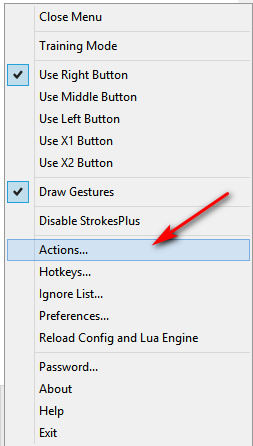
1. Open your StrokesPlus menu and go to Actions…

2. In the StrokesPlus Actions | Global Actions section, choose an un-used mouse-gesture and simply modify it. Here I’ve modified the simple “Last Track” gesture that’s meant for media-players, so that it runs ALT + SHIFT + 4.
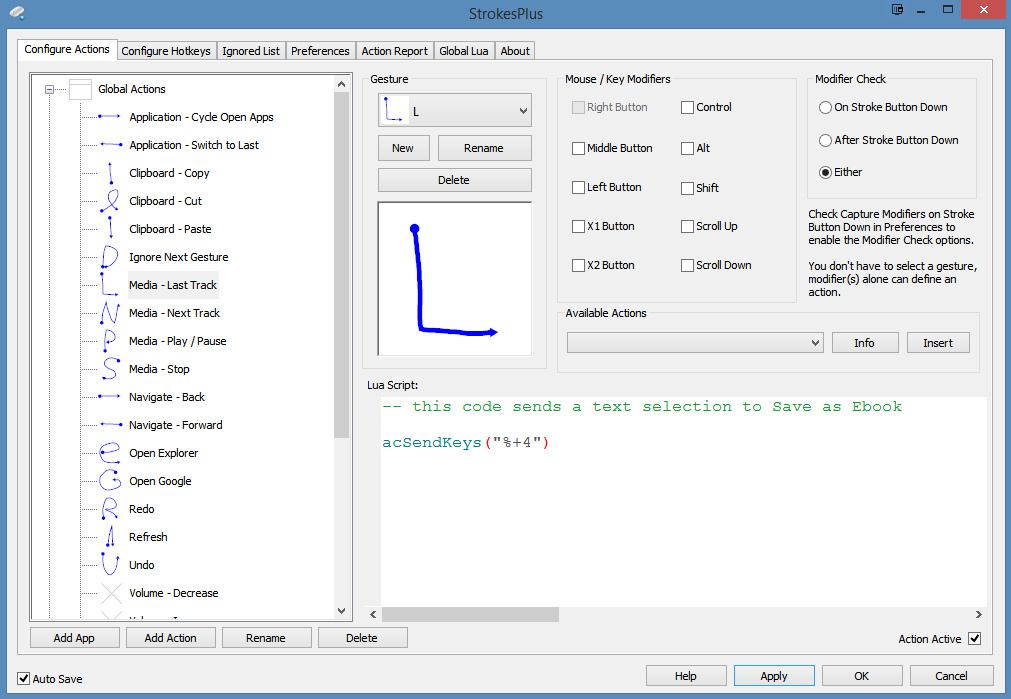
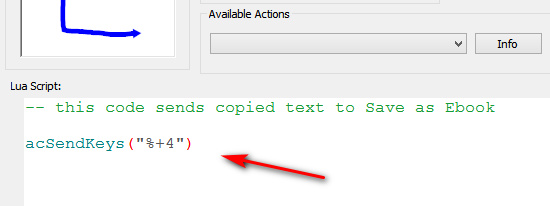
acSendKeys(“%+4”)

This mouse-gesture is then used in a Web browser, being invoked with a ‘right-click and drag’ with the mouse. The triggered command then sends my selection from the text of a news story or journal article to my ‘Save as eBook’ addon. (Note that the gesture needs to be in StrokesPlus’s ‘Global’ folder, not its ‘Internet Browsers’ folder, to work for me).

Having this mouse-gesture is especially useful with ‘Save as eBook’ (a great Instapaper replacement, able to grab more types of text and more private). Because it’s all too easy to hit the wrong item in the plain menu… and thus accidentally blank your ebook!
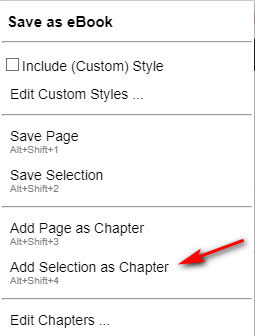
One can even add a command to wait three seconds, then have the ‘Save as eBook’s “OK” button automatically pressed to exit it…

acSendKeys(“%+4{DELAY 3000}{ENTER}”)


3. In your selected StrokesPlus gesture, write your own command and change the comment. Press APPLY and then OK in that order. You’re done.

Test your gesture and see that it works.


“Write your own command? How do you do that?”

Here are the basics of how to write your own command. I’ll use the gesture that works with my ‘Save as eBook’ addon as the example…

acSendKeys(“%+4”)

acSendKeys = do specific keyboard key-presses, in a specific order.

(“”) = always present, to neatly wrap up the keystrokes and commands.

% = the ALT key

+ = the SHIFT key

4 = the number 4 on the keyboard. (This could also be an a-z letter)

The other big keyboard strokes you’ll need for encapsulating keyboard shortcuts are:

^ = CTRL

{F_1} = F1. This can run through to F_9 = F9. Note that the { } brackets are required. Here’s an example that uses them…

acSendKeys(“%^{F_1}”)

This will run the keyboard shortcut ALT + CTRL + F1 when you make your chosen mouse-gesture.

Similarly, such brackets are also required for…

{DELAY 3000} = wait three seconds

{ENTER} = press the ENTER key


A few mores useful working examples:

@c = WINDOWS LEFT KEY + c   (to open a running Copernic Desktop from tasbar, window maximised) (note the lower-case requirement when using the @ shortcut for the WinKey)

acSendKeys(“@c{DELAY 100}@{DOWN}”) = as above, but now we add a slight delay then do Windows LEFT KEY + Down Arrow (this minimizes the newly opened and maximised Copernic Desktop Search window, such that the empty search bar is centred in the user’s desktop view)

The above works on the assumption that after typing and running the search, the Copernic window is always then manually maximised, then after consulting the search results it is sent to the Taskbar in maximised form.

Regrettably I had no success whatsoever in enabling any of the scrolling commands. It’s supposed to be able do gestures that trigger scrolling. But not one of of them work. The best I could get was Page Up and Down…

acSendKeys(“{PGUP}”)
acSendKeys(“{PGDN}”)

While these works they do not autofocus on whatever window chances to be under the cursor. For that you need to add the following to the Global Lua tab…

function sp_before_action(gnm, gsx, gsy, gex, gey, gwd)
     acActivateWindow(nil, gsx, gsy)
end


That’s it. Hopefully that’s enough to get you started.

Mind the Gap

09 Friday Aug 2019

Posted by futurilla in Official and think-tank reports, Open Access publishing, Spotted in the news

≈ Leave a comment

MIT’s Mind the Gap is a new comprehensive survey report on open source publishing systems that can be used for scholarly purposes. The only one I can see that’s missing is WordPress. Which is open source, free, easy to use and rent a server for, and can be quickly tooled-up with plugins for such purposes. In fact, it’s not even mentioned once, even to explain why it and its plugins were omitted.

Carrot2 multi-columns Stylus CSS style

09 Friday Aug 2019

Posted by futurilla in JURN tips and tricks

≈ Leave a comment

Update: Carrot2 changed the layout and a new script is now needed. here’s the fix.

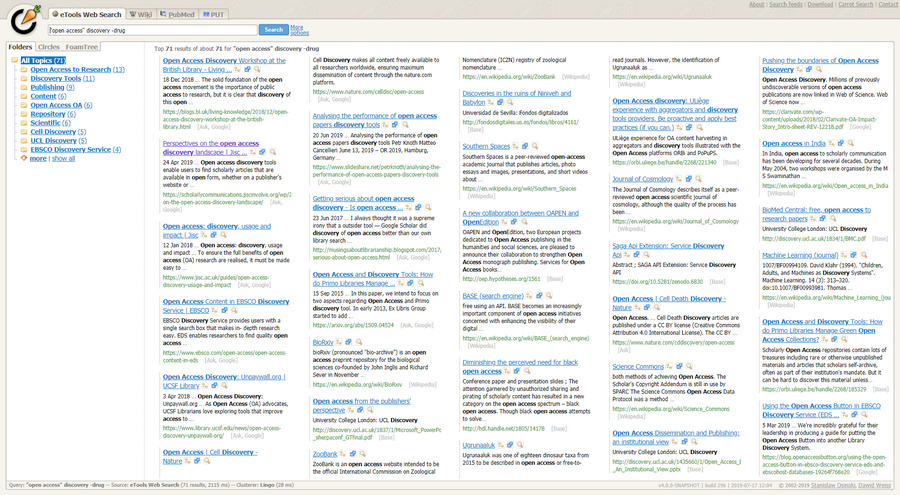
I made a Stylus CSS to have the Carrot2 Clustering Search Engine give its results as a five-column layout showing about 32 results. This is suited to a desktop PC with a widescreen 24″ monitor at 1920px.

On each search result block, I’ve increased the title in size a little, the snippet has been shrunk a little, the URL turned from difficult-to-read grey to a more usual dark green, and the results numbering has been effectively removed by turning it white. Numbering runs down each column and then starts again at the top of the next.

In the straight one-column version, all results come in on a single page and there are usually between 32 and 75 of them. There is thus no pagination (“next page”) in my columnar version. In my version if you wish to see the lower hidden results, right-click your Stylus icon, switch off the style and scroll down. No re-load is needed.

However the lack of pagination in my style may actually be found quite useful. Because it pushes the user toward testing the Carrot2 auto-clustering feature, in order to try to surface stuff that may be down in the inaccessible follow-on results.

Here’s the code. I’ve double-checked that WordPress isn’t blanking some bits of it. To install simply go to Carrot2, then left-click on your icon for the Stylus browser addon and click “Write style for…”.


/* ==== CARROT2 - Multi-Columns v.01 ==== */
element.style {
}
div.document div.url {
overflow: hidden;
color: #3a7730;
font-size: 110%;
}
div.snippet, div.document div.url {
font-size: 97%;
}
div.document .rank {
color: #ffffff;
}
a {
font-size: 113%;
}
#documents {
column-count: 5;
}


It will probably work with other CSS style injectors.


Incidentally, DuckDuckGo has a bang! for flicking searches from Duck-to-Carrot: !carrot This can also be embedded in a menu in DuckDuckGo by using the UserScript ‘DuckDuckMenu’ and adding:

http://search.carrot2.org/stable/search?source=web&view=folders&skin=fancy-compact&query={searchTerms}&results=30&algorithm=lingo&EToolsDocumentSource.country=ALL&EToolsDocumentSource.language=ALL&EToolsDocumentSource.customerId=&EToolsDocumentSource.safeSearch=false

How many users are Google’s captcha’s driving away from the service?

08 Thursday Aug 2019

Posted by futurilla in Ooops!

≈ Leave a comment

Google Search’s captcha’s are becoming intensely annoying. You can’t seem to go more than five pages of results deep with the same search before Google throws up a captcha, even with a relatively unsophisticated verbatim search such as “author name” “annotated”. And it’s not happening because I’ve been hammering the service in other ways.

How to: Google Search in columns at Summer 2019

30 Tuesday Jul 2019

Posted by futurilla in JURN tips and tricks, Spotted in the news

≈ Leave a comment

Update: this advice is now superseded: see Google in columns: how to do it in 2020.


There’s now a temporary sort-of fix for the badly broken GoogleMonkeyR browser userscript, the fix being kindly made by IzzySoft. My thanks to IzzySoft, but it still has numerous problems and also doesn’t work at all with News results. One of the worst problems is that results can get ‘sliced’ across columns, with one bit of a result at the foot of column one, and the other bit at the top of column two. It also doesn’t work well with Google Hit Hider by Domain.

For now then, I suggest that someone wanting three-column Google Search and Google Books, on a widescreen desktop PC, should abandon GoogleMonkeyR. Instead try the following, to get Google Search looking like this…

1. Disable any installs of GoogleMonkeyR.

2. Get the Stylus extension. This is a host that enables quick makeovers of the style of a website, via simple style scripts.

3. Then install the Stylus style “Google Search in columns”, after first setting “3” columns in the download options. I could not get four columns to look or feel good.

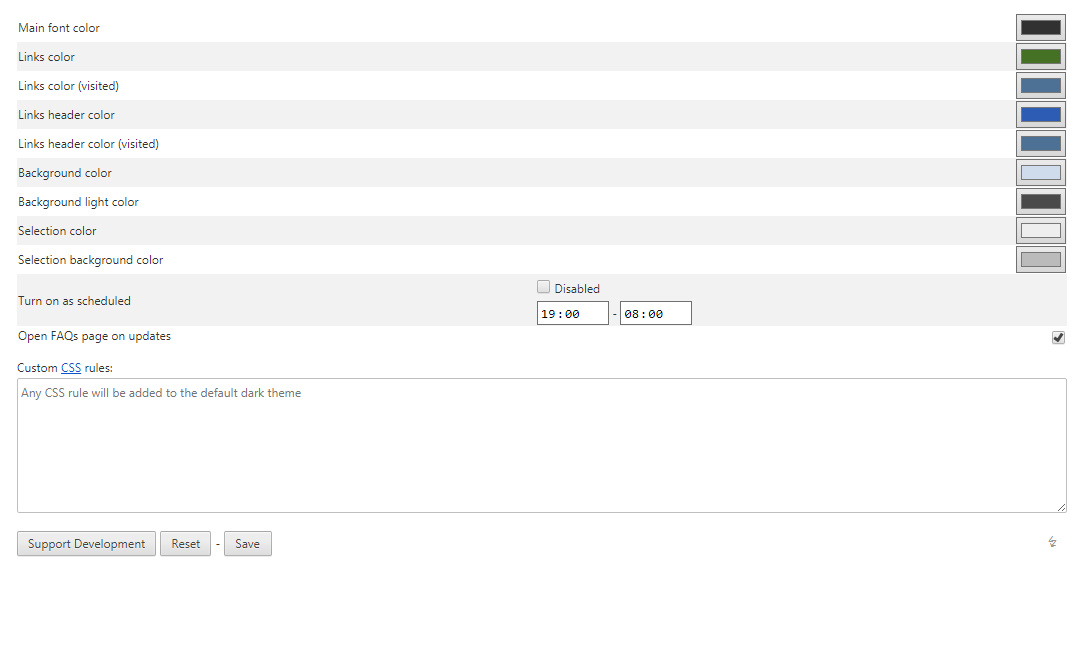
4. I tried some Google Search makeover Styles, but none could colour the link title and URL separately. I’ve learned to instantly ‘read the URLs’ over the years, and thus want them clearly identifiable at the merest glance. For a fully configurable colours makeover I went to the Dark Theme for Google Chrome addon, which can do such things and which seems robust and updated.

5. Tweak the colours in this Dark Theme addon. It’s fully configurable, inc. in my Opera browser, and you access its options via right-clicking its icon.

This gives you easy ways to set the colours, and you can even set a timer so the dark mode only kicks in at dusk and turns off at dawn.

There’s also a custom .CSS injector which looks interesting, and I’ll tinker with it at some point.

6. Now you want to tell Google to deliver only 9 results per page, by using an access URL with a command embedded in it that limits the number of results. 9 results suits a three column layout, and (once you get rid of other clutter), means you usually don’t have to scroll down to find the “next page” controls.

https://www.google.com/webhp?hl=en&complete=0&tbo=1&num=9&tbs=li:1

num=9 is what’s switching you from 10 to 9 results.

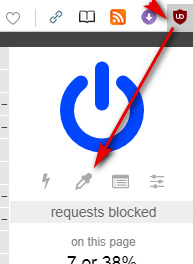
7. Finally you use the popular UBlock addon and its Element Picker to perma-block page clutter, as it appears in the Google Search results to mess up your layout. Such as huge slabs of video suggestions, instant answers, and other distracting and often irrelevant auto-fluff. There’s a bit of an art to such blocking, but you’ll get the hang of it. Just keep at it until all you’re getting is what you want — just the actual search results.

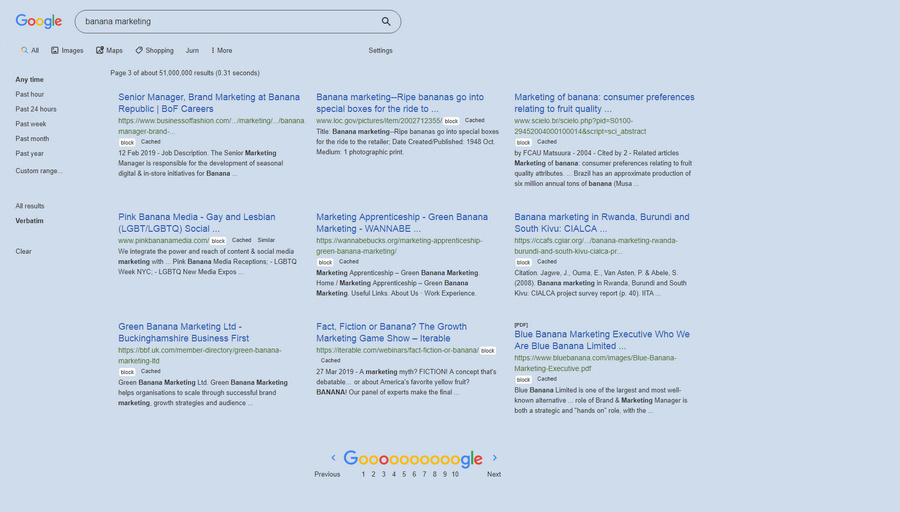
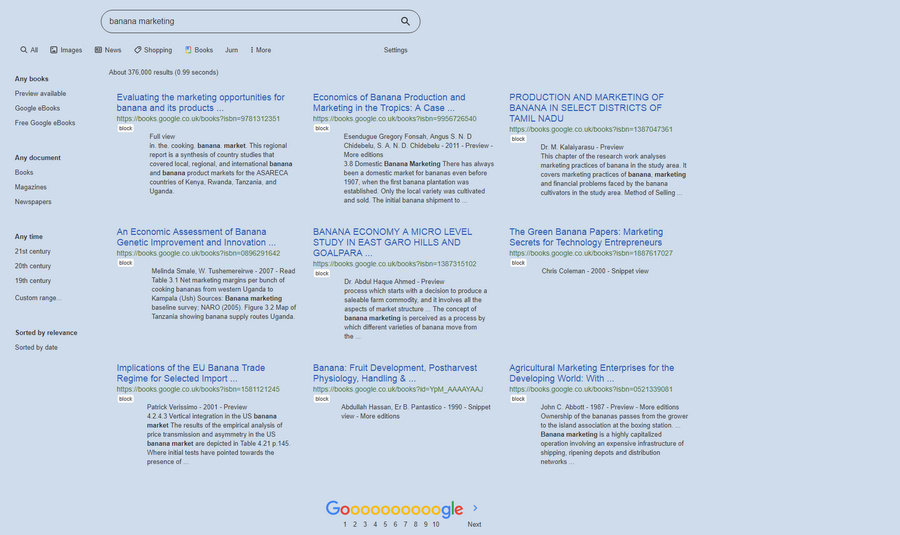
8. Here’s what my Google Search looks like on a desktop PC, with this setup.


Google Search. Everything ‘at a glance’, suited to a desktop widescreen, and with all URLs and controls clearly visible. Only the Google Books switch-through link is behind a dropdown menu, but at some point I’ll find a fix to replace “Shopping” with “Books” on the menu.


Google Books.

Nothing seems to budge Google News, in terms of getting results into columns, unfortunately. GoogleMonkeyR used to do that, but it no longer works and the new fix doesn’t do it. Nothing else seems to work on it.

As you’ll see above I use the UserScript “Google Search Sidebar” to get the neat sidebar, JURN in a UserScript to inject a quick search-query passing link into the Google menu. I also use uBlock to block the distracting book-cover thumbnails on Google Books.

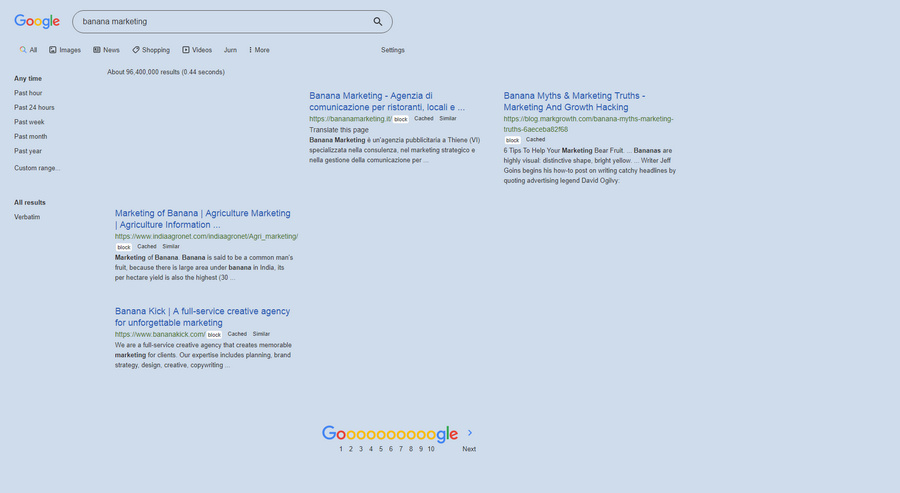
I also run Google HitHider by Domain. Which in some cases means results look like this…

The spaces are results from blocked domains, being elegant replaced with a blank block where the result would have appeared, and thus not spoiling the layout.

Added to JURN

24 Wednesday Jul 2019

Posted by futurilla in Ecology additions, New titles added to JURN

≈ Leave a comment

Te Reo : Journal of the Linguistic Society of New Zealand

Linguistic Frontiers

Journal of Anti-Corruption Law, The (University of the Western Cape, South Africa)

Journal of Anime and Manga Studies, The (forthcoming later in 2019)


Illinois Natural History Survey Bulletin

Fisheries & Aquatic Life (formerly Archives of Polish Fisheries)

Plant and Fungal Systematics

European Microscopy Society Yearbook

A new thesis partly on OA and Google Scholar

24 Wednesday Jul 2019

Posted by futurilla in Spotted in the news

≈ Leave a comment

Generacion de herramientas de evaluacion bibliometrica a partir de Google Scholar, a newly public thesis for the Universidad de Granada, 2019. The focus appears to be on data obtained in 2014.

* Chapter 9. Journal Scholar Metrics: building an Arts, Humanities, and Social Sciences journal ranking with Google Scholar data.

* Chapter 16. Evidence of Open Access of scientific publications in Google Scholar: a large-scale analysis.

Added to JURN

24 Wednesday Jul 2019

Posted by futurilla in New titles added to JURN

≈ Leave a comment

University of Vienna Law Review

CEUR Workshop Proceedings

JSc : Journal of Science (Eastern University, Sri Lanka)

Added to JURN

19 Friday Jul 2019

Posted by futurilla in New titles added to JURN

≈ Leave a comment

Nordic Journal of Media Studies

Fafnir : Nordic journal of science fiction and fantasy (had vanished, now re-located)

Harvard Data Science Review

Orientaliska Studier

Indo-European Linguistics and Classical Philology Yearbook

SudLangues (linguistic science of the global South, mostly Africa)

A GoogleMonkeyR fallback

18 Thursday Jul 2019

Posted by futurilla in JURN tips and tricks

≈ 1 Comment

Update, January 2020: now superseded, please see this solution instead.


Within the last 48 hours or so the GoogleMonkeyR UserScript has stopped columnising Google Search results, due to a wholesale revamp of the Google page code. There appears to be no immediate fix, though doubtless one will emerge via greasyfork.org in time. Turn the script off, for now, if applying the suggested fixes below.

The working fallback I found is the Stylish script at Userstyles.org Google Search in columns for the Stylus browser add-on.

This gives you a working two-column layout on results from Google.com and Google Books. You’ll need to manually add https://www.google.co.uk/search? or whatever your national Google is, via the ‘Add’ botton found in Stylus | ‘Google Search in columns’. Google News remains unaffected, it seems, whatever you add. I’m talking about the real Google News, not the ersatz Google News that the clueless masses see.

To get three columns, which is a suitable layout for widescreen desktop PC, you need to open the drop-down on the install page and manually input the number “3” before install.

For a cleaner column look you’ll then also want to clean off all the unwanted fluff that has newly re-appeared (maps, videos, instant answers, suggestions and other distractions) by selecting it with UBlock Origin…

If using the ‘Google Hit Hider by Domain’ blocking script, careful you don’t clean off your hidden results divs, while thinking they’re just blank spaces in the results.

You’ll also want to stay clear of blocking anything with “nth-of-type(1)” or you’ll blank the Google News results. “nth-of-type(2)” doesn’t seem to cause the same problem.

To block distracting cover thumbnails, on results from the new Google Books, pick one with the uBlock element picker, then block them all by manually pasting in…

##*.th

Here’s a look at the newly added items in my block-list in UBlock Origin, on top of my existing ones for Google…


The results, in combination with the two-column Stylish script (three columns is also possible, but has to be set at install – see note above)…

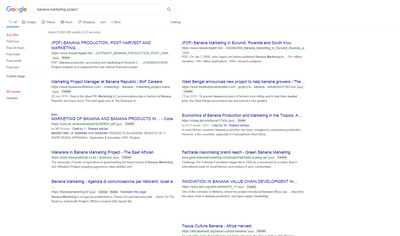
Search.

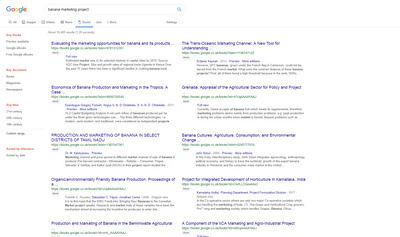
Books.

News (no effect)

Scholar is not affected by these fixes.

Some minimal scrolling is still needed with two-columns, which is wasn’t before. Still, as I said above, this is only a temporary stopgap until a GoogleMonkeyR fix.

← Older posts
Newer posts →
RSS Feed: Subscribe


Please become my patron at www.patreon.com/davehaden to help JURN survive and thrive.

JURN

  • JURN : directory of ejournals
  • JURN : main search-engine
  • JURN : openEco directory
  • JURN : repository search
  • Categories

    • Academic search
    • Ecology additions
    • Economics of Open Access
    • How to improve academic search
    • JURN blogged
    • JURN metrics
    • JURN tips and tricks
    • JURN's Google watch
    • My general observations
    • New media journal articles
    • New titles added to JURN
    • Official and think-tank reports
    • Ooops!
    • Open Access publishing
    • Spotted in the news
    • Uncategorized

    Archives

    • February 2026
    • January 2026
    • October 2025
    • May 2025
    • April 2025
    • September 2024
    • June 2024
    • May 2024
    • April 2024
    • March 2024
    • February 2024
    • January 2024
    • December 2023
    • November 2023
    • October 2023
    • September 2023
    • June 2023
    • May 2023
    • January 2023
    • December 2022
    • November 2022
    • October 2021
    • September 2021
    • August 2021
    • July 2021
    • June 2021
    • May 2021
    • April 2021
    • March 2021
    • February 2021
    • January 2021
    • December 2020
    • November 2020
    • October 2020
    • September 2020
    • August 2020
    • July 2020
    • June 2020
    • May 2020
    • April 2020
    • March 2020
    • February 2020
    • January 2020
    • December 2019
    • November 2019
    • October 2019
    • September 2019
    • August 2019
    • July 2019
    • June 2019
    • May 2019
    • April 2019
    • March 2019
    • February 2019
    • January 2019
    • December 2018
    • November 2018
    • October 2018
    • September 2018
    • August 2018
    • July 2018
    • June 2018
    • May 2018
    • April 2018
    • March 2018
    • February 2018
    • January 2018
    • December 2017
    • November 2017
    • October 2017
    • September 2017
    • August 2017
    • July 2017
    • June 2017
    • May 2017
    • April 2017
    • March 2017
    • February 2017
    • January 2017
    • December 2016
    • November 2016
    • October 2016
    • September 2016
    • August 2016
    • July 2016
    • June 2016
    • May 2016
    • April 2016
    • March 2016
    • February 2016
    • January 2016
    • December 2015
    • November 2015
    • October 2015
    • September 2015
    • August 2015
    • July 2015
    • June 2015
    • May 2015
    • April 2015
    • March 2015
    • February 2015
    • January 2015
    • December 2014
    • November 2014
    • October 2014
    • September 2014
    • August 2014
    • July 2014
    • June 2014
    • May 2014
    • April 2014
    • March 2014
    • February 2014
    • January 2014
    • December 2013
    • November 2013
    • October 2013
    • September 2013
    • August 2013
    • July 2013
    • June 2013
    • May 2013
    • April 2013
    • March 2013
    • February 2013
    • January 2013
    • December 2012
    • November 2012
    • October 2012
    • September 2012
    • August 2012
    • June 2012
    • May 2012
    • April 2012
    • March 2012
    • February 2012
    • January 2012
    • December 2011
    • November 2011
    • October 2011
    • September 2011
    • August 2011
    • July 2011
    • June 2011
    • May 2011
    • April 2011
    • March 2011
    • February 2011
    • January 2011
    • December 2010
    • November 2010
    • October 2010
    • September 2010
    • August 2010
    • July 2010
    • June 2010
    • May 2010
    • April 2010
    • March 2010
    • February 2010
    • January 2010
    • December 2009
    • November 2009
    • October 2009
    • September 2009
    • August 2009
    • July 2009
    • June 2009
    • May 2009
    • April 2009
    • March 2009
    • February 2009

    Proudly powered by WordPress Theme: Chateau by Ignacio Ricci.