• Directory
  • FAQ: about JURN
  • Group tests
  • Guide to academic search
  • JURN’s donationware
  • Links
  • openEco: titles indexed

News from JURN

~ search tool for open access content

News from JURN

Author Archives: futurilla

Find your lost LOLcats

12 Sunday Jul 2020

Posted by futurilla in Spotted in the news

≈ Leave a comment

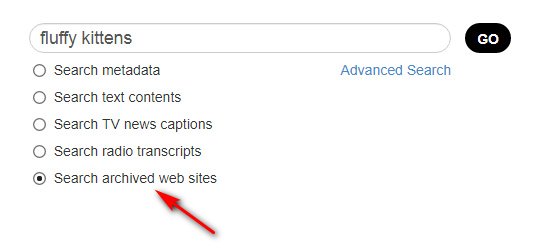
Archive.org has a new search option, from the search-box on the main page…

It’s about as slow as you’d expect, given that’s it’s now been put in front of the general public, but it works. Search results currently look like this…

Also, as you can see, radio and TV ‘news’ transcripts.

How to get pretty buttons on your Google CSE results

12 Sunday Jul 2020

Posted by futurilla in JURN tips and tricks

≈ Leave a comment

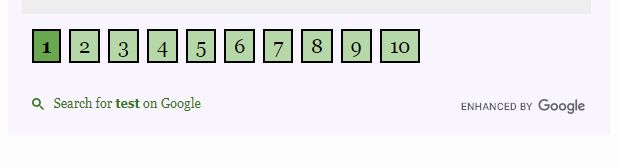
How to get pretty buttons on the bottom of your Google CSE results.

1. You want this…

Instead of this…

Ok, so not that much prettier, but bigger. You can work on the styling once you know how to do the basics.

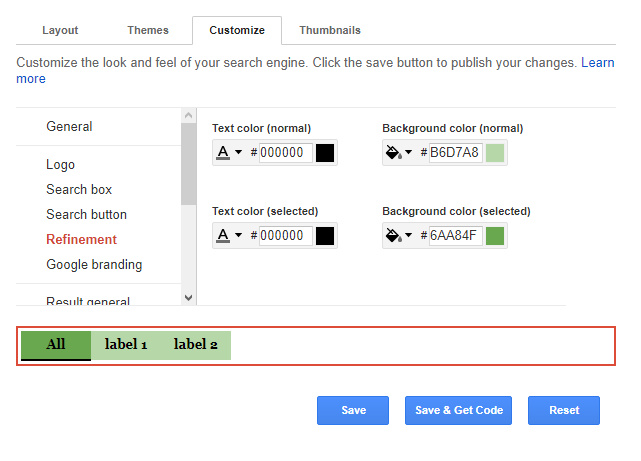
2. First set button and letter/edge colours to match your site/page. You do that here in the CSE Dashboard…

Save.

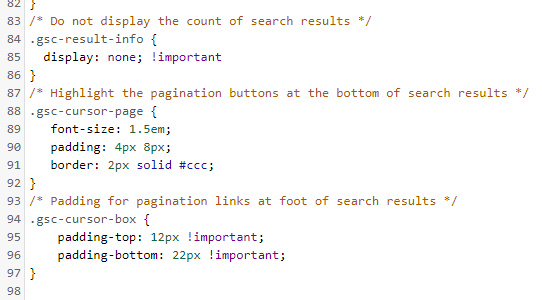
3. Then add this CSS code into your HTML page header, or your blog theme’s ‘custom CSS’ panel.

4. Save, refresh the page, test. Tell your users they don’t have to squint any more.

Snazzy map images

08 Wednesday Jul 2020

Posted by futurilla in Spotted in the news

≈ Leave a comment

Snazzy offers a library of customisable live Google Maps interfaces, such as Google Maps without Labels. The service has now added a new feature, which appears to enhance a 1000px screenshot with 3x AI upscaling.

You could do the same with a screenshot utility and Gigapixel AI, but I’d guess that Snazzy is training its AI on map screenshots and small text. Gigapixel AI gives rather poor results on small text.

A new unified UKRI website

02 Thursday Jul 2020

Posted by futurilla in Spotted in the news

≈ Leave a comment

UKRI write…

“We are creating a unified UKRI website that brings together the existing research council, Innovate UK and Research England websites. If you would like to be involved in its development let us know“. They will be “testing through 2020”.

Added to JURN

30 Tuesday Jun 2020

Posted by futurilla in Ecology additions, New titles added to JURN

≈ Leave a comment

Scandinavica (currently poorly indexed by Google Search)

BYU Studies (Brigham Young University)

Andean Past (history of the Andes)


Entomological Communications

VLC Playlist Edit Maker 1.0

27 Saturday Jun 2020

Posted by futurilla in JURN tips and tricks

≈ 3 Comments

I’ve made an Excel spreadsheet that automatically does the calculations required for making a VLC player ‘playlist edit’ of an .MP3 file. By inputting timings and then copying out the columns in light blue, one gets a nearly-made playlist that uses the required ‘elapsed seconds’ format and will only play specific sections of the target media file. See my earlier post for a full discussion on this unique feature of VLC.

Download: timecode_to_seconds_for_vlc_playlist_edit

I’ve assumed here that you have an 80 minute podcast you want to listen to repeatedly. You want to cut the first eight minutes of intro, and also cut two later sections and the final outro. Theoretically it should also work for the ‘virtual editing’ of a video file. No hefty video-editing workstation required!

Useful extra tip: On the keyboard, Ctrl + T gets you the current time on the VLC playback, in the format: 00H:38m:27s. This can be easily copied to the clipboard, and (with a little trimming) into my spreadsheet. So far as I can tell it can’t be made into a paste-friendlier: 00:38:27.

How to ‘edit’ an audio file using only timecodes and playlist

27 Saturday Jun 2020

Posted by futurilla in JURN tips and tricks

≈ 1 Comment

I’m amazed that there’s no easy way to skip across precise multiple sections of an audio file, when playing back in a laptop/desktop audio player. And to then have one’s choices of sections ‘stick’.

For example, I have a 56 minute audio track, downloaded as an .MP3. I am going to listen to this repeatedly, on a loop, and on playback I wish to always skip minutes 0:00 to 9:30, and then 15:30 to 26:00. The player should save my choices and then ‘always skip these sections, whenever I play this file’ locally.

As far as I can see the only options for doing this on a Windows desktop are…

a) actual editing of the audio file in a good audio editor such as Audacity or similar. But an MP3 can take an age to load and then to save out, when dealing with a 50-60 minute track. At a half-hour to laboriously load and process each one, that’s a whole day wasted if you have an album or long audiobook to to process. And if you’re not savvy about export settings, you can also compromise audio quality on export. The clumsy may also risk overwriting the original file.

b) it can be done via a hand-coded workaround that makes a VLC Player playlist. Not ideal, but it seems to be the best current solution and VLC is safe and well supported. It’s relatively quick and wholly non-destructive of the original files.

The simplest form of use for this is…

1. First preview your audio file and make a note of the various ‘in’ and ‘out’ points, giving you a list of just the segments you want played. For example…

PLAY 09:31 – 15:29
PLAY 26:01 – 56:30

2. Then open Windows Notepad and copy the starter template…

#EXTVLCOPT:start-time=1550
#EXTVLCOPT:stop-time= 2611
Acquired Ears.mp3

#EXTVLCOPT:start-time=2890
#EXTVLCOPT:stop-time=3803
Acquired Ears.mp3

The numbers here are the time in seconds elapsed since the start of the audio file. start-time and stop-time should be self-explanatory.

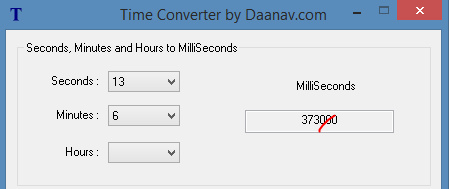
3. Now use the Time Code to Seconds Web page to translate your own noted times to seconds, seconds being the only measure that VLC Player can handle. Most crude online converters only deal in pure seconds. The one linked above can cope with proper audio-player values, such as 26:33. There appears to be no way to do this inside VLC.* A local desktop option for this is the simple Windows freeware Time Converter 1.0. It gives you milliseconds and to get seconds from that you just lop off three zeros…
Update: I made a better solution, a VLC Playlist Edit Maker 1.0 Excel spreadsheet.
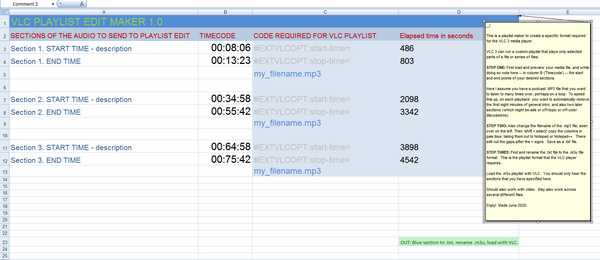
Obviously you also paste in your own file name(s). Blank spaces in the filename don’t phase VLC player.

As you can see you can have multiple sections of the file listed for playback. It appears that each selection/section/segment must follow after the last such, though it might be possible to skip back and forth across the file. It also appears you can also skip between audio files and generally create quite a complex playback mix. Try such things and see. But for the purposes of this tutorial, all that’s needed is a stepped sequence of playback across one file.

4. Once done, you save it out as a .txt file. Then rename this file so it’s a .m3u playlist. The playlist must then be located in the same folder as the audio file(s).

VLC can loop the playback of such a playlist. Video subtitles are said to play nicely with the ‘playlist edited’ playback.

This saved .m3u playlist only seems to work as intended in VLC Player, not in AIMP or other players that also know about .m3u playlists.

Apparently this also works for video, thus potentially easily enabling the lightweight distribution of ‘edited’ or ‘abridged’ versions of video/audio files, along with the actual files themselves. This relieves a potential editor of the need to wrestle with actual editing and re-encoding of the raw file, in a video editor or audio editor. Which, as anyone who has tried it knows, is a pain is the arts.

Now… if only VLC could also fix its broken “Continue playback” feature, which has never worked for me on a desktop across multiple versions — despite all the right switches being set in Preferences | Interface. The only solution I know of is to specifically call the target playlist from the Windows shortcut, by editing it thus…

“C:\Program Files\VideoLAN\VLC\vlc.exe” C:\Users\Music\playlist.m3u

Then, clicking on the resulting shortcut to launch VLC also automatically launches the target playlist. If it’s a playlist configured as above, it will play as it should and loop as normal. It still won’t automatically start at the point you left off listening when you closed VLC, but it’s better than nothing. AIMP, in contrast, handles such things perfectly and with no problem or setup at all.


Anyway, one can see the uses of such special playlists, for instance for reducing fiddliness when using video in the classroom. Or for offering just the ‘edited highlights’ of a long three-hour podcast without actually going to the trouble of editing it in Audacity. Or for creating a quick ‘cleaned’ version of media for viewing with young children. There may be some paid ‘subscriber value’ in offering such ‘playist edits’ to Patreon patrons etc, or as a ‘mailing-list special feature’.

Indeed, there’s potential for a desktop freeware / Web site combo which makes the above process as easy as possible, and then allows the social sharing of ‘playlist edit’ .m3u files, in much the same way as subtitles are already shared. Perhaps the ability to upload the user’s final edit would be contingent on summarising what was in the excluded bits, and having labelled the file correctly (e.g. ‘this section of the music appears to feature a yodelling camel’, and ‘music edit, to skip unwanted singing’).


* VLC Player also has the addons ‘Jump to Time’ (doesn’t appear to show seconds in any useful way for this purpose), and ‘Time 3.2’ (impenetrable interface, and even when finally wrestled into supposedly working it shows no seconds count anywhere in the UI). There appears to be no other ways of showing elapsed seconds / milliseconds inside VLC 3 via a plugin, though “Crtl + T” will grab it during playback. One final option is the VLC 4.0.0 alpha (most people are on the 3.0.1 stable version). This has SMPTE timestamps, SMPTE being industry-standard timecodes apparently including milliseconds. But the 4.0 .MSI and .EXE refused to install for me, and the .ZIP install just gave a black UI. You may have better luck with it in future.

Added to JURN

25 Thursday Jun 2020

Posted by futurilla in Ecology additions, New titles added to JURN

≈ Leave a comment

Ancient Pakistan

Central Asia (Area Studies, University of Peshawar)

Pakistan Journal (University of Peshawar)

Journal of Media Studies (University of the Punjab)

Pakistan Journal of Information Management and Libraries (University of the Punjab)

Journal of Social Sciences and Humanities (University of Karachi)

Inklings Forever (Tolkien, C.S. Lewis and their circles) (was lost, now found again)


Rotunda (magazine of the American Museum of Natural History and the Hayden Planetarium)

MycoPath (fungi and rots in Pakistan and region)

Linked to prison

17 Wednesday Jun 2020

Posted by futurilla in Spotted in the news

≈ Leave a comment

Japan will make it a crime to download… “academic texts from the Internet. The new law will take effect on January 1, 2021.” Two years in prison and an $18k fine, for public “pasting hyperlinks of illegal websites”. The Japanese parliament passed the new law on Friday.

One imagines there will be mass civil disobedience over such a disproportionate law. Doing things like posting links to the most obscure Elsevier textbook freely available on Archive.org, all over official government websites, and then publicly daring the authorities to prosecute.

How to auto-correct curved book pages in 2020

14 Sunday Jun 2020

Posted by futurilla in JURN tips and tricks

≈ 3 Comments

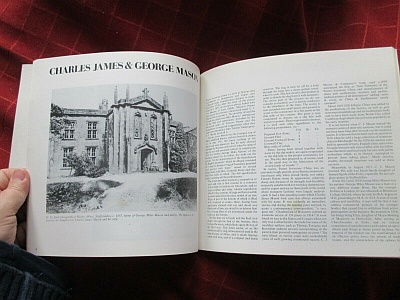
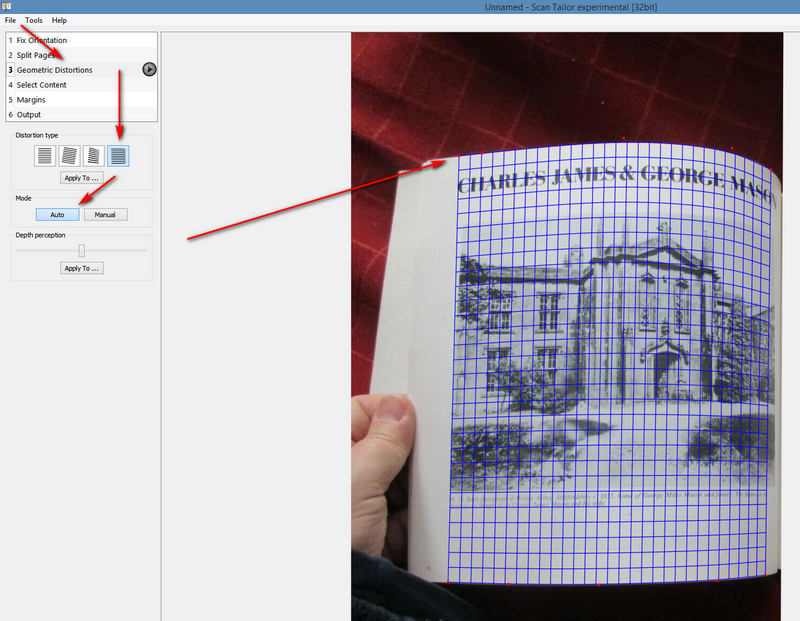
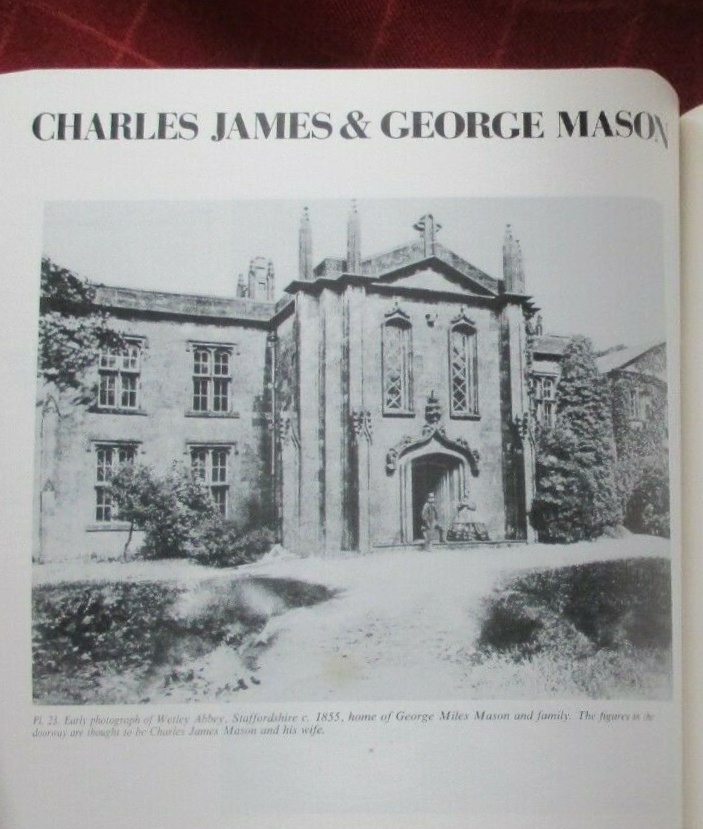
What you found pictured by an eBay seller:

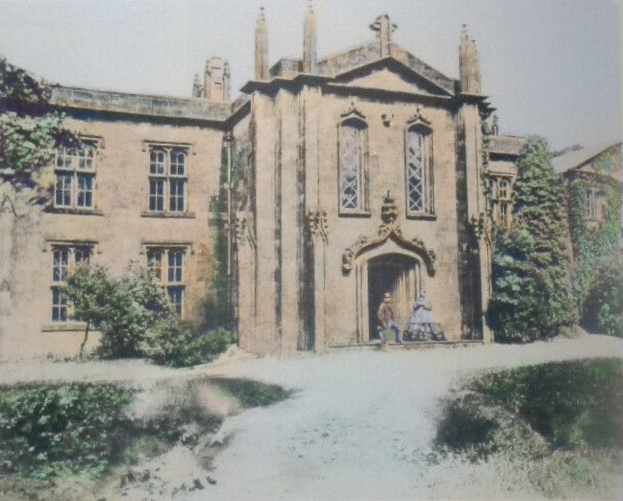
What you want from it:

Ah, if only there were software that can do that… automatically. As a first step, what software can auto-correct curved book pages, of the sort one might be allowed to hastily photograph from a rare book page in a library, or perhaps in the form of a seller’s preview picture on eBay? Of course, I imagine there are now abundant mobile-phone solutions for naughty page-grabbers in book-stores, but what about for scholars on desktop Windows?

It used to be that Snapster 2.0, aka Snapster ICE, could do this via manually placing control-points along the curvature of the pages edges. But that software is now utterly unavailable except as an old 15 day trial which can no longer be unlocked. There’s also an equally finickerty free script for the free Paint.NET, which involves manually laying down two curves — and which I could not get to work at all. Tests show that neither the fine £45 DxO Viewpoint (mostly for architectural photographers) nor its free equivalent ShiftN can do exactly this (though if you have the page fairly straight, they’ll help get everything on it exactly straight). Nor can Photoshop do such auto-correct, rather amazingly, or at least there’s no mention of the capability or any tutorial in how to find and use the relevant tools.

But… there is a solution, and it’s free and relatively easy. You can have it done automatically by a special edition of the Windows freeware called Scan Tailor. No, not the normal/current Scan Tailor, but rather Scan Tailor Experimental 2015, which was a ‘special edition’ produced as a farewell present just before the original maker of Scan Tailor left the project for paid work. His experimental version includes automatic de-curving of book pages, of the sort found in some dedicated software that ships with scanners.

It seems best to first place your target picture(s) in a separate folder and then load up and output one a time, unless they all have the same orientation and distortion. Scan Tailor is obviously meant to run in batch across a lot of nearly-identical book pages. But it works fine and quickly on single images in Windows 8, and even auto-saves the results as a .TIF file.

Automatic isn’t totally perfect, as you can see in the lower-right. It’s a bit ‘off’ there. But even accepting automatic, the results are quite usable…

Automatic does need some edge-contrast to work with. A low-light eBay photo of a book page against a beige carpet will prevent auto from working, and you’ll have to place control-points manually.

As for the colourisation… still not quite automatic as yet, but there are tools that will help you halfway. Then you need to break out the desat and colourising brushes. Good up-rezing can also be done now, but with a fuzzed antique picture like this at 800px the results are not going to be worth having. What can be had from the eBay picture is good enough for a local history website or blog.

If your boss needs current supported software for photographing books on a tight budget, then the $33 Booksorber appears to do much the same thing, with automatic thumb/finger removal. You’ll need a digital SLR camera (ideally one that can also operate from mains electricity as well as easily-expired batteries), release cable, a tripod, and a bright builder-man lamp from the local DIY store.

← Older posts
Newer posts →
RSS Feed: Subscribe


Please become my patron at www.patreon.com/davehaden to help JURN survive and thrive.

JURN

  • JURN : directory of ejournals
  • JURN : main search-engine
  • JURN : openEco directory
  • JURN : repository search
  • Categories

    • Academic search
    • Ecology additions
    • Economics of Open Access
    • How to improve academic search
    • JURN blogged
    • JURN metrics
    • JURN tips and tricks
    • JURN's Google watch
    • My general observations
    • New media journal articles
    • New titles added to JURN
    • Official and think-tank reports
    • Ooops!
    • Open Access publishing
    • Spotted in the news
    • Uncategorized

    Archives

    • February 2026
    • January 2026
    • October 2025
    • May 2025
    • April 2025
    • September 2024
    • June 2024
    • May 2024
    • April 2024
    • March 2024
    • February 2024
    • January 2024
    • December 2023
    • November 2023
    • October 2023
    • September 2023
    • June 2023
    • May 2023
    • January 2023
    • December 2022
    • November 2022
    • October 2021
    • September 2021
    • August 2021
    • July 2021
    • June 2021
    • May 2021
    • April 2021
    • March 2021
    • February 2021
    • January 2021
    • December 2020
    • November 2020
    • October 2020
    • September 2020
    • August 2020
    • July 2020
    • June 2020
    • May 2020
    • April 2020
    • March 2020
    • February 2020
    • January 2020
    • December 2019
    • November 2019
    • October 2019
    • September 2019
    • August 2019
    • July 2019
    • June 2019
    • May 2019
    • April 2019
    • March 2019
    • February 2019
    • January 2019
    • December 2018
    • November 2018
    • October 2018
    • September 2018
    • August 2018
    • July 2018
    • June 2018
    • May 2018
    • April 2018
    • March 2018
    • February 2018
    • January 2018
    • December 2017
    • November 2017
    • October 2017
    • September 2017
    • August 2017
    • July 2017
    • June 2017
    • May 2017
    • April 2017
    • March 2017
    • February 2017
    • January 2017
    • December 2016
    • November 2016
    • October 2016
    • September 2016
    • August 2016
    • July 2016
    • June 2016
    • May 2016
    • April 2016
    • March 2016
    • February 2016
    • January 2016
    • December 2015
    • November 2015
    • October 2015
    • September 2015
    • August 2015
    • July 2015
    • June 2015
    • May 2015
    • April 2015
    • March 2015
    • February 2015
    • January 2015
    • December 2014
    • November 2014
    • October 2014
    • September 2014
    • August 2014
    • July 2014
    • June 2014
    • May 2014
    • April 2014
    • March 2014
    • February 2014
    • January 2014
    • December 2013
    • November 2013
    • October 2013
    • September 2013
    • August 2013
    • July 2013
    • June 2013
    • May 2013
    • April 2013
    • March 2013
    • February 2013
    • January 2013
    • December 2012
    • November 2012
    • October 2012
    • September 2012
    • August 2012
    • June 2012
    • May 2012
    • April 2012
    • March 2012
    • February 2012
    • January 2012
    • December 2011
    • November 2011
    • October 2011
    • September 2011
    • August 2011
    • July 2011
    • June 2011
    • May 2011
    • April 2011
    • March 2011
    • February 2011
    • January 2011
    • December 2010
    • November 2010
    • October 2010
    • September 2010
    • August 2010
    • July 2010
    • June 2010
    • May 2010
    • April 2010
    • March 2010
    • February 2010
    • January 2010
    • December 2009
    • November 2009
    • October 2009
    • September 2009
    • August 2009
    • July 2009
    • June 2009
    • May 2009
    • April 2009
    • March 2009
    • February 2009

    Proudly powered by WordPress Theme: Chateau by Ignacio Ricci.