A Medieval Studies preprint server. Who knew?
BodoArxiv
13 Saturday Feb 2021
Posted in New titles added to JURN

13 Saturday Feb 2021
Posted in New titles added to JURN
A Medieval Studies preprint server. Who knew?
29 Friday Jan 2021
A useful new analysis today from COAR, “Don’t believe the hype: repositories are critical for ensuring equity, inclusion and sustainability in the transition to open access”. Recent…
publishers’ comments portray gold open access as the only ‘legitimate’ route for open access, and attempt to diminish the repository (or green) route.
According to the author, some publishers are even implying that repositories have no aggregators, or are not present in Google Search or in specialist search-engines such as Scholar and GRAFT. Laughably, they apparently suggest that poor over-worked researchers will instead…
need to search through individual repositories to find the articles.
The publishers are also said to be trying to stop all but a sub-set of elite repositories from being used for data deposit, via…
proposing to define the repository selection criteria for where their authors’ should deposit research data. These criteria, which are very narrowly conceived, threaten to exclude thousands of national and institutional repositories as options for deposit.
Again, this sounds like it is designed to make researchers feel it’s more convenient to publish their article + data via a big publisher.
24 Sunday Jan 2021
Posted in Spotted in the news
List updated, May 2021.
The Tucows site has closed its doors and shipped the famous cows off to the local burger-flipping joint. In the early years of the broadband Internet the Tucows site was a go-to-place for desktop PC freeware for Windows, and well-known for its “two cows” graphic logo.
Key ongoing alternatives for users of desktop PCs and classic Windows freeware in 2021 are…
Softpedia. The usual go-to, found from a general shallow-search search-engine such as DuckDuckGo. Mixes trials with well-documented freeware, but it’s obvious which is which.
Lo4D, I rarely use it, but it’s useful if you want a second opinion on a Softpedia find.
MajorGeeks. The best for tracking freeware on a daily or weekly basis, re: what’s new or updated. Also very comprehensive, to the point of including selected trialware and shareware. Just avoid the scattered text ads for downloads of the Malwarebytes software, which is ‘limpet-ware’ — it does what it says, but is a lead-in to a purchase and I found it to be extremely difficult to remove once installed.
Filepanda.cc is a possible fallback.
OldApps is also useful if you need a specific older version. Despite the name, it’s classic Windows desktop software and not mobile apps. Here you find software from more than about five years ago, it seems. It also has some Mac pages, and useful forums.
GitHub Search can be useful, if you know what functionality you’re looking for and the precise terminology. Such as Scan Tailor Experimental 2015 for automatic de-curving of photos of opened book pages.
A final backstop is The Internet Archive Software Collection which has all sorts of golden oldies for Windows. Such as a 2020 version of the avast_free_antivirus_setup_offline.exe installer — to run on an older Windows 7 PC offline server for some special academic use. Later 2021 versions of this leading freeware anti-virus refused to install on old Windows 7 PCs. Archive.org also has ISOs of old magazine cover-CDs and DVDs. You’ll need a freeware tool to mount the ISO, such as Daemon Tools Lite or WinCDEmu. The latter can mount ISOs without needing a special driver, which can be useful on persnickety workstation PCs.
Being a bit of a connoisseur of rare or overlooked graphics and utility freeware for the Windows desktop, I also know that many nice bits of freeware never reach such sites, and reside on the maker site or some specialist software-specific directory like Paint.NET Plugins Index. Sometimes the latest updates from a solo maker are only ever posted on forum threads, with Dropbox links, and that’s the last you hear of him. In such cases, a search with a deep-search engine such as Google is often needed, as such recent or forum-buried things are usually not highly ranked by the search-engines. Yippy can also be useful for finding free scripts. (Yippy now dead).
Finally, avoid sites like FileHippo, which used to be good but have turned to the dark side.
Update: Filehorse is a new major one in early summer 2021. Seems to be legit.
23 Saturday Jan 2021
Posted in JURN tips and tricks, Spotted in the news
Got nasty breadbrumbs in your Google Search, again? An update to the free UserScript Google Search restore URLs (undo breadcrumbs) fixes that, restoring full human-readable URL paths in your search results. Having URL paths visible is vital for instantly detecting and blocking spam, something which Google’s mega-mind AI seems unable to learn to do. After a while, the experienced searcher learns to spot the half-dozen common types of spam URLs. An obvious example…

A garbled hash forms part of the URL + an .it domain + a movie ‘download’ offer = definitely robo-spam and likely dangerous too. Why is it even in Google Search, and for search terms that have nothing to do with Thundercats?
21 Thursday Jan 2021
Posted in Spotted in the news
The leading graphics-card developer NVIDIA has a new NVIDIA NGC catalog that…
provides GPU-optimized AI software for data engineers, data scientists, developers, and DevOps teams” and these are “optimized to run on NVIDIA GPU cloud instances, such as the Amazon EC2 P4d instance.
Apparently free, though the December press-release called it a “Storefront”. Presumably the modules are free, but you then pay to have them pondered by Amazon’s super-brain.
31 Thursday Dec 2020
Posted in JURN tips and tricks, Spotted in the news
Seamless and free height-maps for the whole world, now at Tangram Heightmapper. It’s very easy to use. Once you’ve dived down to your location, and exported such a map, these height maps can be imported into 3D software. There they can then be used as the basis for making new elevated terrain maps, and as pretty as you care to make them.
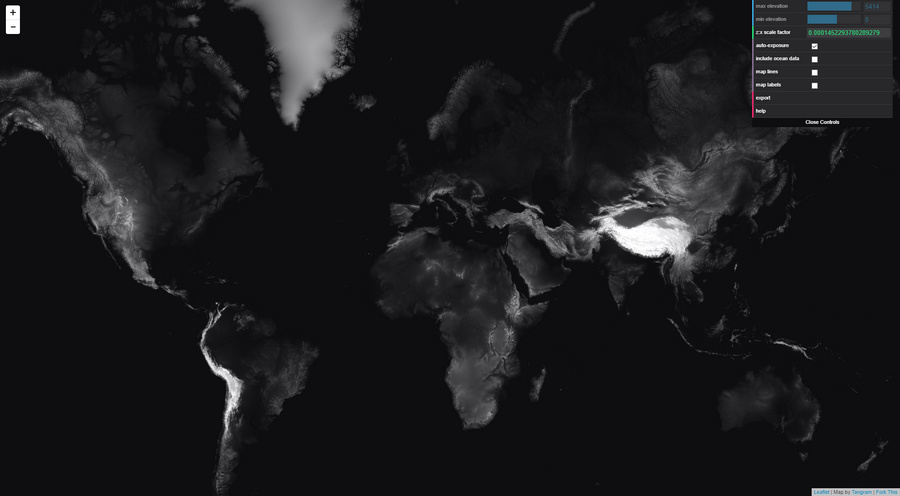
How to use…
1. Go to Google Maps. Find your chosen location, and position it. Copy the current Google Maps URL to Notepad.
2. Now use this Google Maps URL co-ordinate data to craft a new URL for the Height Mapper. An example Google Maps URL would look like…
../maps/place/Your_place/@53.0220219,-2.2297826,12z/
Therefore the needed Tangrams Height Mapper URL would be…
https://tangrams.github.io/heightmapper/#12/53.0220/-2.2297
The #12 appears to be the zoom-level, with #13 zooming the satellite down another mile or so nearer to the ground. It appears to correspond with the ,12z bit of the Google Maps URL. It thus seems someone could easily cook up an URL-converter UserScript for Google Maps, but for now it needs to be done manually.
3. Paste your newly-crafted URL into Tangrams Height Mapper. Allow time to load. Once you’re happy, press “Export” to get the heightmap in PNG.

If needed, zoom-in further and grab multiple adjacent sections for export, then stitch these with the free Microsoft ICE. Although this does not appear to add detail. It just makes the final image larger. Nor can the upres-er AI Gigapixel add much new detail.
4. View in your chosen 3D landscape software by loading up your new height map. For a quick look, the Aerialod freeware is simple and will do the trick.
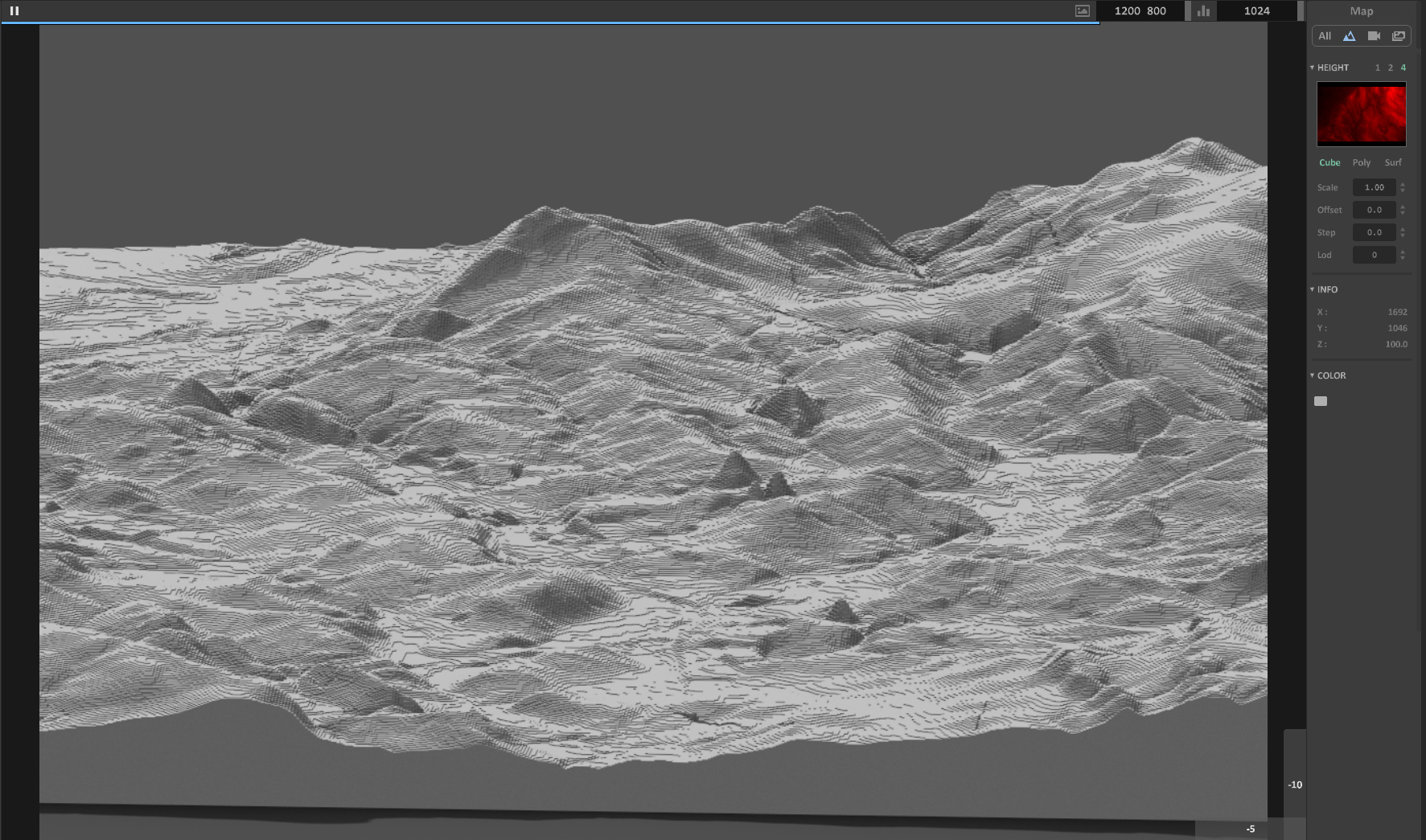
You will then likely find the height map has “terraces” (aka “stairsteps” or “steps” or “zippers” or stepped “waterlines” or “tidelines”). These look like the tiny lines following the contours of a drawn map. These are not actually drawn-on contour-lines, but rather the unwanted artefacts of the relatively low-resolution heightmap. If you want high-resolution heightmaps you’re assumed to prospecting for oil or gold and you generally have to take out a mortgage to afford them.
Seen here in Aerialod, this “stepping” effect is actually not unappealing when rendered crisply. Though here with a bit too much of the Minecraft game about it. You can hide this effect somewhat by switching Aerialod to display in ‘Poly’ or ‘Surf’ mode, but these modes make the terrain look like a plaster-cast and seem far from ideal.
5. Most will then want to find a method of smoothing these tiny terraces, but without removing too much detail from the real bits of the terrain. Sadly it appears there’s there’s not really any way to do that, without smushing the other details, other than to cover the terrain with a satellite map or apply textures.
One simple free option that I find works for mesh export is Height Map to OBJ. This gives a smoother 3D mesh as it exports, though also regrettably smushing fine details, rather than trying to smooth the height-map pixels first. It’s old but, like most good Windows freeware, still works and it will get rid of the ‘terraces’. Just note that the height maps you feed it must have exactly square dimensions. On import of the resulting OBJ into 3D software you may find you have to re-set the scaling, to something like 700% on the Y axis.
With a vastly steeper learning-curve, TerreSculptor is now free and will also import a height map and export an OBJ.
13 Sunday Dec 2020
Posted in JURN tips and tricks
There are two useful YouTube addons for wrangling YouTube, without needing the services of some third-party online outfit in Whereizitagin.
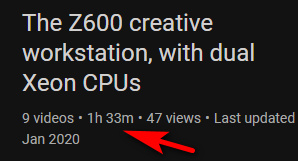
Youtube Playlist Total Duration is a UserScript that shows the total duration of the playlist. Useful for those who need to know how long a software-training or hardware-setup playlist will take to view. Tested and working, but note that you must re-load the page to see the correct time for the playlist.
Got a slow presenter, and need your learning playlist running a little faster? The Chrome browser addon Any Youtube Playback Speed does the job nicely, and with fine increments on a simple slider. Again, tested and working.
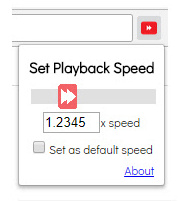
Small changes re: time and speed, but both are very useful.
25 Wednesday Nov 2020
Posted in JURN tips and tricks
Sometimes you get a PDF where the page is “squished”, as seen here…
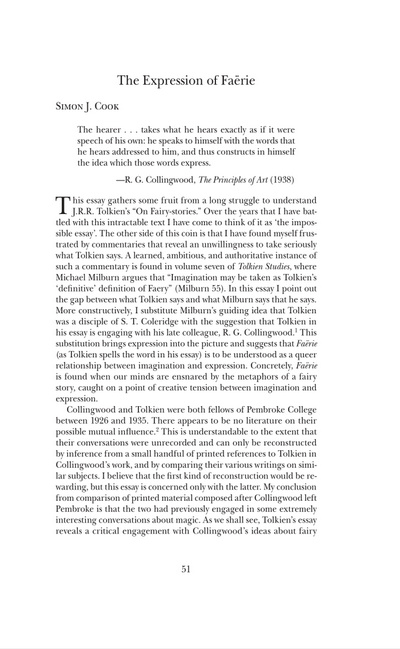
Bad, some dunderhead saved the pages with slightly wrong proportions and didn’t notice.
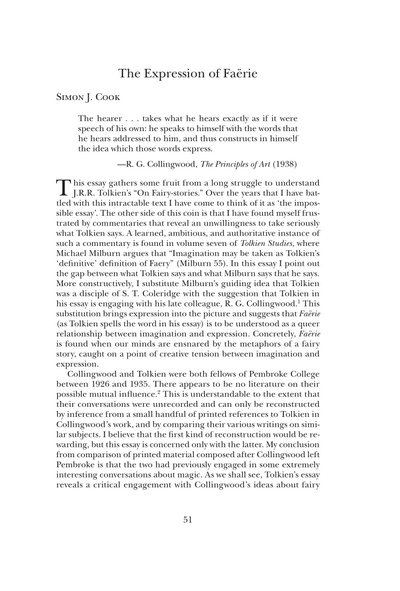
Good, as it should be.
It can also happen when ebooks files are being bulk converted to .PDF files. It’s often especially noticeable where there is artwork with faces. The slightly “squished” or “stretched” result is locked in a PDF file and is difficult to change. It’s no use trying PDF tools that only scale a page proportionally, or simply crop the page, or will re-print from U.S. Letter size to UK A4 size etc. Because you only need to change each page along one dimension, not along both.
There are three or four online tools for fixing this in a PDF, though that’s not much help if you have a 200Mb PDF and a very slow upload speed, or are offline. Or have 50 such files to process. Or if your business has a mission-sensitive document you’d rather not sent to Whereizitagin. The full paid Adobe Acrobat can also do the repair though in a clunky way, from Adobe Acrobat DC (2015, not to be confused with Adobe Reader) onward, via fiddling around with Preflight and following a convoluted recipe.
Are there any fast Windows desktop options? I found and tested three working possibilities, one free.
1. The free and trusty Irfanview can open PDFs (with the free Ghostscript and free plugins pack installed). This combo can together open and page through PDFs. Irfanview can even resize the first page in an unconstrained way, so you can work out what your re-size dimensions need to be. Sadly it can’t then flow this resizing over to all subsequent pages. Instead it can at least automatically save out all the pages as .PNGs or .JPGs, then you’d open their output folder and batch resize them with Irfanview. Then you’d re-compile them back to a .PDF file, or zip them into into a Comic Book .CBZ file.
2. Apex PDF Page Resizer did the job easily and perfectly, although it’s expensive at $20 via FastSpring. Over-priced, for a one-trick-pony that won’t be used too often. There’s a 30-day trial with only a light watermark.
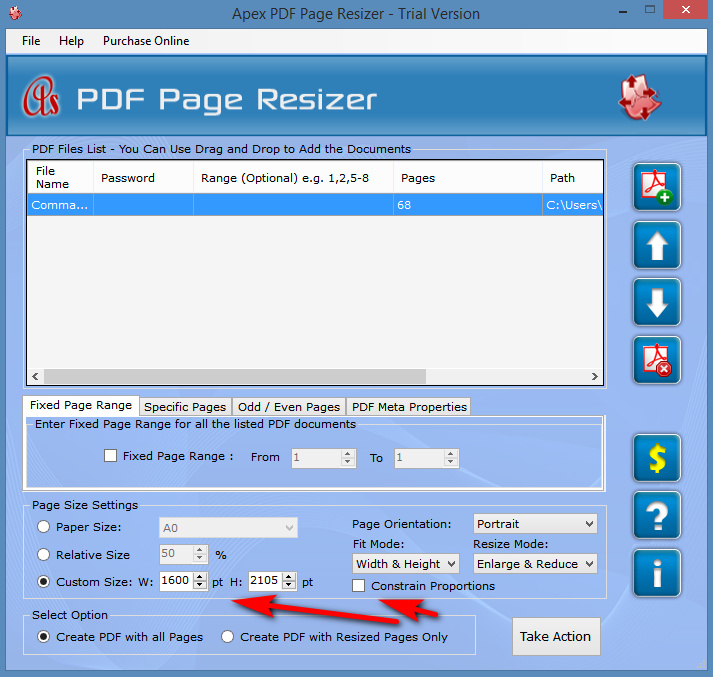
3. Advanced PDF Tools at $38. Twice the price it should be, but it does the job after a quick bit of fiddling with the settings. As you can see here, you scale the Page Content by a % and then pad in pt’s to accommodate the added width or height. It’s a bit more hit-and-miss than Apex.
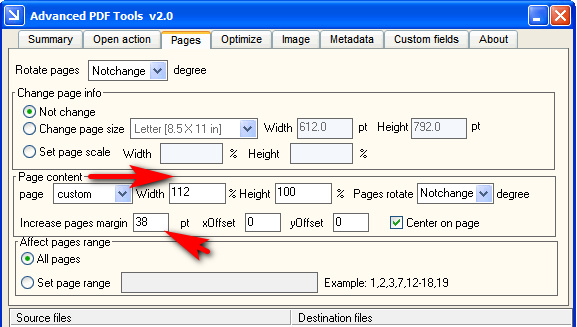
As you can see, you’re getting many more features than Apex PDF Page Resizer. But the very fast output speed and exactly the same file-size in output suggests it is working in much the same way as Apex, probably via a .NET Windows GUI that gives a pipe into several key Ghostscript switches.
In both, the settings are then run across all pages, and a new repaired .PDF is swiftly saved out. It strikes me that such a relatively slight change could be one way of detecting a leaker in an organisation. Give each person a .PDF copy with very slightly widened or lengthened pages, such that each imperceptibly changed .PDF is unique to one person.
I looked hard but could not find anything with a GUI for Windows that hooked into Ghostscript’s resizing and scaling switches in the same way as the above two, but for free. pdfScale: Bash Script to Scale and Resize PDFs using Ghostscript came closest (see the scripts at the end) and may interest some.
If you just want to crop pages to a user-defined rectangle, including instances where you have several columns on the same page, the free Briss is well recommended.
(If you have a related problem, a PDF that shows the curved pages of a book as photographed from above with a hand-held camera, see my recent How to auto-correct curved book pages post)
13 Friday Nov 2020
Posted in JURN tips and tricks
Well, here’s a handy trick for users of the Opera Web browser, and possibly of any other Chrome-based browser. Do you have a lingering and slightly annoying search-box autosuggest, which occurs on non-search websites? Such as on one of your WordPress blogs…

If so, then it’s no use searching in Opera’s Settings | Advanced | Privacy | Autofill. Only things like home mailing addresses and passwords live back there.
What you do is move your mouse cursor down to highlight (but not click) the offending suggestion, when it occurs in normal use. Then it’s hands-off your mouse, to press SHIFT and then DEL (delete) simultaneously on your keyboard. This removes the offending suggestion.
31 Saturday Oct 2020
Posted in JURN tips and tricks
YouTube has removed the ‘Export RSS feeds list’ option from your Subscribed Channels List. It used to be that it was at the foot of the page. The link to this feature is now nowhere to be found.
For the time being the RSS feeds are still there and working, however. A standard subscription URL is in the form of…
https://www.youtube.com/channel/UCralF3lNmSNYFaFtul5apuw
.. and a handy bit of UserScript reveals the current YouTube RSS feed URL is in the form of…
http://www.youtube.com/feeds/videos.xml?channel_id=UCralF3lNmSNYFaFtul5apuw
Therefore, you go to your Subscribed Channels List page, and there use LinkClump (or similar) to copy out just the channel URLs and then in Notepad…
Search: /channel/
Replace: /feeds/videos.xml?channel_id=
You then have a list of RSS feeds for your subscriptions.