The Adblock Browser has launched for mobile devices (Android and iOS). DuckDuckGo is their default search-engine.
AdBlock Browser launches
23 Wednesday Sep 2015
Posted in Spotted in the news

23 Wednesday Sep 2015
Posted in Spotted in the news
The Adblock Browser has launched for mobile devices (Android and iOS). DuckDuckGo is their default search-engine.
23 Wednesday Sep 2015
Posted in JURN tips and tricks
Here are my ten steps to switch to the DuckDuckGo search engine in Firefox, and have it work reasonably well across a PC desktop widescreen. In my view DuckDuckGo’s indexing and relevancy ranking is now ready for a serious test by power searchers. The image search relevancy, for instance, is arguably better than Google Images can offer.

1. In Firefox, switch your ‘home’ search-engine to https://duckduckgo.com/ in Tools | Options | General | Home Page.
There appear to be no useful URL modifiers you can append to this URL, for instance &show=15 to only show 15 results.
2. Look inside the little “three bars” icon in the top-right of your new DuckDuckGo search-engine page. Here you’ll find a variety of visual and feature settings that you can change. Changes can be either saved locally or anonymously to the Cloud. I assume you run AdBlock or similar and won’t need to turn off adverts, though DuckDuckGo kindly lets you turn ads off if you want to.
3. Note that DuckDuckGo’s Settings pages have several tabs, one of which is Appearance. This lets you change fonts and font size, link colours and more. If you just want search results to look a little more Google-y in that respect there’s also a very handy “DuckDuckGo Modifier” UserScript for Greasemonkey that will handle that for you. I like this simple addon a lot, and it will ease the transition greatly for many Google users.
4. You can also pick a base colour theme for the DuckDuckGo home and results pages, and then modify this theme by changing Background Colour using a Hex value from a simple colour-picker widget.
5. Power searchers who have learned to instantly sight-read an URL will want to turn on “Result Full URLs” and “Show the Result URL line above the snippet text”. Unfortunately longer URL paths are truncated.
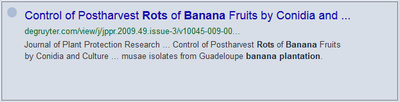
You may also want to turn off the distracting tiny “Site Icons”, and allow URLs to be copied to the clipboard “as is” rather than in an obfuscated form.
6. Now install a multiple column layout for your search results. “DuckDuckGo – Multi-Columns” is a maintained GreaseMonkey UserScript and also a theme for the Stylish add-on, that will do this for you. Basically it does for DuckDuckGo search-engine results what GoogleMonkeyR does for Google Search results in Firefox.
Picture: Multi-column results, unwanted results hidden, customised colors.
Sadly you can’t limit DuckDuckGo to showing only 15 results, as you can with Google, which means some scrolling with this setup. Though you can turn off Autoscroll in DuckDuckGo’s settings, which helps a bit. But it’s still not ideal, for a widescreen desktop user who wants as little scrolling as possible.
Installing this “DuckDuckGo – Multi-Columns” add-on as a Greasemonkey UserScript is probably best, since then you can then easily edit certain features in the script. For instance, you can turn off the distracting “DuckDuckGo – Multi-Columns” results-numbering. To do this, find the scripts’ code-block that starts…
"/* (new3) RESULTS - COUNTER */"
… and change the colour and background colour codes to match your theme background, thus effectively making the numbers invisible…
" color: orange ! important;",
" background: yellow ! important;",
You will probably also want to change the awful bright red colour that the script uses to highlight your search keywords (when they appear in search result text snippets). To do that find the scripts’ code-block that starts…
"/* (new2) - RESULTS HIGHLIGHTING - ",
… and then change the colour name “tomato” to something less garish…
" color: tomato !important;",
7. Note that the excellent “Google Hit Hider” UserScript add-on for Firefox also works by default with DuckDuckGo. It seamlessly blanks results from URLs you’ve added to your personal list of unwanted domains.
You will probably want to choose to have this add-on’s “Block” button set to appear only when a search result is in a mouseover state, as it’s one less visual distraction for the speedy searcher.
8. Useful search modifiers that work for Google also work for DuckDuckGo…
-keyword these must be the last words in the search, to work.
“specific phrase“
“the ethics of *“ will wildcard a word in a phrase.
filetype:pdf or simply f: will find only PDF files.
intitle:keyword or simply t: only results with this keyword in the link.
sort:date or simply s:d Gives “sort by date”. This gives a simple re-sort of results to show only the most recently indexed results. My guess is that using s:d only brings results from a ‘recently indexed’ sub-set, and that any ‘recently indexed’ tag is jettisoned by DuckDuckGo once spam and adult content is cleaned and the clean results are passed over into the main index.
site:imdb.com Note that you can leave out the www. bit (unlike Google, which expects it).
-site:wikipedia.org No Wikipedia results!
site:imdb.com,rottentomatoes.com Search multiple domains in one go. It would be more useful if a user could somehow pin their custom chain of such URLs to the search box. But I guess you can set it up as a Bookmark on your Bookmarks Toolbar in Firefox.
-site:imdb.com,rottentomatoes.com,wikipedia.org Show no results from any of these sites.
region:uk Limit results to a national domain. This is also embodied in a very handy pop-out visual side-widget with nation flags, titled “Region”.
Most of these search modifiers can be combined, but it seems that sort:date only works if it is the final item in the search box.
9. DuckDuckGo’s excellent Image Search has no Creative Commons filter. But CC can be approximated by adding keywords e.g.: Commons Attribution -Noncommercial. This actually seems to work very well, though you will of course need to check for the license and not take things for granted.
10. DuckDuckGo’s !bang feature sound like a pointless gimmick at first, but you soon start to realise the power of the !bang. !a will pass your search directly over onto Amazon, and !yt to YouTube and without going through those sites’ respective start pages. !gsc does the same for Google Scholar and !gb for Google Books. There are many more.
The UserScript add-on DuckDuckMenu provides a more familiar “top menu of links” way of using the !bang system. It’s also customisable.
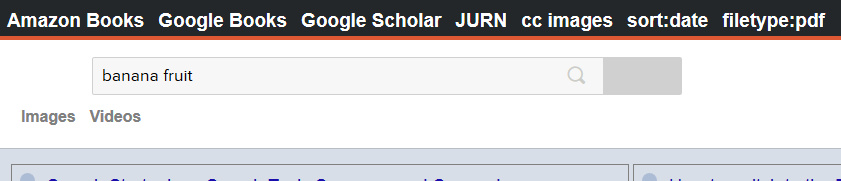
Below are the correctly formatted links for setting up some academic services on this menu. The inserted {searchTerms} section of the URL copies in the already searched search terms that are currently sitting in your DuckDuckGo search box.
Google Search (turn off the stupid AutoSuggest, force Verbatim, and return 15 results for use with three column results layouts such as GoogleMonkeyR):
https://www.google.com/search?q={searchTerms}&tbo=1&num=15&complete=0&tbs=li:1
Google Books:
https://www.google.com/search?q={searchTerms}&tbm=bks
JURN:
https://jurn.link/#gsc.tab=0&gsc.q={searchTerms}&gsc.sort=
Google Scholar UK:
https://scholar.google.co.uk/scholar?hl=en&q={searchTerms}
Amazon Books UK (books only):
https://www.amazon.co.uk/s/ref=sr_nr_i_0?fst=as%3Aoff&rh=k%3A{searchTerms}%2Ci%3Astripbooks
You can also add a handy no-typing way to instantly re-sort your search by date on DuckDuckGo itself:
Re-sort my DuckDuckGo search by sort:date:
https://duckduckgo.com/?q={searchTerms}+sort%3Adate
Add a filetype:pdf link to the menu:
https://duckduckgo.com/?q={searchTerms}+filetype%3Apdf
And an approximate Creative Commons image search can be had by using the link:
https://duckduckgo.com/?q={searchTerms}+commons+attribution+-noncommercial&iax=1&ia=images
Keep in mind that the latter link won’t pick up Flickr’s CC pictures, since Flickr obfuscates the CC licence behind a blanket phrase. For Flickr search it’s probably best to use search.creativecommons.org.
DuckDuckGo appears to have no Current News search function worth talking about (it’s sort of in there, but is very flaky about when it chooses to appear and is obviously not ready for prime-time). But !gn will pass your search through to Google News and !bnews to Bing News.
It seems you can’t yet create something like a BIG!bang that would search across a large collection of 100s or 1000s of specific URLs (like a Google CSE does) and/or RSS feeds, and thus approximate your own custom News search ability.
22 Tuesday Sep 2015
Posted in JURN tips and tricks, Spotted in the news
This may possibly be handy for some people. How to remove your fulltext PDF from ResearchGate, but leave the record standing. Finding the way to the delete function doesn’t seem very intuitive…
[youtube https://www.youtube.com/watch?v=7TqBusqz1nY?rel=0&w=420&h=315]
20 Sunday Sep 2015
Posted in Spotted in the news
A fine short blog post by Manu Saunders on the historical ecology data latent in art history.
 Picture: 1857 bushfire near Timboon, Victoria, Australia.
20 Sunday Sep 2015
Posted in Spotted in the news
Tree of Life, a rough first-try at merging the available data on the relationships of the 2.3 million known and named species on Earth…
“According to a survey of more than 7,500 phylogenetic research papers published between 2000 and 2012, only one out of six studies came with a digital, downloadable format of the data. … Many of the evolutionary trees that have been published are only available as PDFs and other image files that can’t be entered into a database or merged with other trees.”
20 Sunday Sep 2015
Posted in JURN tips and tricks
DuckDuckGo’s Image Search is now a very pleasant experience in terms of relevancy ranking, a year after introduction of the images service in the summer of 2014. Speedy, too.
Of course it lacks Google’s useful filters for Creative Commons and image-size, but CC can be approximated in DuckDuckGo by adding the keywords Commons and Attribution to one’s search — and DuckDuckGo doesn’t seem to distort such a search by also trying to finding synonyms.
Nor does adding the word commons mean that it get confused into searching for pictures of the ‘heather and hawks’ type of natural heathland commons.
Such an approximation of CC appears to work quite well. And in such cases (‘find large-size CC images’) DuckDuckGo doesn’t appear to have a major handicap compared to Google, since both search engines seem to cover the same mega-services such as Wikipedia and DeviantArt etc.
Flickr is a special case, since the relevant keywords aren’t there — one would do better to use search.creativecommons.org for a thorough CC Flickr search.

19 Saturday Sep 2015
Posted in Spotted in the news
Have you noticed the rise of UTM tracking tokens in URLs? There’s an increasing amount of extra text being added after the URL, usually meant to tell marketeers how the link was found. At its simplest it might look something like…
http://www.url.org/page.html?#they_found_this__page_via_Facebook
Anyone not web-savvy who then shares the URL also unwittingly reveals to the world how they found that URL, unless the tracking is cloaked as gibberish numbers.
Anyway, urlHosted has spotted the potential of this URL misusage to initiate a new server-less communication method…
urlHosted is an experimental web app that misuses the part after the “#” of a URL to store and read data. … This means this app neither stores nor sends any of your data to any server. … [then] Whenever you visit the site [that has] payload data in the URL, the [URLhosted browser] app renders that data as an [text] article.”
One would still have to pass a clickable link somehow, so I’m not sure how useful this would actually be to anyone in its current form. I guess at its most clandestine urlHosted might work something like: Bill places a time-limited message-URL in an old post on his blog, then casually refers to the title of this post (without linking to it, or even mentioning his blog) in an email to Susan. Bill and Susan both know that this mention means she should check his blog and find the post in the next 12 hours — and then click on an URL there that has been temporarily altered to contain a message. urlHosted elegantly renders the message on a page for Susan. 12 hours later Bill switches the URL link back to normal. Since old blog posts are only rarely re-indexed by search services, and receive little traffic, there’s only a slim chance the message will be exposed to public view. The addition of simple ROT-13 to the message would make it even more unlikely to be discovered. But it’s probably much easier for Bill and Susan just to use SnapChat.
Update: There’s a handy Greasemonkey script for Firefox users that simply auto-strips such gunk from the URL when the Web page loads in the browser. Those in need of a standalone add-on for Firefox might look at Au Revoir ATM or PureURL.
19 Saturday Sep 2015
Posted in Spotted in the news
A 2015 study of the “Indexing of Mapping Science Journals”, including cartographic history journals.
* Found that 47 such titles were published as free / open access, but that only eight of those were in the DOAJ.
* Of the 47 free / open access titles, 12 were represented in Google Scholar by 10 or less articles.
* Scopus indexed 18 of the 47 free / open access titles.
18 Friday Sep 2015
Posted in Spotted in the news
So it’s “back to school” time. What fab free MOOCs are available and starting this September / October?
* Teaching Library Research Strategies | Canvas Network
“… an experienced academic librarian will share his strategies for getting students engaged in the art of library research.”
* Book Sleuthing: What 19th-Century Books Can Tell Us About the Rise of the Reading Public | edX
“Go behind the scenes at Harvard’s libraries to discover how readers in the first information age interacted with their books.”
* 30 Days of TED | Canvas Network
“… the wide variety of resources available on the TED website [TED Talks etc] and how to use them in the classroom.”
17 Thursday Sep 2015
Posted in Spotted in the news
An unusual new OA journal is the Journal of Brief Ideas, containing “citable ideas in fewer than 200 words” which are published under a CC-BY license. Interesting idea, but the title is not going into JURN just yet. The journal is in beta, for one thing. I also suspect that a clear focus on rational evidence-based discourse may be difficult to maintain, once wider audiences find it and realise it’s a free-for-all platform. The curation, such as it is, seems too light-touch to allow the journal’s reputation to survive a surge of articulate loons.
However, I’ve often thought that a normal journal might usefully have such short pieces — perhaps tight summary surveys of each of the field’s knowledge gaps (“what we know that we don’t know”). Perhaps such an article series might run alongside a series of imaginative ‘brief ideas’ articles on how those knowledge gaps might be filled. A third series might briefly outline the field’s as-yet unexplored interdisciplinary potentials.