
The excellent free MultiLinks addon for Firefox can be a handy way to open links in many tabs. Just Crtl + right mouse-click and drag a box around the links you want to open. Then when you release the mouse, your selected links spring into life as new tabs all busy loading pages.
But MultiLinks can also work as a very handy links harvester, neatly copying URLs complete with their anchor text to the clipboard. That can certainly beat ferreting around among the code in ‘View Source’. Here’s how to do it.
1. Install MultiLinks. Then go to Tools | Addons…

2. Click the “Options” button on the MultiLinks listing…

3. Change the behaviour of MultiLinks to: Copy to Clipboard | URLs with Titles…

4. You can also tell it to ignore everything except the main links, on pages of Google Search results…

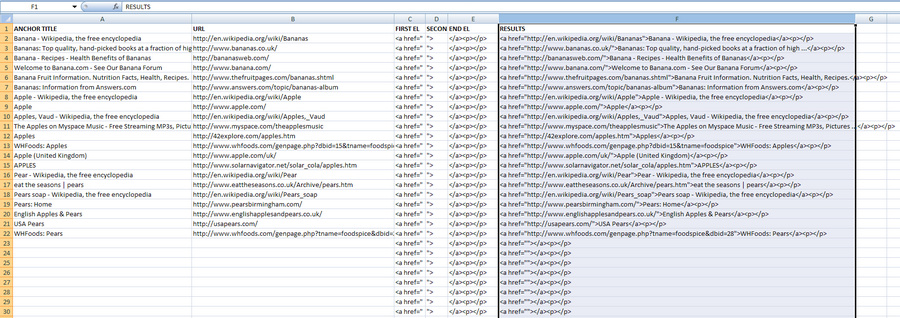
5. Now when you Crtl + right-click and drag a box around some Web links, when you release the mouse button those URLs and their anchor (title) text are placed on your clipboard. Not very useful, unless Excel 2007 automatically places these side-by-side in different columns. Thankfully it does…

6. Now you can use Excel to automatically turn them back into HTML links, as soon as you paste them into your spreadsheet. My ready-made spreadsheet with formula applied is URL-maker.xlsx. It uses the simple concatenation (‘combine columns’) formula: =C2&B2&D2&A2&E2
Pingback: How to extract a CSV list of search-result URLs, along with their anchor titles « JURN blog
Linkclump lets you do the same with the Google Chrome browser.
Pingback: Google Search harvesting becomes more difficult « News from JURN.org